Skip to content

Fortinet October 2026 Security Release: What to Do

If you run a FortiGate firewall, FortiManager, FortiAnalyzer, FortiMail or FortiAuthenticator, Fortinet is asking you to upgrade this week, and to treat it as an emergency change rather than routine maintenance. The updates for FortiOS, FortiManager and FortiAnalyzer ship on October 22, 2026; FortiMail and FortiAuthenticator fixes are already out.

This post covers which versions are affected, the order to upgrade in, and what to lock down today if you cannot upgrade yet.

The short answer: Fortinet’s October 2026 security hardening release fixes critical and high-severity flaws in FortiOS, FortiManager, FortiAnalyzer, FortiMail and FortiAuthenticator, found through AI-assisted security testing. Upgrade internet-facing devices first, ideally by October 23. Until then, restrict admin interfaces to trusted IP addresses, keep FortiManager off the internet, and enforce MFA on every admin account.

Fortinet has not published the CVE details yet; they arrive on November 10. That gap is the risk. Attackers can compare old and new firmware to find the flaws, and Fortinet itself warns that AI lets them build working exploits “in hours or days, rather than weeks.” Patch before the details go public.

Security hardening release

A security hardening release is a coordinated set of firmware updates that fixes multiple vulnerabilities across several products at once. Fortinet ships the fixes first and publishes the detailed advisories later, giving customers a head start to patch before attackers learn exactly what was fixed.

What is in Fortinet’s October 2026 security release?

It is a batch of critical and high-severity fixes across five Fortinet products, announced by Fortinet CISO Carl Windsor on October 21, 2026. Fortinet found the issues by adding frontier AI models to its own product security testing, analyzing code paths, protocol handling and configuration logic.

Fortinet has not listed CVE numbers or individual severity scores. Full advisories will be published on the FortiGuard PSIRT page at the next Patch Tuesday, November 10. As of release, Fortinet has not reported any of these flaws being exploited.

As a Fortinet Advanced Partner (and a Fortinet partner since 2003), we read the wording here as unusually direct. Fortinet is asking customers to schedule change windows for October 22 and 23 on internet-facing systems. Vendors do not usually set the calendar for you.

Which Fortinet versions are affected?

Every supported branch of the five products is affected. Find your product and branch below and upgrade to the fixed version or later.

ProductAffectedUpgrade toAvailable
FortiOS 8.08.0.0 to 8.0.18.0.2+Oct 22
FortiOS 7.67.6.0 to 7.6.77.6.8+Oct 22
FortiOS 7.47.4.0 to 7.4.127.4.13+Oct 22
FortiOS 7.27.2.0 to 7.2.137.2.14+Oct 22
FortiManager 8.08.0.0 to 8.0.18.0.2+Oct 22
FortiManager 7.67.6.0 to 7.6.77.6.8+Oct 22
FortiManager 7.47.4.0 to 7.4.117.4.12+Oct 22
FortiManager 7.27.2.0 to 7.2.127.2.13+Oct 22
FortiAnalyzer 8.08.0.0 to 8.0.18.0.2+Oct 22
FortiAnalyzer 7.67.6.0 to 7.6.77.6.8+Oct 22
FortiAnalyzer 7.47.4.0 to 7.4.117.4.12+Oct 22
FortiAnalyzer 7.27.2.0 to 7.2.127.2.13+Oct 22
FortiMail 8.08.0.0 to 8.0.18.0.2+Oct 21
FortiMail 7.67.6.0 to 7.6.67.6.7+Oct 21
FortiMail 7.47.4.0 to 7.4.87.4.9+Oct 21
FortiMail 7.27.2.0 to 7.2.9Move to 7.4 or laterOct 21
FortiAuthenticator 8.08.0.0 to 8.0.38.0.4+Oct 21
FortiAuthenticator 6.66.6.0 to 6.6.106.6.11+Oct 21

Cloud services are mostly handled for you. FortiSASE was updated automatically before release. FortiManager Cloud has the update available but may need a manual update. Public cloud instances are being updated through the cloud providers’ normal release processes, so check yours rather than assume.

Warning:

Running FortiOS 7.0 or older, or FortiMail 7.2? There is no fix on your branch in this release. That puts you on a forced upgrade, and possibly a hardware conversation if your model cannot run a supported version. We covered the trade-offs in the real cost of running outdated FortiGate models.

Why is Fortinet treating this as urgent?

Because once a patch ships, the clock starts for attackers too. Firmware fixes can be reverse-engineered to reveal what was broken, and Fortinet says AI now helps attackers turn that into a working exploit in hours or days. It also warns that AI can chain several lower-severity flaws into one serious attack.

We are seeing the same pattern elsewhere this week. The PHP2Shell vulnerability disclosed on October 21 was turned into a working exploit with AI help, and attackers were testing it before the patch shipped. Firewalls and management consoles are an even more attractive target, because they sit on the edge of the network and hold the keys to everything behind them.

Nov 10

Date Fortinet publishes the full advisories. Every day before then is a head start for defenders (Fortinet, October 2026)

How should you roll out the Fortinet updates?

Inventory, back up, upgrade the internet-facing devices first, then watch the logs. This is the order we follow when we run a coordinated Fortinet upgrade for a client, and it matches Fortinet’s own guidance.

List every device: record every FortiGate, FortiManager, FortiAnalyzer, FortiMail and FortiAuthenticator, its current version, and whether its admin interface can be reached from the internet. Branch-office and lab devices are the ones most often forgotten.

Back up configurations: take a fresh config backup of every device before you touch it, and store it off the device.

Check the upgrade path: FortiOS often needs intermediate versions when you jump several builds. Use Fortinet’s upgrade path tool so a firewall does not come back with a broken config.

Upgrade internet-facing devices first: perimeter FortiGates, VPN gateways, FortiMail and anything with an admin interface exposed. For HA pairs, follow the normal cluster upgrade process to keep traffic flowing.

Review logs before and after: look for admin logins from unfamiliar IP addresses, new admin accounts, or configuration changes nobody approved. Upgrading does not remove an attacker who is already in.

Upgrade FortiManager and FortiAnalyzer before the FortiGates they manage. A management console running an older version than its firewalls can stop pushing policies or receiving logs, and you will find out at the worst moment.

What should you do if you cannot upgrade today?

Shrink who can reach your admin interfaces. Fortinet lists these temporary steps, and stresses they reduce risk but do not replace the upgrade:

  • Limit HTTPS and SSH admin access to trusted IP addresses, or turn admin access off on external interfaces entirely.
  • Make sure FortiManager cannot be reached from the internet.
  • Manage devices out of band, and move management behind a VPN or SASE where you can.
  • Use strong, unique passwords and enforce MFA for every admin account.

If those steps sound familiar, they should. Exposed admin interfaces and reused admin credentials were at the centre of the FortiBleed credential leak, and they are the first things we close on any firewall we take over. Getting them right now protects you against this release and the next one.

What this means for your patching process

A firewall patch that waits for next month’s maintenance window is now a gamble. If your team cannot upgrade every perimeter device within a day or two of a critical release, the gap is in the process, not the people: an incomplete inventory, no tested upgrade path, or no one with time set aside. We wrote about that problem in depth in FortiGate CVEs and the patch management problem.

Upgrade internet-facing Fortinet devices by October 23, management consoles first. Lock down admin access in the meantime, and check logs for unexpected admin activity. Then fix whatever made this upgrade hard, because the next one will be just as urgent.

If you would rather not run this upgrade under pressure, our managed firewall team handles Fortinet upgrades, admin lockdown and log review for organizations across the GTA and BC. We have been a Fortinet partner since 2003, and coordinated releases like this one are routine work for us.

Sources

PHP2Shell Vulnerability: What IT Teams Must Do Now

If your organization runs a website, a customer portal, an intranet, or any web application built on WordPress, Drupal, Magento, Laravel or custom PHP, you have a patching job this week that cannot wait for the next maintenance window. On October 21, 2026, the PHP project shipped emergency fixes for two critical flaws now known as PHP2Shell, and attackers were already testing them before the patches existed.

This post covers what PHP2Shell is, which systems are exposed, how to confirm you are actually patched (the version number alone will not tell you), and what to do today if you cannot patch yet.

The short answer: PHP2Shell (CVE-2026-109618 and CVE-2026-109619) lets an attacker with no login run code on any server that uses PHP to serve web pages. Update to PHP 8.2.35, 8.3.36, 8.4.27 or 8.5.12, restart every PHP worker, and confirm the fix with your host or vendor. If you are on PHP 8.1 or older, you need a vendor backport or an upgrade, because the PHP project no longer ships fixes for those versions.

Treat PHP2Shell as an emergency patch, not a routine one. Exploitation attempts started before disclosure, the flaw triggers before your application code runs, and keeping WordPress or your CMS updated does not protect you. Only a patched PHP runtime does.

PHP2Shell

PHP2Shell is the name for two critical remote code execution vulnerabilities in the PHP runtime, CVE-2026-109618 (out-of-memory corruption) and CVE-2026-109619 (stale global state), each rated 9.2 on CVSS v4.0. They let an unauthenticated attacker run commands or read memory on a web server running PHP, regardless of how secure the application code is.

What is the PHP2Shell vulnerability?

PHP2Shell is a pair of flaws in PHP itself, not in any one application. Both carry a CVSS v4.0 score of 9.2 and can be exploited by a remote attacker who has no account and no password. Because the problem sits in how PHP handles a request before your code runs, application-level logins, plugins and security settings cannot block it.

  • CVE-2026-109618 (out-of-memory corruption): if PHP runs out of memory while it is still setting up a request, the cleanup step later treats half-built data as valid. An attacker can shape that data.
  • CVE-2026-109619 (stale global state): leftover state from one request points to memory that has already been freed, and a later request on the same worker can use it. The PHP advisory lists memory disclosure as a confirmed impact, which means passwords, tokens and API keys from other users’ requests can leak.

The code behind these flaws is old. Researchers traced the affected code path back to PHP 5.4, and the researchers say AI models helped turn the long-known weakness into a working exploit in about a week. That speed is the real story: the gap between “bug exists” and “bug is weaponized” is now measured in days.

1.3M+

Internet-exposed hosts estimated to be potentially vulnerable to PHP2Shell (Silas Cutler, via Tenable, October 2026)

Which PHP versions and servers are affected?

Every PHP branch before the October 21 releases is affected, and so is every common way of running PHP on a web server. If PHP answers web requests on a machine, assume that machine is in scope until you have confirmed otherwise.

PHP branchVulnerableFixed inWhat to do
8.5Before 8.5.128.5.12Update now
8.4Before 8.4.278.4.27Update now
8.3Before 8.3.368.3.36Update now
8.2Before 8.2.358.2.35Update now, then plan to move off 8.2 (end of life December 31, 2026)
7.4 to 8.1AllNo official releaseGet a vendor backport or upgrade to a supported branch
5.4 to 7.3AllNoneUpgrade or isolate the system

On the server side, Datadog Security Labs lists Apache with mod_php, PHP-FPM, php-cgi, FrankenPHP and LiteSpeed as in scope. PHP rates mod_php as the highest risk, because a single unauthenticated request can trigger the attack before any application code runs. Researchers also confirmed pre-authentication code execution against specific versions of WordPress, Drupal, Joomla and Magento.

Warning:

Updating WordPress, Drupal or your plugins does not fix PHP2Shell. WordPress.org has said no WordPress update is required or planned. The fix lives in the PHP runtime on the server.

Is PHP2Shell being exploited right now?

Yes. Exploitation attempts began before the patch was public, and they increased on release day. As of October 21, no confirmed break-ins had been publicly reported, but that tends to lag the attacks by weeks.

  • October 17: Amazon Threat Intelligence saw an attempt against its honeypot, four days before disclosure. Amazon recommends starting investigations from this date.
  • October 20: a working proof of concept video was mistakenly posted, and the PHP project moved its release up a day.
  • October 21: Cloudflare reported early attacks and pushed emergency firewall rules; watchTowr reported “active exploitation attempts” against both CVEs; PHP released the fixes at 14:00 UTC.

Canadian organizations felt it on day one. BambooHR took its service offline in the US, Canada and Ireland as a precaution, interrupting payroll for its customers. That is worth sitting with: even if your own servers are clean, the SaaS tools your HR, finance and operations teams depend on may be running PHP too. If you want the background on why pre-patch attacks like this are so dangerous, our explainer on zero-day exploits covers it.

How do you check if you are patched?

Check the PHP version your web server actually runs, then confirm the fix with whoever supplies that PHP build. The version string can mislead you in both directions, so a version number on its own is not proof.

This is the step we see trip teams up most. The PHP version shown on the command line is often not the one the web server uses, and many servers run several versions side by side. Linux distributions and control panels such as cPanel often apply the fix without changing the displayed version number. A server showing PHP 7.4 may be patched by its vendor; a server showing 8.3 may still be on an unpatched build in a forgotten container.

When we inventory PHP for a client, we look in four places, not one: web servers, containers and images, third-party hosted sites (the marketing site, careers portal, event microsites), and vendor appliances with a web console. The marketing website on an agency’s hosting account is the one most often missed, because IT never set it up.

  • WordPress sites: in the dashboard, go to Tools, then Site Health, then the Info tab, and open the Server section. Then ask your host in writing whether the October 21 fix is applied.
  • Linux packages: check the package changelog for CVE-2026-109618 and CVE-2026-109619, not the version number.
  • Containers: rebuild images from patched base images and redeploy. A patched host does not patch a container that bundles its own PHP.
  • Vulnerability scanners: Tenable has published Nessus plugin 369483 for this issue; most major scanners have added checks.

What should IT teams do in the next 48 hours?

Find every PHP system, patch the internet-facing ones first, restart the workers, and look back to October 17 for signs of compromise. This is the order we work in with clients, because it closes the most exposure in the least time.

Build the list: record every system that runs PHP, who owns it, where its PHP comes from (distribution package, control panel, container image, host) and how it gets updated. Include sites hosted by agencies and vendors.

Patch internet-facing systems first: apply the upstream or vendor update on anything reachable from the internet, starting with Apache mod_php servers. Internal-only systems come second.

Restart every worker: a patched package does nothing until the old PHP processes are gone. Restart PHP-FPM pools and Apache, and redeploy containers.

Get written confirmation from hosts and vendors: for anything you do not manage directly, ask whether the October 21 fix is applied and when. Keep the replies.

Hunt back to October 17: review logs on exposed systems for the warning signs listed below, and rotate any secrets (database passwords, API keys, tokens) stored on servers that were exposed and unpatched.

Rotating secrets is the step most teams skip, and it matters here. Because CVE-2026-109619 can leak memory without running any code, an attacker may have read credentials without leaving the usual traces. The same patch-under-pressure problem shows up with firewalls; we wrote about it in FortiGate CVEs and the patch management problem.

What if you cannot patch PHP yet?

Apply the interim settings, put a web application firewall in front of the site, and isolate anything you cannot protect. None of these is a fix. The PHP security team is clear that only updating PHP fully closes the hole.

  • For CVE-2026-109619: set session.upload_progress.enabled=0 (and on PHP 8.5, fatal_error_backtraces=0), then restart all workers. WordPress does not use upload progress, so a typical site should not notice.
  • For CVE-2026-109618: set memory_limit=-1 at the administrator level so applications cannot override it, keep post_max_size low, and enforce request-size limits at the web server or proxy.
  • Web application firewall: Cloudflare has deployed rules for known attack patterns to all customers, including free plans. Set managed rules to block, not just log. Attackers have already changed payloads to get around them.
  • Isolation: CERT-EU recommends taking internet-facing applications off public networks until a fix is applied and verified.
Good to know:

Running PHP 8.1 or older? This is the push to upgrade. Those versions get no official fixes, and PHP 8.2 itself reaches end of life on December 31, 2026. Plan the move to 8.3 or newer now, test it on a staging copy, and you will not be in the same position next time.

What are the signs your server was already hit?

Look for unusual request patterns, early memory errors, crashing workers and, most of all, a web process starting a shell. A successful attack does not necessarily crash anything or change the page, so a site that “looks fine” is not evidence of anything.

  • POST requests with an unusually long field name (one documented example was about 3.5 MB) or binary data in a field with no name
  • Errors like Allowed memory size ... exhausted with the location Unknown on line 0, meaning the failure happened before any script ran
  • Repeated HTTP 500 responses, segmentation faults or unexplained PHP worker restarts
  • Unusually large PHPSESSID cookies
  • A web server process (for example apache2 or php-fpm) spawning sh or bash, which is the most direct evidence of exploitation

That last signal is why endpoint and server monitoring matters more than log review alone. A managed detection and response service watching process behaviour on your servers will flag a web worker opening a shell within minutes, whether or not anyone knew the vulnerability existed yet.

Does PHP2Shell trigger PIPEDA breach reporting?

It can. If an exposed server held personal information and you find evidence it was accessed, PIPEDA requires you to assess whether the breach creates a “real risk of significant harm.” If it does, you must report it to the Office of the Privacy Commissioner of Canada and notify affected individuals as soon as feasible.

Two details catch Canadian organizations out. First, you must keep a record of every breach for two years, even ones that fall below the reporting threshold. Second, the memory-disclosure side of CVE-2026-109619 means “no code ran” is not the same as “no data left.” If you cannot rule out exposure on a server handling customer, patient or employee data, document your assessment now, while the facts are fresh. Our guide to building an incident response plan walks through how to structure that work.

What this means for your patching process

PHP2Shell is a test of whether your organization knows what it runs. The teams that close this out in a day are the ones with a current inventory of every web-facing system, a named owner for each, and an agreed emergency patch path that does not wait for a monthly window.

Expect more of these. The researchers behind PHP2Shell say AI cut weeks of exploit work down to days, and Fortinet gave its customers the same warning this week about its own security release. A 30-day patch cycle for internet-facing systems was already risky; it no longer matches how fast attackers move.

Patch PHP to 8.2.35, 8.3.36, 8.4.27 or 8.5.12 (or get a confirmed vendor backport), restart every worker, check logs back to October 17, and rotate secrets on any server that was exposed. Then use this week to fix the inventory gap that made it hard.

If you are not sure how many PHP systems you have, or who is responsible for patching the ones your vendors host, that is exactly the kind of gap our cybersecurity team closes. We can help you inventory exposed systems, confirm patch status, and check for signs of compromise, so you have a clear answer instead of a guess.

Sources

Productivity Mega Deduction: What It Means for IT Security

If a firewall replacement, a switch refresh or a server upgrade has been sitting on your list for a year or two, the federal government just changed the math on it. On September 15, 2026, Ottawa announced the Productivity Mega Deduction, and most of the equipment that protects and runs a business network falls inside it.

This post explains what the deduction is, which IT and security purchases it covers, what it is worth in real dollars, and the timing rule that decides whether a purchase counts this year or next.

The short answer: the Productivity Mega Deduction lets a business deduct 100% of the cost of eligible new equipment in the year it is put into use, instead of writing it off over many years. Firewalls, network switches, servers, computers and software all qualify. The equipment must be acquired on or after September 15, 2026, and the deduction lands in the tax year the equipment is installed and working, not the year it was ordered.

A FortiGate firewall or FortiSwitch that used to be written off at 30% a year can now be written off in full in year one. The tax saving arrives this year instead of trickling in over the better part of a decade, which lowers the real cost of security upgrades you were going to make anyway. The rules are still draft legislation, so confirm with your accountant before you buy.

Productivity Mega Deduction (PMD)

A proposed, permanent federal tax measure announced on September 15, 2026 that allows businesses to deduct the full cost of most new depreciable property in the year it becomes available for use, instead of claiming capital cost allowance (CCA, the tax version of depreciation) a portion at a time over several years.

What is the Productivity Mega Deduction?

The Productivity Mega Deduction is permanent immediate expensing for capital purchases. According to the Department of Finance announcement, it applies to capital property acquired on or after September 15, 2026, and lets the business write off the full cost in the year the property becomes available for use.

Under the normal rules, equipment goes into a CCA class and you deduct a fixed percentage of the remaining balance each year. That spreads the tax benefit over many years. The new measure collapses all of it into year one.

A few points from the announcement and the draft legislative proposals that matter for IT buyers:

  • It is permanent. Unlike earlier temporary measures, there is no planned end date.
  • The equipment must be new to you. Property qualifies only if neither you nor anyone not at arm’s length with you has owned it before.
  • Corporations, individuals and partnerships can all use it, as DLA Piper’s summary notes. For individuals and some partnerships, the deduction cannot create or increase a loss.
  • Some property is excluded, including most buildings, goodwill, licences and franchises, and most passenger vehicles. Excluded property still gets the existing Accelerated Investment Incentive, per Torys LLP.

6.4%

Canada’s marginal effective tax rate on new business investment once the Productivity Mega Deduction applies, compared with 16.9% in the U.S. (Department of Finance Canada, September 2026)

Which IT and cybersecurity equipment qualifies?

Most of the hardware and software that makes up a business network qualifies. The Department of Finance lists Class 46 (data network infrastructure), Class 50 (computers) and Class 12 (software) as eligible. In practice, that covers almost everything on a typical security refresh list.

EquipmentCCA classNormal write-off rateWith the Mega Deduction
FortiGate firewalls, FortiSwitch switches, SD-WAN appliances, wireless access pointsClass 4630% a year (declining balance)100% in year one
Servers, desktops, laptops, storageClass 5055% a year (declining balance)100% in year one
Application software you buy outrightClass 12100%, normally halved in year one100% in year one
Security subscriptions (FortiGuard, endpoint protection, Microsoft 365)Operating expenseAlready fully deductibleNo change
Support, maintenance and managed servicesOperating expenseAlready fully deductibleNo change

The normal rates come from the Canada Revenue Agency’s CCA class list. The biggest change is for network equipment. Class 46 has one of the slowest write-off rates of anything in an IT budget, so firewalls and switches gain the most.

Good to know:

Subscriptions and support were never the issue. Annual FortiGuard licences, endpoint protection and managed service fees are operating costs and were already deductible in the year you pay them. The Mega Deduction matters for the hardware and software you buy and own.

How much is the deduction worth on a firewall refresh?

The deduction does not make equipment free. It moves the tax saving forward, so you get the full benefit in the first year instead of a slowly shrinking slice each year. For network gear, that is the difference between waiting the better part of a decade and getting it now.

Take a $40,000 network refresh: a pair of FortiGate firewalls in a high-availability setup plus new FortiSwitch switches. The table below compares the deduction you can claim under the Class 46 30% declining-balance rate with the Mega Deduction. It is simplified: it leaves out first-year adjustments under the current rules, which vary by purchase date.

YearClass 46 at 30% (deduction)Cumulative written offWith the Mega Deduction
Year 1$12,000$12,000 (30%)$40,000 (100%)
Year 2$8,400$20,400 (51%)Done
Year 3$5,880$26,280 (66%)Done
Year 5$2,881$33,277 (83%)Done

At the combined federal and Ontario general corporate tax rate of 26.5% (15% federal plus 11.5% Ontario), deducting the full $40,000 in year one is worth about $10,600 in tax that year. Under the old schedule, year one is worth about $3,180, and after five years you still have not claimed the full amount. Your own numbers depend on your tax rate and your income, which is why the next step is a conversation with your accountant.

When do you need to buy and install equipment to claim it?

Two dates matter. The equipment must be acquired on or after September 15, 2026, and the deduction is claimed in the tax year the equipment becomes available for use. A firewall ordered in November and installed after your year end counts for next year, not this one.

That second rule is where we see plans slip. A firewall refresh is not a same-week job. When we replace a FortiGate for a client, the work runs in this order: confirm the right model for current throughput and growth, order the hardware, rebuild and test the configuration (policies, VPNs, SD-WAN rules) on the new unit, then cut over in a maintenance window that does not disrupt the business. Hardware lead times and year-end change freezes add to that.

Warning:

If your fiscal year ends December 31, a refresh you want to count for 2026 needs to be scoped in October or early November. Leaving the order until mid-December puts the year-one deduction at risk.

Ask your IT provider for a written in-service date before you sign the purchase order, and give that date to your accountant. “Available for use” is the test, so the date the equipment went live is the one that matters at tax time.

Which security upgrades should you prioritize?

The deduction is a reason to do necessary work sooner, not a reason to buy equipment you do not need. Start with the gear that is already a risk. In the FortiGate estates we manage, three things come up again and again:

  • Firewalls on unsupported software. FortiOS 7.2 reached end of support on September 30, 2026 (see Fortinet’s product life cycle page). Some older FortiGate models cannot run the newer versions at all, which means the hardware itself has to go. We cover the risks in the real cost of running outdated FortiGate models.
  • Firewalls that are undersized. A unit bought for 30 staff and a few cloud apps often struggles once security inspection is switched on for 80 staff. Our guide to sizing a FortiGate explains how to check.
  • A single firewall with no backup. If the business stops when the firewall fails, a second unit in a high-availability pair is the cheapest uptime insurance you can buy, and it qualifies for the same deduction.

After that, look at switches with no remaining vendor support, servers at the end of their warranty, and staff laptops that cannot run current versions of Windows or your security tools.

How do you build the business case before year end?

The fastest path is a short equipment review that gives your finance team a list with three things on it: what is at risk, what it costs to replace, and when it can be live. Here is the process we use with clients.

List what you have: every firewall, switch, access point and server, with model, software version, warranty date and support status.

Flag the risks: anything out of vendor support, unable to run current software, near capacity, or without a backup unit.

Price the replacements: hardware, installation and the first year of security subscriptions, kept on separate lines because they are treated differently for tax.

Set in-service dates: work back from your fiscal year end so every item is installed and working in time.

Review it with your accountant: confirm which items qualify for your business and what the deduction is worth at your tax rate.

Splitting the quote into hardware, installation and subscriptions matters. The hardware is what gets the new year-one deduction. Subscriptions and support were already deductible, and your accountant will want to see them separately.

Is the Productivity Mega Deduction law yet?

No. As of October 2026 it is a proposal published as draft legislation, and the details may change before it is enacted. The proposed start date, September 15, 2026, is already set, so purchases made now are the ones it is written to cover. Final eligibility depends on the enacted rules and your own situation.

Important:

This article explains the announced measure in plain terms for IT planning. It is not tax advice. Confirm with your accountant or tax advisor how the deduction applies to your business before you make a purchase decision based on it.

The Productivity Mega Deduction turns a slow, multi-year write-off for firewalls, switches and servers into a full deduction in year one. If you already know your network needs work, the deduction makes this the year to do it. Just make sure the equipment is installed and working before your fiscal year end.

BALANCED+ has been a Fortinet partner since 2003 and now holds Advanced Partner status. If you want a clear list of what in your network is due for replacement, what it would cost and when it could be live, book a security equipment review with our team. You can see how we design and run these environments on our Fortinet solutions and managed firewall services pages, or plan the bigger picture with our vCIO and IT roadmapping service.

Sources

Beyond the Sender: Following the Phishing Attack Path

A reported phishing email may look like a single-message problem. A proper investigation looks beyond the sender to determine where the message leads, how far it reached, whether anyone interacted with it, and what actually needs to be contained.

Security awareness training has made many employees more familiar with the warning signs of phishing. A suspicious sender, an unexpected request, or an unusual link may be enough for someone to stop and report the message to IT. That report is important, but for the security team it is only the beginning of the investigation.

A phishing email rarely exists as just a sender and a message. Behind it may be a chain of redirects, separate destination domains, additional recipients, and evidence of user interaction. Looking only at the sender address can answer one question while leaving several more important ones unresolved: Where does the message actually lead? Who else received it? Did anyone interact with it? And what should actually be contained?

By the numbers

28%

of breaches investigated by Microsoft Incident Response were initiated through phishing or social engineering. (Microsoft Digital Defense Report 2025)

$2.77B

in reported 2024 losses associated with Business Email Compromise complaints. (FBI Internet Crime Complaint Center)

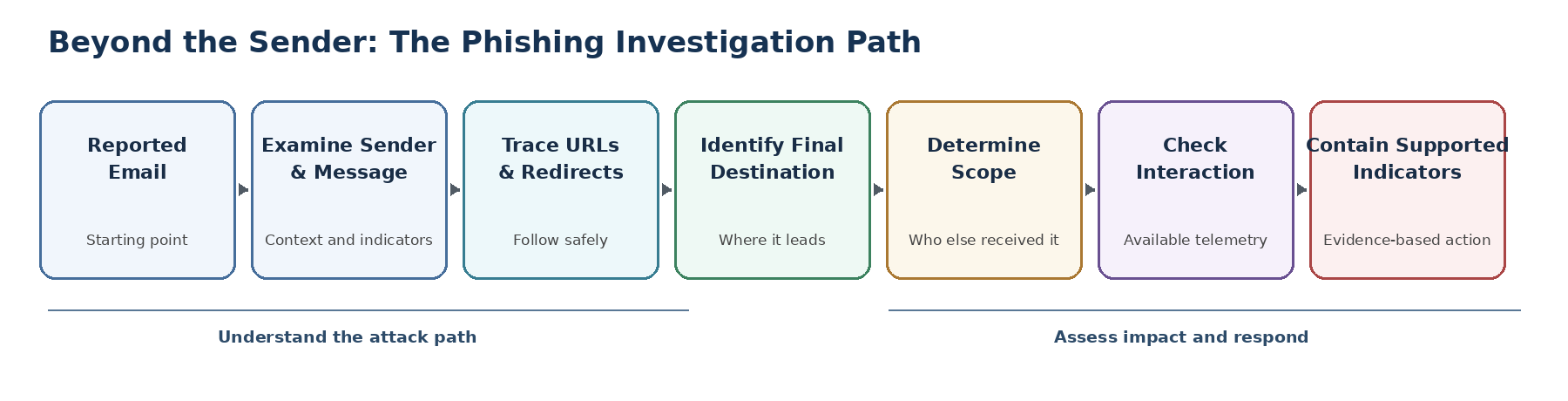
Seven-step phishing investigation path: reported email, examine sender and message, trace URLs and redirects, identify final destination, determine scope, check interaction, contain supported indicators
Figure 1. A reported email is the starting point. Investigation follows the message through scope, interaction, and evidence-based containment.

The Sender Is Only the Starting Point

The sender address still matters. It can help establish whether a message came from an expected source, whether the sending domain is suspicious, and whether the same sender appears elsewhere in the environment. But it is only one indicator. Attackers can spoof identities, abuse legitimate services, rotate sending accounts, or use one domain to deliver a message that ultimately sends the recipient somewhere completely different.

This is why a reported message should be treated as an entry point into the investigation rather than the entire incident. The objective is not simply to decide whether the From address looks suspicious. It is to reconstruct enough of the activity to understand the threat and respond proportionately.

Follow Where the Message Actually Leads

In several phishing investigations, one of the most useful questions has been simple: where would the user actually end up? The URL displayed in a message may not be the final destination. A link can pass through a legitimate service, tracking mechanism, or redirect before reaching infrastructure controlled or abused by the attacker.

That makes URL analysis more than a reputation check on the first domain we see. The redirect chain and final destination can reveal infrastructure that is more relevant to containment than the visible sender itself. This analysis should be performed safely using appropriate security tooling or an isolated analysis environment, not by casually opening suspicious links from a production workstation.

The destination also needs context. Domain reputation, registration information, security detections, message characteristics, and other threat intelligence can all contribute evidence. No single result should become the verdict. A newly registered domain is not automatically malicious, and a clean reputation result does not prove a site is safe. The stronger conclusion comes from correlating multiple indicators with what the message is actually trying to make the recipient do.

Good to know:

Good to know: The domain visible in an email is not necessarily the final destination. Redirects can move a user through multiple services or domains before reaching the actual landing page. Investigating that chain can reveal indicators that are not obvious from the original message.

One Report May Reveal a Wider Campaign

The employee who reports a phishing email sees one message. The investigator needs to determine whether that message is isolated or part of something larger.

Message tracing and email security telemetry can show whether similar messages reached other recipients, when they were delivered, and whether related activity exists. This changes the question from “Is this email suspicious?” to “What is the scope of this activity?” Microsoft Defender for Office 365, for example, correlates campaign information such as sending sources, recipients, payload URLs, delivery state, and URL clicks. Trend Micro email security tooling similarly exposes suspicious URLs, related messages, and recent recipients.

That scope matters operationally. Blocking one sender may address the message that was reported, but it may not address copies already delivered to other users or a malicious destination being reused through different messages.

Establishing Delivery Does Not Establish Impact

Finding additional recipients establishes the reach of a message, but it does not by itself establish compromise. Delivery, link interaction, credential submission, and malicious execution represent different levels of potential impact, and each requires its own supporting evidence.

Where the security platform provides the visibility, investigators can review click or interaction telemetry and correlate it with the affected messages. The wording of the conclusion matters as well. If no interaction appears in the available telemetry, the defensible finding is that no interaction was observed in that telemetry, not an absolute claim that no user could have interacted with the message.

If the evidence indicates credential submission, malware execution, or another form of compromise, the investigation should expand beyond email. That may require reviewing authentication activity, sessions, endpoint telemetry, mailbox changes, or other evidence appropriate to the incident.

Important:

Important: A delivered message, a clicked link, and a compromised account are different findings. Each requires different evidence and can lead to a different response.

Contain What the Evidence Supports

Containment should follow the evidence, and it does not always mean blocking everything associated with a message. Depending on the investigation, the appropriate action might include blocking a confirmed malicious sender, URL, domain, or related infrastructure; removing delivered messages; or adding confirmed indicators to the organization’s security controls.

Containment can also begin before every investigative question has been answered when the evidence is strong enough to justify reducing exposure. The investigation then continues to determine whether the scope or response needs to expand. At the same time, overly broad blocking can disrupt legitimate business communication, so the response should remain proportional to what the evidence supports.

Good to know:

Good to know: More blocking is not always better. Blocking an entire legitimate domain because one sender or URL is suspicious can disrupt business communications. Effective containment targets the indicators the investigation actually supports.

A phishing report may begin with one suspicious email, but a sound investigation looks beyond the sender. Following the attack path helps determine where the message leads, how broadly it was delivered, whether users interacted with it, and which indicators actually need to be contained.

What Organizations Can Take From This

Organizations should make it easy for employees to report suspicious messages, but the process should not end with the report. Effective response also depends on having enough visibility to determine who received the message, investigate the infrastructure behind it, review available interaction telemetry, and act on confirmed malicious indicators. That requires the right email security controls, logging, response procedures, and technical expertise to turn a user report into an informed security decision.

Questions your organization should be able to answer

  • When an employee reports phishing, who investigates it?
  • Can you determine whether other employees received the same message?
  • Can you safely analyze where suspicious links ultimately lead?
  • Can you determine whether available telemetry shows user interaction?
  • Can you remove malicious messages already delivered to other mailboxes?
  • Can you block confirmed indicators without unnecessarily disrupting legitimate communication?
  • If compromise is suspected, is there a defined path to broader incident response?

The Bottom Line

For organizations, the difference between receiving a phishing report and responding effectively is the capability behind that report. Someone still needs to investigate the message, determine its scope, assess potential interaction, contain confirmed threats, and recognize when the evidence requires a broader incident response.

A user reporting a suspicious email may be the first line of defense. What happens next determines how effective that defense actually is. The investigative work behind the report is what turns one suspicious message into an evidence-based security response that can protect the wider organization.

Sources