Skip to content

MDR vs SIEM: Which One Does Your Business Need?

Your security team is drowning in alerts. Every week brings another vendor pitch promising to “stop threats in real time.” But when you dig into the options, two solutions keep coming up: MDR (Managed Detection and Response) and SIEM (Security Information and Event Management). They sound similar. They’re not.

This post breaks down what each one actually does, what they cost, and which one makes sense for mid-market businesses running lean IT teams.

MDR gives you a fully managed security operations team that detects and responds to threats on your behalf. SIEM gives you a powerful data platform that collects and correlates logs, but requires skilled analysts to operate. Most mid-market businesses get better security outcomes from MDR, while SIEM suits organizations with an existing SOC team.

What Is MDR?

Managed Detection and Response (MDR)

MDR is a managed cybersecurity service that combines technology, threat intelligence, and human analysts to monitor your environment 24/7, detect threats, and take action to contain them. Unlike traditional monitoring, MDR providers actively respond to incidents, isolating compromised endpoints, blocking malicious connections, and escalating confirmed threats to your team.

Think of MDR as outsourcing your security operations centre (SOC). You get endpoint detection, network monitoring, threat hunting, and incident response, all delivered as a service. Your internal IT team stays focused on infrastructure and support while the MDR provider handles the security heavy lifting.

What Is SIEM?

Security Information and Event Management (SIEM)

SIEM is a software platform that collects log data from across your IT environment, firewalls, servers, endpoints, cloud services, applications, and correlates that data to identify potential security events. It provides a centralized dashboard for monitoring, alerting, and compliance reporting.

SIEM is a tool, not a service. It ingests data and generates alerts based on rules and correlation logic. But someone has to write those rules, tune out false positives, investigate alerts, and respond to confirmed threats. That someone is typically a team of 2-5 security analysts, your SOC.

Good to know:

Popular SIEM platforms include Splunk, Microsoft Sentinel, IBM QRadar, and Elastic Security. Popular MDR providers include Arctic Wolf, Sophos MDR, CrowdStrike Falcon Complete, and Fortinet FortiGuard MDR.

MDR vs SIEM: Head-to-Head Comparison

Here’s where the differences become clear. MDR and SIEM solve related problems, but they operate at fundamentally different levels.

CapabilityMDRSIEM
Deployment modelFully managed serviceSelf-managed software platform
24/7 monitoringIncluded, staffed SOCRequires your own SOC team
Threat detectionAI + human threat huntersRule-based correlation + ML
Incident responseActive containment includedAlerting only, you respond
Log aggregationLimited to security-relevant dataBroad, all log sources
Compliance reportingBasic reports includedDeep, customizable reporting
Time to valueDays to weeks3-6 months typical
Internal staff needed1 IT liaison2-5 dedicated security analysts
Annual cost (mid-market)$120K–$300K CAD$250K–$800K+ CAD (platform + staff)

What Does Each One Actually Cost?

Cost is where the MDR vs SIEM conversation gets real for mid-market budgets. The sticker price on a SIEM licence looks manageable, until you factor in the people required to run it.

$115K–$135K

Average annual salary for a Security Analyst in Toronto, according to Glassdoor and Robert Half 2025 salary data. A functional SOC needs at least 2-3.

SIEM Total Cost of Ownership

  • Platform licence: $50K–$150K+ CAD/year depending on data volume (Splunk, Sentinel, QRadar)
  • Infrastructure: $20K–$60K CAD/year for on-prem or cloud compute/storage
  • SOC staff (minimum 2 analysts): $230K–$270K CAD/year in Toronto
  • Ongoing tuning and rule development: $30K–$50K CAD/year (contractor or senior analyst time)
  • Training and certifications: $5K–$15K CAD/year

Realistic all-in annual cost: $350K–$550K+ CAD for a mid-market company running a basic SIEM deployment with a small SOC.

MDR Total Cost of Ownership

  • MDR service: $120K–$300K CAD/year depending on endpoints, coverage scope, and response SLAs
  • Internal coordination: Minimal, typically handled by your existing IT lead
  • No additional infrastructure or hiring required

For most mid-market organizations in the 50–500 employee range, MDR delivers equivalent or better security outcomes at 40–60% lower total cost than a SIEM-based approach.

Warning:

A common mistake: buying a SIEM and then not staffing it properly. An unmonitored SIEM is just an expensive log storage system. If alerts go uninvestigated, you have visibility without protection, and a false sense of security that’s arguably worse than no tool at all.

When Does SIEM Make Sense?

SIEM isn’t the wrong choice for every organization. It’s the right choice for a specific profile:

  • You already have a SOC team (or budget to build one) with 3+ security analysts
  • You have heavy compliance requirements that demand granular log retention and custom reporting (SOC 2 Type II, PCI DSS, PHIPA)
  • You need deep forensic capabilities, long-term log correlation, custom detection rules, threat modelling across complex environments
  • You operate in a regulated industry (financial services, healthcare) where audit trails and data sovereignty are non-negotiable
  • Your environment is highly complex, multiple data centres, hybrid cloud, custom applications generating unique telemetry

If three or more of these apply to you, a SIEM investment may be justified. But even then, many enterprises are now pairing SIEM with MDR, using the SIEM for compliance and log management while the MDR provider handles active threat detection and response.

When Is MDR the Better Fit?

MDR was essentially built for the mid-market gap: organizations too large to ignore cybersecurity, but too lean to staff a full SOC. If any of these sound familiar, MDR is likely your better path:

  • Your IT team is 1–10 people and none of them are dedicated security specialists
  • You need 24/7 coverage but can’t justify three shifts of security analysts
  • You want fast time-to-value, protection in weeks, not months
  • You need active response, not just alerts that pile up until Monday morning
  • You’re working toward compliance (PIPEDA, SOC 2) and need a partner who can help you get there
  • Your budget is under $300K CAD/year for security operations

68%

of mid-market companies lack dedicated cybersecurity staff, according to the 2024 Ponemon Institute Cost of Cybercrime study, making MDR the practical choice for most.

When evaluating MDR providers, ask about their mean time to respond (MTTR) and whether response actions are automated or require your approval. The best MDR services can isolate a compromised endpoint within minutes, not hours. Also confirm they support your existing security stack (especially your firewall vendor) rather than forcing a full rip-and-replace.

Can You Use MDR and SIEM Together?

Yes, and for some organizations, that’s the right answer. The hybrid approach is becoming increasingly common:

Start with MDR: Get 24/7 threat detection and response operational quickly. This covers your most critical security gap, active protection.

Add SIEM for compliance: If your industry requires long-term log retention, audit trails, or custom compliance reporting, layer in a SIEM (Microsoft Sentinel is a cost-effective option for M365-heavy environments).

Feed SIEM data into MDR: Many MDR providers can ingest SIEM data as an additional telemetry source, giving their analysts richer context without adding work for your team.

Evaluate annually: As your security maturity grows, reassess whether to build internal SOC capabilities or continue with the managed model.

How to Decide: MDR vs SIEM Decision Framework

Use this quick assessment to guide your decision:

QuestionIf Yes → SIEMIf No → MDR
Do you have 3+ dedicated security analysts?
Is your security ops budget over $400K CAD/year?
Do regulations require custom log retention policies?
Do you need forensic-depth analysis on custom apps?
Can you wait 3-6 months for full deployment?

If you answered “No” to three or more of these questions, MDR is almost certainly the right starting point. You can always add SIEM capabilities later as your security program matures.

MDR and SIEM solve different problems. SIEM is a data platform that requires a team to operate. MDR is a managed service that provides the team, the tools, and the active response. For mid-market businesses without a dedicated SOC, MDR delivers stronger security outcomes at a lower total cost, and gets you protected in weeks instead of months.

If you’re evaluating MDR providers or trying to figure out the right security stack for your environment, our MDR service is built specifically for mid-market businesses in the GTA. We pair Fortinet’s security fabric with 24/7 managed detection and response, so your IT team can focus on running the business while we handle the threats. Reach out for a no-pressure conversation about what makes sense for your situation.

How AI Agents Automate Business Operations

Your operations team spent 12 hours last week copying data between spreadsheets. Your IT staff manually checked 40 web pages for uptime. Someone on your marketing team filled out the same test form six times to verify it worked after a plugin update. None of this required human judgment. It just required a human’s time.

That’s changing. AI agents (not chatbots, not basic automations) are now capable of navigating websites, filling out forms, extracting data, and completing multi-step workflows without human intervention. And for mid-market businesses running lean teams, this isn’t a future trend. It’s a competitive advantage available right now.

AI agents aren’t chatbots that answer questions. They’re autonomous tools that take action. They navigate websites, interact with applications, extract data, and complete multi-step business workflows. The difference between a chatbot and an AI agent is the difference between someone who gives you directions and someone who drives you there.

What Are AI Agents (And Why Should You Care Now?)

The term “AI” gets thrown around loosely, so let’s be specific about what we mean when we talk about AI agents in a business context.

AI Agent

A software system powered by a large language model (LLM) that can autonomously plan and execute multi-step tasks. Unlike a chatbot, which only responds to prompts, an AI agent can browse websites, interact with applications, make decisions based on what it finds, and complete workflows from start to finish without human input at each step.

The key word is autonomously. A chatbot waits for your question. An AI agent takes your goal (“check our website for broken links every morning” or “fill out this vendor application form with our company details”) and figures out how to accomplish it.

What makes this possible today is a new category of capability that lets AI agents interact with the real world:

Model Context Protocol (MCP)

An open standard developed by Anthropic that lets AI agents connect to external tools and data sources through a universal interface. MCP servers act as bridges between the AI and real-world systems like web browsers, databases, APIs, file systems, and business applications. Think of MCP as a USB port for AI: instead of building a custom integration for every tool, any MCP-compatible agent can plug into any MCP server and immediately gain new capabilities.

This is the architecture that makes AI agents practical for business. Rather than needing a developer to build custom integrations for every workflow, your team can connect pre-built MCP servers that handle web browsing, database queries, file management, and more. The agent handles the reasoning. The MCP servers handle the doing.

The Tools Behind It: Playwright and Claude Code

Every screenshot in this article was captured by an AI agent browsing a live website in real time. The tool that makes this possible is Playwright, an open-source browser automation framework built by Microsoft. Playwright can control Chromium, Firefox, and WebKit browsers programmatically, navigating pages, clicking buttons, filling forms, and taking screenshots just like a human user would.

What makes Playwright especially powerful for AI agents is the Playwright MCP server. This server wraps Playwright’s capabilities into the Model Context Protocol, so any MCP-compatible AI agent (like Anthropic’s Claude) can control a web browser through natural language instructions. The agent says “navigate to this URL and fill out the contact form,” and the Playwright MCP server translates that into real browser actions.

If you’re using Claude Code (Anthropic’s command-line AI development tool), you can add the Playwright MCP server in under a minute:

That single command gives Claude the ability to open a browser, navigate to any URL, read page content, interact with elements, fill out forms, and capture screenshots. No additional configuration required. Once installed, you can ask Claude to do things like “go to our website and check if the contact form works” and it will open a real browser, run through the workflow, and report back with screenshots of what it found.

This is the same setup we used to generate every demonstration in this article. The form-filling screenshots, the site monitoring captures, the page analysis examples: all produced by Claude controlling a Playwright browser through MCP, running against a live production website.

Playwright MCP is just one of hundreds of available MCP servers. Others connect AI agents to Google Drive, Slack, databases, GitHub, CRM platforms, and more. The MCP ecosystem is growing fast, and each new server expands what your AI agent can do without any custom development.

5 Ways AI Agents Save Your Team Time Every Week

Here’s where this gets practical. These aren’t hypothetical use cases. They’re workflows that businesses are automating with AI agents today.

1. Automated Website Monitoring

An AI agent can navigate your entire website on a schedule, checking that pages load correctly, forms function, SSL certificates are valid, and content hasn’t been tampered with. Unlike basic uptime monitors that only check if a server responds, an AI agent actually sees the page the way a visitor would.

Screenshot of an AI agent automatically monitoring the BALANCED+ homepage for uptime and content changes
An AI agent navigating to a business website to verify the homepage loads correctly, checking navigation elements, hero content, and page structure, all without human intervention.

If something is wrong (a broken image, a missing phone number, a form that throws an error) the agent flags it immediately. No more finding out about broken pages from a customer complaint.

2. Competitive Intelligence on Autopilot

Want to know when a competitor updates their pricing page, launches a new service, or publishes a blog post targeting your keywords? An AI agent can monitor competitor websites daily, extract the relevant changes, and deliver a summary to your inbox every morning.

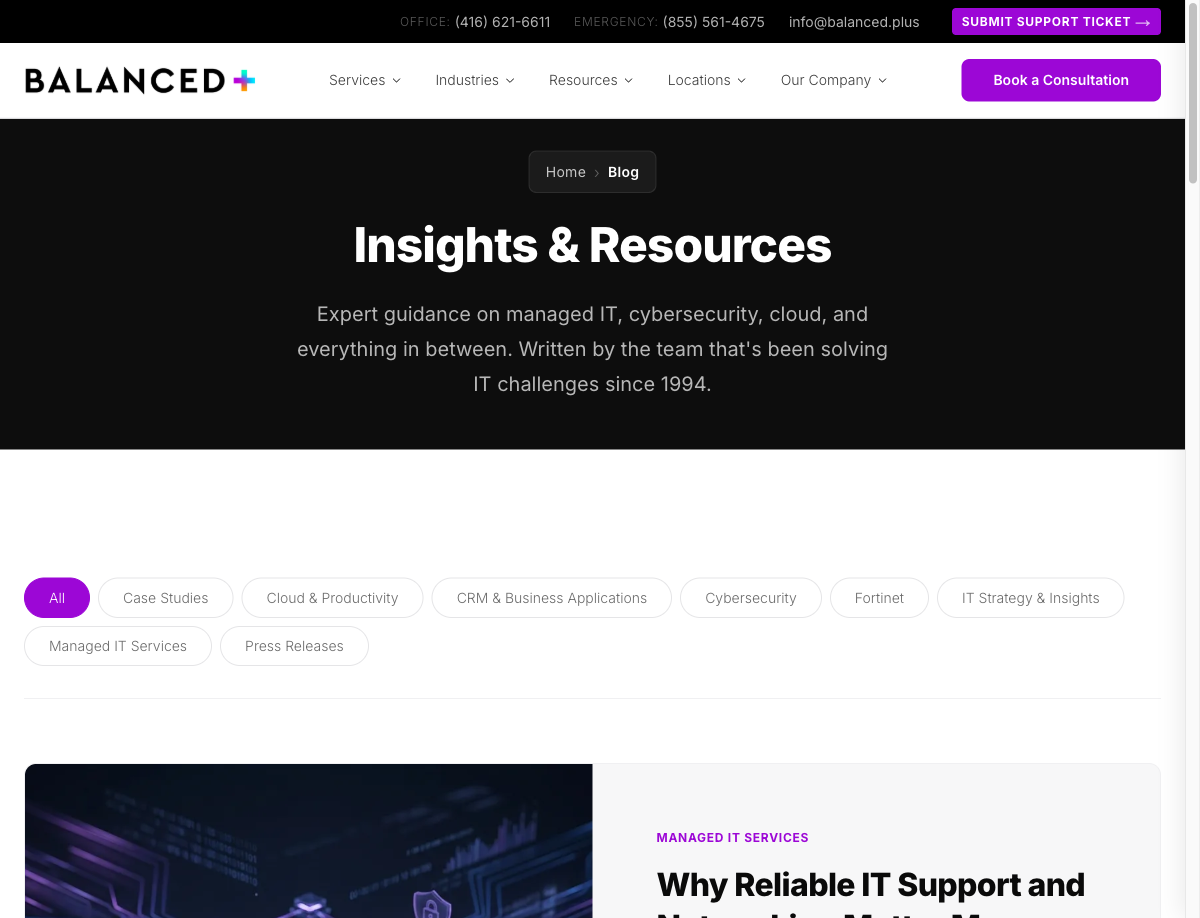
Screenshot of an AI agent automatically scanning a company blog page to gather competitive intelligence and content insights
An AI agent scanning a blog index page. It can read headlines, categorize content topics, and track publishing frequency across multiple competitor sites automatically.

This used to require a junior analyst spending hours clicking through competitor sites. Now it runs in the background while your team focuses on acting on the insights instead of gathering them.

3. Automated Form Testing

Every time you update a WordPress plugin, change a form field, or modify your contact page, there’s a risk that something breaks. AI agents can automatically test your forms by navigating to the page, filling in every field with realistic test data, submitting, and verifying the confirmation message appears.

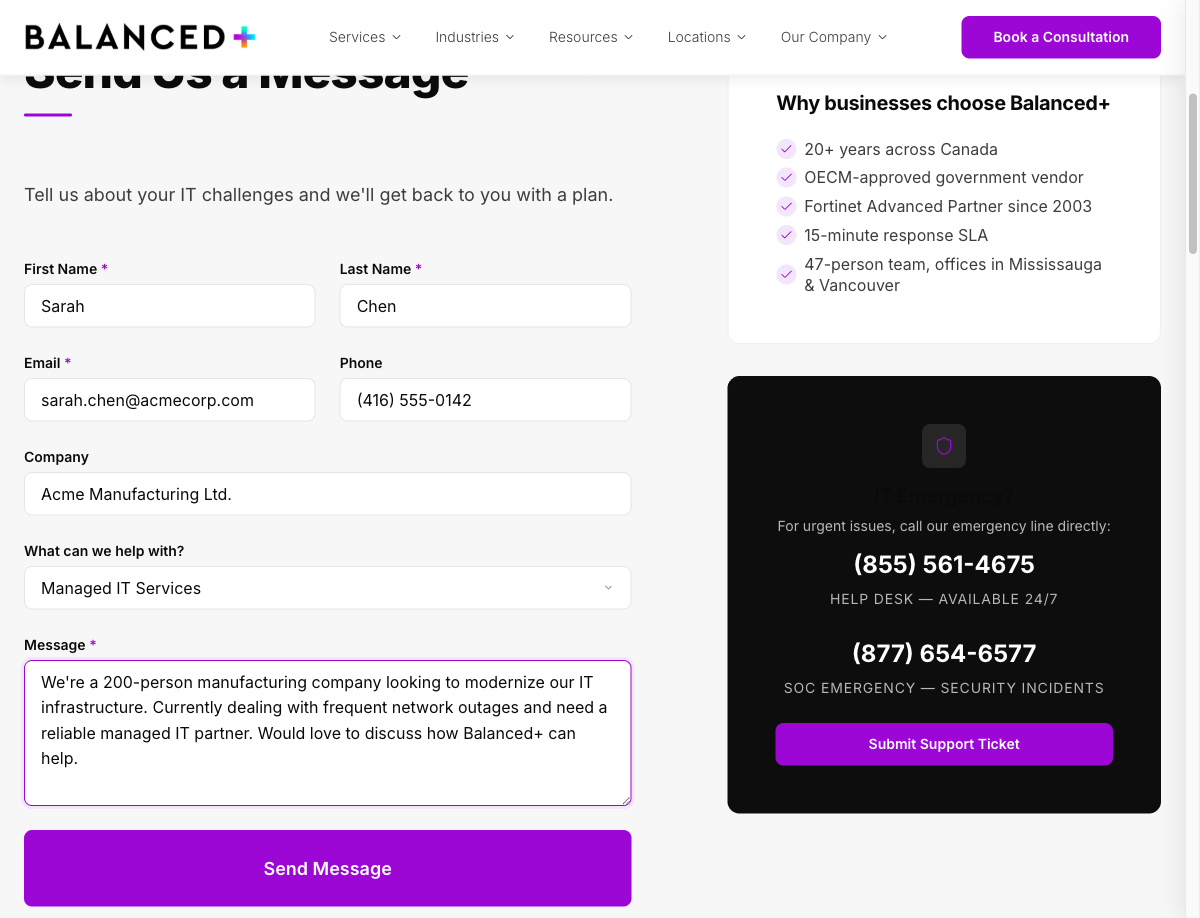
Screenshot showing an AI agent that has automatically filled in all fields of a contact form including name, email, company, service type, and message
A real demonstration: an AI agent navigated to a contact form, identified all input fields, selected the appropriate service category from a dropdown, and composed a realistic message, in seconds.

Run this after every deployment and you’ll catch broken forms before your prospects do. That’s leads you’d otherwise lose without ever knowing it.

15-25 hrs/week

Time mid-market teams typically spend on manual web tasks that AI agents can automate, including monitoring, data collection, form testing, and report generation. (Internal benchmarks across 50+ managed accounts)

4. Data Collection and Reporting

Need to pull pricing data from vendor portals every week? Aggregate job postings across multiple boards? Collect product specifications from supplier websites? AI agents handle repetitive data collection tasks that would otherwise eat hours of your team’s week.

The agent navigates to each source, extracts the data you’ve specified, normalizes it into a consistent format, and delivers it to a spreadsheet, database, or dashboard. When a source changes its layout (something that would break a traditional scraper) the AI agent adapts because it understands the page structure, not just the HTML.

5. Employee Onboarding Workflows

Onboarding a new employee involves creating accounts across multiple platforms: email, project management, HR systems, security training, VPN access. An AI agent can work through an onboarding checklist, navigating to each platform, creating accounts with the correct permissions, and logging what was completed.

This reduces onboarding from a half-day IT task to a supervised 30-minute process, with a complete audit trail of exactly what was provisioned and when.

Start with one workflow. Pick the most repetitive, lowest-risk task your team does every week (website monitoring or form testing are great candidates) and automate that first. Once you see the time savings and reliability improvements, you’ll quickly identify the next five workflows to hand off to an AI agent.

What This Looks Like in Practice

To make this concrete, here’s exactly what happens when an AI agent automates a form testing workflow, one of the most common use cases we see with our managed IT clients.

Step 1: The agent receives its instructions. You define the task once: “Navigate to our contact page, fill out the form with test data, submit it, and verify the confirmation message appears. Run this every morning at 7 AM and alert me if anything fails.” The agent stores these instructions and executes them on schedule.

Step 2: The agent navigates to the page. Using the Playwright MCP server, the agent opens a real Chromium browser, navigates to your contact page, and waits for it to fully load, just like a real visitor would.

Step 3: The agent reads the page and identifies the form. Rather than relying on hardcoded selectors that break when your page changes, the AI agent understands the page structure. It identifies the form fields by their labels (First Name, Last Name, Email, Message) and knows what type of data each expects.

Step 4: The agent fills and submits the form. Each field gets populated with realistic test data. Dropdowns are selected, text areas are filled with appropriate content, and the submit button is clicked. The agent then waits for the page response.

Step 5: The agent verifies the result and reports back. Did a confirmation message appear? Did the page throw an error? Did the form redirect to a thank-you page? The agent checks for the expected outcome and sends a pass/fail report. If something broke, you know about it before your first prospect of the day hits that form.

Here’s what the agent actually sees at each stage. These are real screenshots captured by an AI agent during a live demonstration:

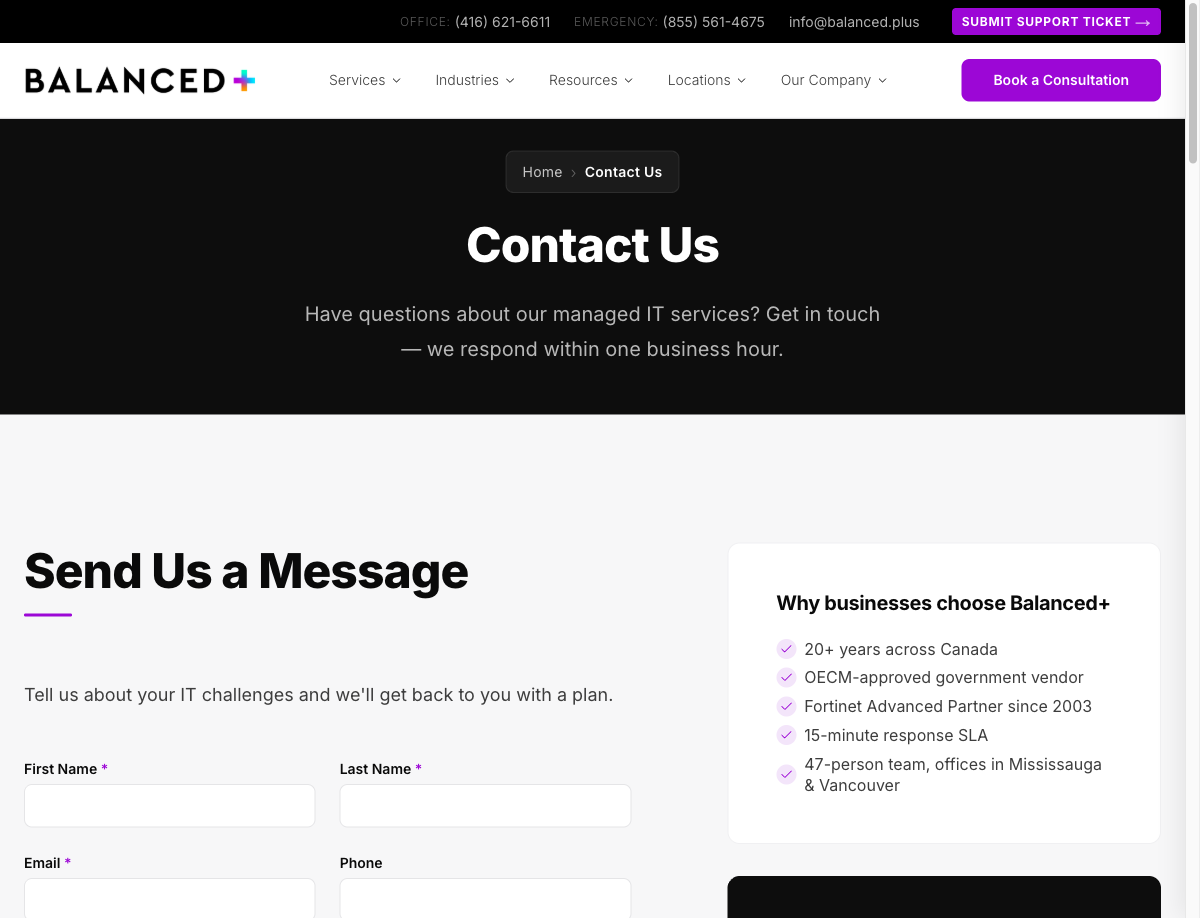
Screenshot of an AI agent navigating to the BALANCED+ contact page to begin automated form testing
Step 2 in action: the AI agent has navigated to the contact page and is ready to identify and interact with the form fields.
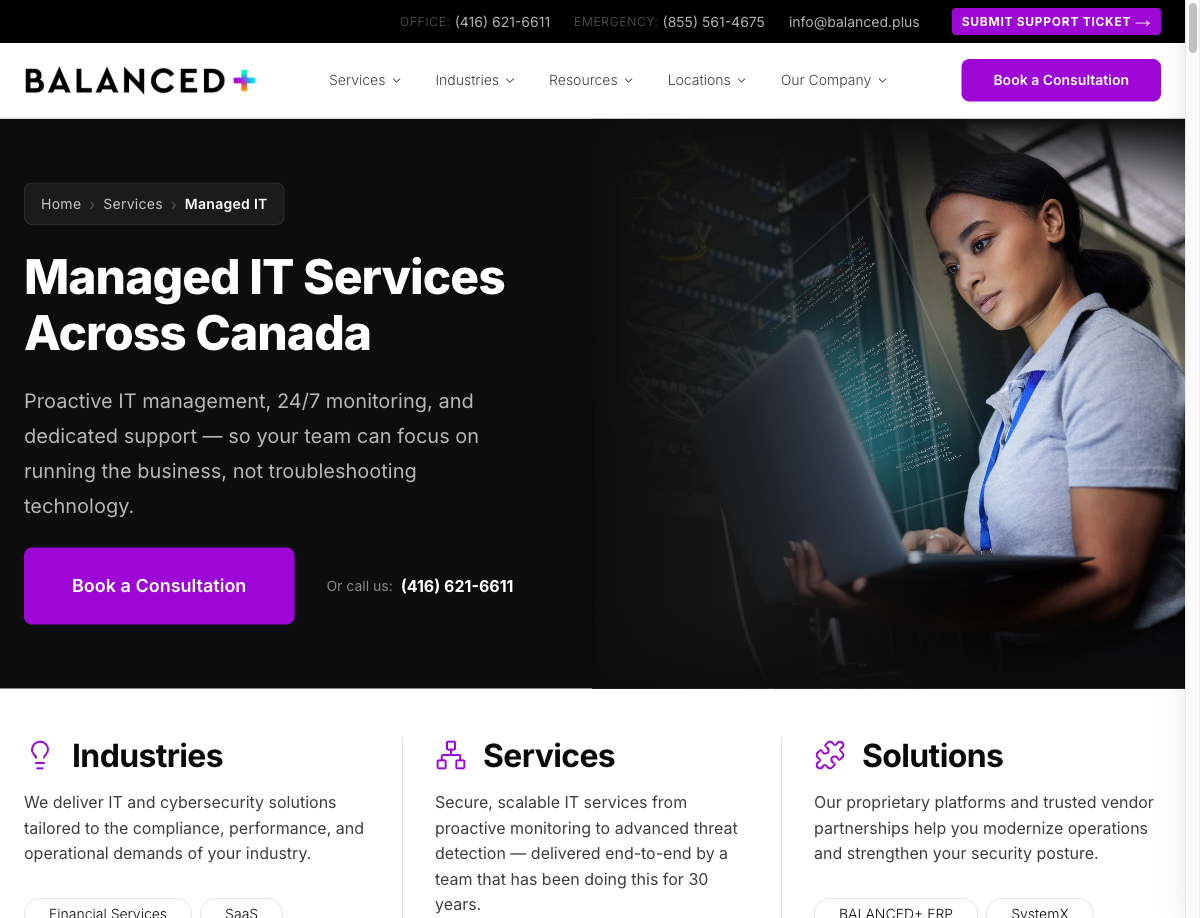
Screenshot of an AI agent navigating and analyzing a Managed IT Services webpage for content and structure
The same agent can navigate to any page on the site. Here it’s analyzing a services page, reading the content structure, checking for missing elements, and verifying that all links resolve correctly.

How AI Agents Compare to Traditional Automation

If you’ve used scripts, macros, or tools like Zapier before, you might be wondering what’s different here. The short answer: AI agents handle complexity and change in ways that traditional automation can’t.

Scripts & MacrosAI Agents
SetupRequires a developer to write and test custom codeDescribe what you want in plain language
MaintenanceBreaks when the target website or application changes its layoutAdapts automatically by understanding page structure, not just HTML selectors
FlexibilityDoes exactly one thing; any variation requires new codeHandles variations and edge cases by reasoning about the task
CostLow per-script, but developer time for each new automation adds upHigher per-task compute cost, but dramatically lower setup and maintenance time
Learning curveRequires programming knowledge (Python, JavaScript, etc.)Natural language instructions allow your operations team to define workflows
Error handlingFails silently or crashes when encountering unexpected statesRecognizes errors, attempts recovery, and reports what went wrong in plain language

Traditional automation still has its place. For high-volume, unchanging tasks, a well-written script is faster and cheaper per execution. But for the kind of varied, web-based workflows that mid-market operations teams deal with daily, AI agents are a step change in what’s possible without a dedicated development team.

What to Consider Before You Start

Warning:

AI agents are powerful, but they need guardrails. Before deploying any AI automation in your business, make sure you have these fundamentals in place: Start small and automate one low-risk workflow first, then validate the results before scaling. Define clear boundaries by specifying exactly what the agent should and shouldn’t do, especially around sensitive data and customer-facing interactions. Maintain human oversight because AI agents should report to humans, not replace human judgment on decisions that matter. Ensure security controls so that any tool interacting with your systems has proper access controls, credential management, and audit logging.

The biggest mistake businesses make with AI automation is trying to automate everything at once. The teams that get the most value start with a focused pilot, measure the results, and expand methodically.

You should also consider data privacy. AI agents that browse the web and interact with applications are processing data. Make sure your implementation complies with your organization’s data handling policies and any applicable regulations (PIPEDA in Canada, GDPR for European clients, etc.).

The Bottom Line

AI agents represent a genuine shift in what small and mid-market teams can accomplish without growing headcount. The manual web tasks that eat 15 to 25 hours of your team’s week (monitoring, testing, data collection, reporting) can run autonomously with better accuracy and complete audit trails. The technology is here now, the ROI is measurable, and the barrier to entry is lower than most businesses expect. The question isn’t whether AI agents will change how your team works. It’s whether you’ll be the one setting the pace or playing catch-up.

Ready to explore how AI-powered automation could work for your business? Our team helps mid-market companies identify the right workflows to automate and implement the tools to make it happen, securely and strategically.

Book a consultation to discuss your automation opportunities, or learn more about our managed IT services that keep the foundation running while you innovate.

Why Reliable IT Support and Networking Matter More Than Ever

Your company ran fine last Tuesday. Email worked, files opened, video calls connected. Nobody thanked the network. Then on Wednesday morning, a switch failed, DNS stopped resolving, and 200 employees sat idle for four hours. The cost? Somewhere north of $50,000 in lost productivity, and that was before the emergency break-fix invoice landed.

This post breaks down why IT support and network infrastructure deserve the same strategic attention as sales pipelines and financial planning, and what happens when they don’t get it.

Reliable IT support and networking aren’t overhead, they’re operational infrastructure. Mid-market companies that treat networking as a strategic investment instead of a cost centre experience fewer outages, stronger security posture, and measurably higher employee productivity. The difference between “IT that works” and “IT that breaks” is almost always proactive management, not better hardware.

What “Network Infrastructure” Actually Means for Your Business

Network Infrastructure

The complete set of hardware, software, and services that enable communication and data transfer within an organization and between that organization and the outside world. This includes switches, routers, firewalls, wireless access points, DNS and DHCP services, VPN connections, and the cabling and configuration that ties it all together.

Most office workers never think about what happens between clicking “open” on a shared document and seeing it on their screen. That single action can traverse a wireless access point, a network switch, a firewall rule, a DNS lookup, and a cloud authentication handshake, all in under a second.

Here’s what each component actually does:

ComponentWhat It DoesWhat Happens When It Fails
SwitchConnects devices on your local network, computers, printers, phones, serversEntire floors or departments lose connectivity
RouterDirects traffic between your internal network and the internetNo internet access, cloud apps go dark
FirewallFilters traffic, blocks unauthorized access, enforces security policiesNetwork exposed to external threats or legitimate traffic blocked
DNSTranslates domain names into IP addresses so devices can find each otherWebsites and cloud services become unreachable despite working internet
DHCPAutomatically assigns IP addresses to devices when they connectNew devices can’t join the network; IP conflicts cause random disconnections
Wireless APProvides Wi-Fi coverage for mobile devices and laptopsDead zones, dropped connections, employees tethering to phones

When these components are properly configured and monitored, technology becomes invisible. When they aren’t, your entire operation feels it.

The Real Cost of Network Downtime

Downtime isn’t just an inconvenience, it’s a measurable financial hit. And for mid-market companies in Toronto, the numbers add up fast.

$5,600/minute

Average cost of IT downtime for mid-size businesses, factoring in lost productivity, revenue, and recovery costs. (Gartner)

A four-hour outage affecting 150 employees at an average fully-loaded cost of $65/hour means over $39,000 in lost productivity alone, before you account for missed client deadlines, SLA penalties, or emergency vendor fees.

Warning:

Most mid-market outages aren’t caused by catastrophic hardware failures. They’re caused by missed firmware updates, expired certificates, misconfigured firewall rules, or DHCP scope exhaustion, all preventable issues that proactive monitoring catches before they cause downtime.

The irony is that the organizations most vulnerable to downtime are often the ones spending the least on proactive IT management. They’re stuck in a reactive cycle: something breaks, they call someone to fix it, they pay the emergency rate, and they go back to ignoring infrastructure until the next failure.

Network Security Is a Business Problem, Not Just an IT Problem

Every device on your network is a potential entry point. Every employee with a password is a potential vulnerability. Network security isn’t a technical checkbox, it’s a business risk that needs to be managed at the same level as financial and legal risk.

Defense in Depth

A network security strategy that layers multiple protective measures, firewalls, NAT, VPNs, endpoint protection, access controls, and monitoring, so that no single point of failure can compromise the entire environment. If one layer is breached, the next layer contains the threat.

The core technologies that protect your network work together as layers:

  • Firewalls, filter inbound and outbound traffic based on security rules, blocking known threats and unauthorized access attempts
  • NAT (Network Address Translation), masks your internal network structure from the public internet, making it harder for attackers to map your environment
  • VPNs (Virtual Private Networks), encrypt connections for remote workers, ensuring data in transit can’t be intercepted on public networks
  • Network segmentation, isolates sensitive systems (finance, HR, servers) so a breach in one area can’t spread laterally across the organization
  • DNS filtering, blocks access to known malicious domains before a connection is ever established

82%

of ransomware attacks target companies with fewer than 1,000 employees, the mid-market is the primary target, not large enterprises. (Coveware, 2024)

But technology alone doesn’t solve the problem. The majority of successful breaches start with a human action, clicking a phishing link, reusing a compromised password, or misconfiguring a cloud permission. That’s why network security has to be paired with employee awareness training and clear security policies.

If your organization hasn’t conducted a security awareness training session in the past 12 months, you’re behind. Quarterly phishing simulations combined with short, practical training sessions reduce click-through rates on real phishing emails by up to 75%. It’s one of the highest-ROI security investments you can make.

What Reliable IT Support Actually Looks Like

There’s a significant gap between “we have an IT guy” and “we have reliable IT support.” The difference isn’t just headcount, it’s the operating model.

Reactive IT (Break-Fix)Proactive Managed IT
MonitoringNone, issues found when users report them24/7 automated monitoring with alerting
Updates & patchingDone occasionally or after incidentsScheduled, automated, verified
SecurityAntivirus and a firewall, maybeLayered: firewall, EDR, DNS filtering, MFA, VPN
Backup & recovery“We think backups are running”Tested regularly with documented recovery procedures
Cost modelUnpredictable, emergency rates when things breakFixed monthly fee with predictable budgeting
Strategic planningNoneQuarterly reviews, technology roadmap, budget forecasting
Downtime per year3.6 hours (average for SMBs without managed IT)Under 1 hour (with proactive management)

The day-to-day work of proactive IT support is largely invisible, and that’s the point. Behind the scenes, a managed IT team is:

Monitoring infrastructure continuously: Routers, switches, firewalls, servers, and endpoints are all tracked in real time. Performance degradation and anomalies are caught before they become outages.

Patching and updating systems: Firmware updates, security patches, and software updates are applied on a regular schedule, tested first, then deployed during maintenance windows to minimize disruption.

Managing network performance: Bandwidth allocation, QoS policies for VoIP and video, and traffic analysis ensure the network performs well even as usage grows.

Testing backups and disaster recovery: Backups are verified, not just that they ran, but that they can actually restore. Recovery procedures are documented and tested quarterly.

Planning for what’s next: Technology roadmapping, lifecycle management, and budget forecasting so hardware refreshes and upgrades happen on schedule, not in a panic.

How Strong Networks Enable Modern Work

A well-designed network isn’t just about preventing problems, it’s about enabling capabilities that drive the business forward.

Modern mid-market companies depend on their network to support:

  • VoIP and unified communications, replacing legacy phone systems with cloud-based voice, video, and messaging that works from any location
  • Microsoft 365 and cloud productivity, Teams, SharePoint, OneDrive, and Exchange Online all require consistent, low-latency connectivity
  • Secure remote and hybrid work, VPN or ZTNA connections that give remote employees the same access and performance as on-site staff
  • Cloud-hosted business applications, ERP, CRM, and line-of-business apps that live in Azure, AWS, or private cloud environments
  • Enterprise wireless, seamless Wi-Fi coverage with proper segmentation for corporate devices, guest access, and IoT
Good to know:

Network performance directly impacts Microsoft 365 adoption. Organizations with properly optimized networks report 40% higher Teams adoption rates and significantly fewer support tickets related to call quality, file sync issues, and authentication failures. (Microsoft FastTrack data)

None of these work well on a network that was designed five years ago and hasn’t been reassessed since. Business requirements change, device counts grow, and cloud adoption shifts traffic patterns. Networks need to evolve with the business.

How to Evaluate Your Current IT and Network Health

If you’re not sure whether your IT support and network infrastructure are where they should be, these five questions will give you a clear picture:

When was your last network assessment? If it’s been more than 18 months, or if you’ve never had a formal assessment, you’re likely running on assumptions, not data.

Do you know your actual uptime numbers? Not “we think it’s been fine”, actual monitored uptime with incident logs. If nobody is tracking this, nobody knows.

How quickly can you recover from a major outage? If your answer involves “it depends” or “we’d have to figure it out,” your disaster recovery plan needs work.

Are firmware and security patches current across all devices? Check your firewall, switches, access points, and servers. If anything is more than 90 days behind on patches, it’s a risk.

Is there a technology roadmap tied to your business plan? IT that operates without a forward-looking plan will always be reactive. A good MSP provides quarterly reviews and a 12–24 month technology roadmap aligned to your growth.

Ask your IT provider for a network topology diagram. If they can’t produce one, or if the one they have is outdated, that’s a red flag. You can’t secure, troubleshoot, or optimize a network you haven’t documented.

The Bottom Line

Reliable IT support and networking aren’t things you notice when they work, you notice when they don’t. For mid-market businesses in Toronto, the difference between a network that enables growth and one that creates constant friction comes down to proactive management, layered security, and strategic planning. The companies that invest in their IT infrastructure as a business asset, not an afterthought, consistently outperform those that don’t.

If your IT feels more like a source of problems than a competitive advantage, it might be time for a different approach. Learn how BALANCED+ manages IT infrastructure for mid-market companies across the GTA, or explore our network infrastructure services to see what a properly designed network looks like.

FortiOS 8.0 Is Here: Everything Announced at Fortinet Accelerate 2026

The BALANCED+ team is on the ground at Fortinet Accelerate 2026 in Las Vegas this week, and the headline announcement is a big one: FortiOS 8.0 is here. This is the most significant platform update Fortinet has shipped in years, and it changes how organizations should think about network security, AI-driven threat protection, and quantum readiness.

Here’s what matters for mid-market IT leaders and security teams.

FortiOS 8.0: One Platform, Not Twelve Tools

The core message behind FortiOS 8.0 is consolidation. Fortinet has rebuilt the operating system to bridge advanced networking with AI-driven security natively, no bolt-on integrations, no stitching together separate products.

FortiOS 8.0

Fortinet’s natively integrated operating system that unifies networking and security into a single platform. It consolidates endpoint protection, zero-trust access, threat detection, and network management under one OS, replacing fragmented legacy tool stacks.

The consolidation breaks down into three pillars:

One Unified Agent (FortiClient): Integrates endpoint protection (EPP), zero-trust network access (ZTNA), and endpoint detection and response (EDR) into a single agent. It now supports post-quantum cryptography for VPNs, adaptive ZTNA posture visibility, and AI application control.

One Management Tool (FortiManager): Centralized control across campus, branch, and cloud environments. FortiAI-Assist is now built in, using generative AI to simplify network management and reduce human error.

One Data Lake (FortiAnalyzer): Upgraded with a unified XDR dashboard for instant risk assessment across network, endpoint, and identity domains. SOC monitoring moves to machine-speed response.

AI Built Into the Core, Not Layered on Top

Fortinet has embedded what they call “Native AI” directly inline within FortiOS 8.0. This isn’t a chatbot slapped onto a dashboard, it’s machine learning running inside the inspection engine to stop zero-day and AI-powered attacks at wire speed without adding latency.

Good to know:

FortiOS 8.0 introduces three distinct AI engines: FortiAI-SecureAI for securing AI workloads, FortiAI-Protect for inline threat prevention, and FortiAI-Assist for guided configuration and troubleshooting, each purpose-built for a different security function.

The practical impact for security teams:

  • AI-powered IPS for DNS, catches malicious DNS queries that signature-based systems miss
  • Application-to-application (A2A) detection, visibility into machine-to-machine API traffic
  • GenAI usage controls, deep visibility and governance over how employees use tools like ChatGPT, Copilot, and other AI services
  • FortiAI-Assist for FortiGate, AI-driven tooltips, guided suggestions, and debugging assistance that help close the security skills gap

The GenAI governance capabilities in FortiOS 8.0 are a direct answer to one of the biggest shadow IT risks in 2026. If your organization hasn’t established policies for AI tool usage, this update gives you enforcement at the network level, not just a written policy that nobody follows.

Post-Quantum Cryptography: Preparing for Tomorrow’s Threats Today

This is the part that should get every CISO’s attention. Fortinet is building post-quantum cryptography (PQC) and Quantum Key Distribution (QKD) directly into FortiOS 8.0, not as an add-on license or future roadmap item.

Warning:

The “harvest-now, decrypt-later” threat is real. Adversaries are already capturing encrypted traffic today with the expectation that quantum computers will crack it within the next decade. If your VPN tunnels or data transfers carry sensitive information, the window to act is now, not when quantum computing matures.

What FortiOS 8.0 delivers on the quantum front:

  • Support for NIST-approved PQC algorithms (FIPS 204 and FIPS 205)
  • Full SSL/TLS deep inspection with quantum-safe encryption
  • Quantum-resilient management access and agentless VPNs
  • Minimal performance impact, critical for production environments

FIPS 204 & 205

NIST-approved post-quantum cryptography standards now supported natively in FortiOS 8.0

Next-Gen Security Operations: FortiSOC Gets Agentic AI

Fortinet’s SOC platform, spanning SIEM, SOAR, and XDR, now leverages what they call “Agentic AI.” These are embedded AI agents within FortiAnalyzer that autonomously handle alert triage, root-cause investigation, and response orchestration.

Agentic AI

AI systems that operate autonomously to complete multi-step tasks without constant human direction. In the context of FortiSOC, agentic AI conducts initial alert triage, investigates root causes, and recommends or executes response actions, reducing the volume of work that requires a human analyst.

For organizations already running SOC operations (in-house or outsourced), this translates to:

  • Faster mean time to detect (MTTD) and mean time to respond (MTTR)
  • Reduced analyst fatigue from alert noise
  • Identity-driven detections that catch credential-based attacks earlier in the kill chain

Unified SASE and the All-in-One Bundle

Fortinet continues to push the convergence of networking and security with some significant packaging and architecture changes:

All-in-One Services Bundle: Consolidates 5 SKUs and premium care into a single SKU. Organizations can extend SD-WAN to full SASE at roughly 40% of the FortiGate model cost, a significant reduction in licensing complexity.

Sovereign SASE: Rolling out in 2025–2026, this gives organizations the flexibility to run SASE with data sovereignty controls, critical for Canadian organizations subject to PIPEDA and provincial privacy regulations.

FortiASIC SP5: Fortinet’s proprietary ASICs now support up to 14 different applications simultaneously, including 5G, VXLAN, OT, and Zero Trust workloads, delivering hardware-accelerated performance where software alone can’t keep up.

40%

Cost reduction when extending SD-WAN to full SASE using the new All-in-One Services Bundle vs. individual FortiGate licensing

Data Loss Prevention Gets Serious Upgrades

Data governance is no longer a nice-to-have. FortiOS 8.0 significantly expands its DLP and content inspection capabilities:

  • OCR-powered inspection via FortiGuard DLP, catches sensitive data embedded in images and scanned documents
  • Image classification through URL filtering, blocks visual content that text-based filters miss
  • FortiData Labels aligned with Microsoft Information Protection (MIP), consistent data classification across apps and environments

The MIP alignment is particularly relevant for organizations running Microsoft 365. If you’ve already invested in Microsoft’s data classification labels, FortiOS 8.0 can now enforce those same labels at the network perimeter, creating a unified governance model from endpoint to firewall.

OT Security Extends to the Industrial Edge

For organizations with operational technology environments, manufacturing floors, utilities, critical infrastructure, FortiOS 8.0 extends advanced security controls directly to the industrial edge:

  • Virtual IP (VIP) support for encrypted communications to OT servers
  • Strong segmentation between IT and OT networks
  • Enhanced IPsec connectivity for remote OT sites
  • Compliance and audit readiness for NERC CIP and IEC 62443 standards

What This Means for Your Organization

FortiOS 8.0 isn’t an incremental update, it’s a platform shift. The consolidation of endpoint, network, and cloud security under one OS eliminates the integration tax that mid-market businesses have been paying for years. The native AI capabilities move threat detection from human-speed to machine-speed. And the post-quantum readiness gives organizations a concrete path to protect data against future decryption threats.

As an authorized Fortinet partner, the BALANCED+ team is at Accelerate 2026 getting hands-on with FortiOS 8.0 and evaluating how these capabilities translate to real-world deployments for our clients. If you’re running Fortinet infrastructure, or considering it, this is the right time to have a conversation about your upgrade path.

Talk to BALANCED+ about your FortiOS 8.0 upgrade path →

SOC as a Service vs. In-House SOC

If your business has been hit with a cybersecurity assessment or a new insurance renewal, you’ve probably landed on the same question: do we build our own Security Operations Center, or do we outsource it?

It sounds like a straightforward build-vs-buy decision. It’s not. The real numbers are rarely shared, and the gap between what an in-house SOC costs and what most mid-market businesses can actually sustain is significant.

This post breaks it down honestly.

What Is a SOC?

Security Operations Center (SOC)

The team and technology responsible for monitoring your environment 24/7, detecting threats, and responding before damage is done. A SOC watches your logs, endpoints, network traffic, and cloud environments in real time, around the clock, including weekends and holidays.

A SOC is not your IT helpdesk, a firewall or antivirus product, or a one-time penetration test. It’s an ongoing, always-on operation.

The Real Cost of Building an In-House SOC

Here’s what a functional in-house SOC actually requires for a mid-market company (50–500 employees).

Staffing

To provide genuine 24/7 coverage, you need at minimum three shifts of analysts. A lean but functional SOC team:

RoleAnnual Salary (Toronto, 2025)
SOC Manager$110,000–$130,000
Senior SOC Analyst (×2)$85,000–$100,000 each
SOC Analyst Tier 1 (×4)$60,000–$75,000 each
Threat Intelligence Analyst$90,000–$110,000

$590K–$730K

Annual staffing cost for a lean in-house SOC, before benefits, recruitment, or turnover

Warning:

These figures don’t include benefits (typically 20–30% on top of salary), recruitment costs, or the reality that skilled security analysts have one of the highest turnover rates in tech.

Technology

A SOC requires its own dedicated toolset. At minimum:

ToolAnnual Cost
SIEM (e.g., Microsoft Sentinel, Splunk)$30,000–$120,000
EDR / XDR platform$15,000–$40,000
Threat intelligence feeds$10,000–$30,000
SOAR (automation/orchestration)$20,000–$60,000
Log storage and infrastructure$10,000–$25,000

$85K–$275K

Annual technology stack cost, tools alone, on top of staffing

Training and Certification

Security is not static. Your analysts need ongoing training, certifications (CISSP, GIAC, etc.), and threat research time. Budget $5,000–$15,000 per analyst per year, adding another $30,000–$90,000 annually.

Total In-House SOC Cost

CategoryLow EstimateHigh Estimate
Staffing$590,000$730,000
Technology$85,000$275,000
Training$30,000$90,000
Annual Total$705,000$1,095,000

$700K–$1M+

What a mid-market company spends annually on an in-house SOC, before detecting a single threat

What You Get With SOC as a Service

SOC as a Service (SOCaaS) gives you the same monitoring capability without building the infrastructure or hiring the team yourself. You pay a managed security provider for access to their analysts, tools, and processes.

  • 24/7/365 monitoring, analysts watching your environment at 2am on a Sunday, not just during business hours
  • SIEM + SOAR included, the technology stack is operated and maintained by the provider
  • Dedicated threat intelligence, updated continuously, not relying on a single analyst’s knowledge
  • Incident response support, when something is detected, the response starts immediately
  • Compliance reporting, logs and reports formatted for SOC 2, ISO 27001, NIST, and others
  • Scalability, your coverage grows with your environment without hiring

What SOCaaS Costs

ScopeMonthly CostAnnual Cost
Basic monitoring (EDR + SIEM)$3,000–$6,000$36,000–$72,000
Full SOCaaS (MDR + SOAR + IR)$6,000–$15,000$72,000–$180,000

SOCaaS is typically 5–15x less expensive than building in-house, with broader coverage, faster response times, and no hiring risk. For most mid-market companies, it’s not even close.

Side-by-Side Comparison

In-House SOCSOC as a Service
Annual cost$700K–$1M+$36K–$180K
Time to operational6–18 monthsDays to weeks
24/7 coverageDifficult to sustainIncluded
Tool costsAdditionalBundled
Staff turnover riskHighProvider’s problem
Compliance reportingManualAutomated
ScalabilitySlow and expensiveOn-demand
Threat intelligenceLimited by team sizeAggregated across all clients

When an In-House SOC Makes Sense

To be fair, there are scenarios where building internal security operations is the right call:

  • Large enterprise (1,000+ employees) with a dedicated CISO and existing security team
  • Regulated industries requiring strict data residency or air-gapped environments
  • Government and defence contractors with classified data handling requirements
  • Organizations that have already invested in a partial security team and want to build from there
Good to know:

For most mid-market companies in Toronto, professional services, manufacturing, healthcare, legal, SOCaaS is the more practical, more cost-effective path.

The Hidden Cost Nobody Talks About: Alert Fatigue

An in-house SOC dealing with hundreds or thousands of daily alerts, without the automation, playbooks, and threat intelligence context that a mature SOCaaS provider has, burns out fast. Analysts miss things. Critical alerts get buried in noise.

45%

of SOC analysts consider leaving their role due to alert fatigue, and average breach detection time without mature capabilities is still over 200 days

The cost of a missed breach isn’t just remediation. It’s regulatory penalties, client notification requirements, reputational damage, and downtime. That number dwarfs any savings from going in-house.

What to Look for in a SOC as a Service Provider

Not all providers are equal. When evaluating SOCaaS, ask:

What is your mean time to detect (MTTD) and mean time to respond (MTTR)? Get SLA numbers in writing.

Do you have dedicated analysts or shared pools? Shared analysts across hundreds of clients is not the same as dedicated coverage.

What tools do you use? A reputable provider will be transparent about their SIEM, EDR, and SOAR stack.

How do you handle incident response? Detection alone isn’t enough, response capability matters.

Can you support our compliance requirements? SOC 2, ISO 27001, NIST, PHIPA, confirm they have experience with your specific framework.

What does onboarding look like? Time-to-value matters. A 6-month onboarding is a red flag.

Bottom Line

For mid-market companies in Toronto and the GTA, the math on building an in-house SOC rarely works out. The staffing cost alone exceeds what most businesses spend on IT entirely, and sustaining 24/7 coverage without burnout or gaps is genuinely hard to do at this scale.

SOC as a Service gives you enterprise-grade detection and response at a fraction of the cost, with faster deployment and no hiring risk. If you’re evaluating your security posture, or if a cyber insurance renewal has put this decision on your plate, it’s worth having a conversation.

Talk to BALANCED+ about managed SOC and security operations →

.NET EF Identity Resolution, the Hard Way

Why do two seemingly identical database queries return different values? That’s the question that kicked off an hours-long debugging session, one that revealed a subtle but dangerous interaction between .NET Entity Framework’s Identity Resolution and improper DbContext management.

Entity Framework Core tracks every entity it loads by primary key. If a helper class creates its own DbContext instead of sharing one through Dependency Injection, the two contexts maintain separate identity caches. Changes made in one are invisible to the other, leading to silent data resets that are incredibly hard to trace.

The Problem

The scenario was straightforward on the surface. An API endpoint increments and saves a “Counter” property on a Parts entity mid-execution. The database reflects the correct value after the save. But by the time the endpoint finishes, the Counter resets to its original value, as if the increment never happened.

The culprit line? A completely unrelated save operation on the same entity, updating different fields. Somehow, saving unrelated properties was overwriting the Counter with a stale value. The Counter wasn’t being touched anywhere else in the code, so where was the old value coming from?

C# PartService.cs
// These two lines return DIFFERENT Counter values
// even though they query the same row at the same time:

var counter1 = dbContext.Parts.Find(partId).Counter;
// Returns: 5 (stale, from identity cache)

var counter2 = dbContext.Parts
    .AsNoTracking()
    .First(p => p.Id == partId).Counter;
// Returns: 6 (correct, fresh from database)

The Debugging Journey

Tracking this down required a methodical approach. Each step peeled back another layer of the problem, and each result added to the confusion before the full picture emerged.

Pinpoint the Reset

By commenting out lines one at a time, the exact statement that resets the Counter was identified: an SaveChanges() call that updates completely unrelated fields on the same entity. The Counter value in the database is correct before this line runs, and wrong after.

Inspect the In-Memory Object

Logging the part instance’s Counter value showed it was already stale, holding the original value, not the incremented one. But the increment and save had already succeeded. Where was this stale copy coming from?

Query a Fresh Copy

Selecting another copy of the same row from the database using a standard LINQ query also returned the wrong Counter value, even though the database showed the correct value at that exact moment. Two queries, same row, both stale.

Bypass the Cache

As a final test, querying the Counter value with AsNoTracking(), which skips EF’s caching layer entirely, returned the correct value. This confirmed the problem wasn’t in the database. It was in EF’s own tracking system.

The Root Cause

The answer comes down to two concepts colliding: Entity Framework’s Identity Resolution and the way the DbContext was being managed in this codebase.

Identity Resolution (EF Core)

When Entity Framework returns an entity from the database, it tracks that instance by its primary key. Any subsequent query for the same entity returns the already-tracked instance from memory rather than hitting the database again. This improves performance and reduces memory usage, but it means in-memory values can drift from what’s actually in the database.

Identity Resolution on its own isn’t enough to cause this bug. The real issue was how the codebase managed its DbContext instances.

Warning:

The API endpoint’s logic was split between a parent controller and a helper class. Instead of receiving the DbContext through Dependency Injection (or even as a constructor argument), the helper class instantiated its own new AppDbContext(). This created two completely separate tracking contexts, each with its own Identity Resolution cache, oblivious to changes made by the other.

Here’s what happened step by step: The parent controller incremented the Counter and saved it through its DbContext, the database now holds the correct value. Then the helper class, using its own separate DbContext, queried the same entity. Its Identity Resolution cache still held the original, pre-increment value. When the helper saved its unrelated changes, it overwrote the Counter with the stale cached value.

2

separate DbContext instances were active in the same API request, each maintaining its own identity cache, silently fighting over the same data.

The Fix

Always use Dependency Injection for your DbContext. Never instantiate new DbContext() inside helper classes, services, or utility methods. One HTTP request should use one DbContext instance, giving every component the same source of truth and the same Identity Resolution cache.

The fix was simple once the root cause was clear. Instead of the helper class creating its own DbContext, the existing context is passed through the constructor:

C# PartHelper.cs
// BEFORE: helper creates its own context (broken)
public class PartHelper
{
    private readonly AppDbContext _db = new AppDbContext();
    // This context has NO knowledge of changes
    // made by the parent controller's context
}

// AFTER: context is injected (correct)
public class PartHelper
{
    private readonly AppDbContext _db;
    public PartHelper(AppDbContext db) => _db = db;
    // Now shares the same tracking cache as the parent
}

With a single shared DbContext, both the parent controller and the helper class read from and write to the same Identity Resolution cache. The Counter increment is visible everywhere, and no save operation can silently overwrite it with a stale value.

The Takeaway

Going back to the original mystery, those two “identical” queries that returned different values, the explanation is now clear. The first query (Find()) consults the Identity Resolution cache and returns the tracked instance with its stale Counter value. The second query (AsNoTracking()) bypasses the cache entirely and fetches the real, current value from the database.

This kind of bug is particularly dangerous because it’s silent. No exceptions are thrown. No logs indicate a problem. The data just quietly reverts, and everything looks normal until someone notices the numbers don’t add up.

Tip:

Quick reference: dbContext.Entity.Find(id) returns the tracked, potentially stale instance from the Identity Resolution cache. dbContext.Entity.AsNoTracking().First(...) always fetches fresh data from the database. When debugging unexpected values, AsNoTracking() is your fastest way to check if Identity Resolution is the culprit.

The process to find the solution was far more complex than the solution itself, but that’s often how it goes with framework-level bugs. Understanding Identity Resolution isn’t just useful for debugging; it’s essential knowledge for building reliable .NET applications that don’t silently corrupt their own data.

MDR vs. EDR vs. XDR: What’s the Difference?

Your security vendor says you need EDR. Your consultant recommends MDR. The latest analyst report says XDR is the future. Meanwhile, you just need to know your business is protected and you are not overpaying for capabilities you will never use.

These three acronyms represent fundamentally different approaches to threat detection and response. Choosing the wrong one does not just waste budget, it leaves gaps that attackers know how to exploit. Here is what each one actually does, where they overlap, and how to pick the right fit for your organization.

EDR is a tool that protects endpoints. MDR is a managed service where experts monitor and respond on your behalf. XDR is a platform that correlates data across your entire environment. Most mid-market businesses get the best results from MDR paired with strong EDR, not by chasing the newest acronym.

EDR: The Foundation of Endpoint Security

EDR (Endpoint Detection and Response)

Software installed on endpoints, laptops, servers, workstations, that continuously monitors for suspicious activity, records telemetry, and can isolate threats in real time. Think of it as a security camera with a panic button on every device.

EDR replaced traditional antivirus for a reason. Legacy antivirus relies on known malware signatures, a database of known bad files. EDR watches behavior. It does not just ask “is this file on the blocklist?” It asks “why is PowerShell launching at 3 AM and trying to reach an external IP?”

What EDR Does Well

EDR excels at catching threats that bypass traditional defenses. Fileless malware that lives in memory, legitimate tools being used maliciously (known as living-off-the-land attacks), and ransomware that encrypts files faster than signature-based tools can react. Modern EDR platforms provide real-time visibility into what is happening on every endpoint, detailed forensic timelines when something goes wrong, and automated containment to isolate a compromised device before the threat spreads.

68%

of breaches involve a human element like phishing or stolen credentials, exactly the endpoint-level threats EDR is designed to catch. (Verizon DBIR 2024)

Where EDR Falls Short

EDR only sees endpoints. If an attacker compromises a cloud application, moves laterally through your identity provider, or exploits a network vulnerability, your EDR may never fire an alert. It is one lens on a complex environment.

The bigger problem: EDR generates a massive volume of alerts. A 200-endpoint deployment can produce thousands of events daily. Without skilled analysts triaging those alerts, real threats get buried in noise. This is where most organizations hit the wall, they buy EDR expecting it to solve the problem, then realize they do not have anyone to watch it.

Warning:

Deploying EDR without dedicated staff to monitor it is like installing a fire alarm system with nobody to answer the calls. The technology works, but only if someone is paying attention.

MDR: Expert Eyes on Your Environment

MDR (Managed Detection and Response)

A fully managed security service where a team of analysts monitors your environment 24/7, investigates alerts, hunts for threats proactively, and responds to incidents on your behalf. MDR is not a product, it is a team you hire.

MDR exists because most businesses cannot staff a security operations center. Hiring a single senior security analyst in Canada costs well over $100,000 per year. A proper 24/7 SOC requires a minimum of five to six analysts working in shifts, plus tooling, training, and management overhead. For a mid-market company, that math rarely works.

MDR providers solve this by spreading that cost across many clients while maintaining the expertise and coverage that each individual client needs.

What MDR Actually Includes

A strong MDR service goes far beyond alert forwarding. The core capabilities you should expect include continuous 24/7 monitoring and triage of security events, proactive threat hunting to find attackers who have evaded automated defenses, guided or fully managed incident response when threats are confirmed, regular reporting on your security posture and risk trends, and access to senior analysts who understand your environment, not just a rotating help desk.

Where MDR Falls Short

MDR providers are only as effective as the data they can see. Most MDR services are built around EDR telemetry, endpoint data. If your network, cloud, email, and identity systems are not feeding into the MDR platform, threats in those layers can go undetected. Some advanced MDR providers integrate broader data sources, but this varies significantly between vendors.

There is also a dependency factor. Your MDR provider becomes a critical part of your security posture. If their SOC is overwhelmed, understaffed, or using outdated detection logic, your risk increases without your knowledge.

XDR: The Unified Platform

XDR (Extended Detection and Response)

A security platform that ingests and correlates telemetry from multiple sources, endpoints, network, cloud workloads, email, and identity systems, into a single detection and response layer. XDR aims to eliminate the silos between security tools.

XDR emerged because modern attacks do not stay in one lane. A typical breach might start with a phishing email, use stolen credentials to access a cloud application, move laterally through your identity provider, and ultimately deploy ransomware on endpoints. EDR only sees the last step. A SIEM might see the pieces individually but struggle to connect them. XDR is designed to correlate the full kill chain automatically.

What XDR Does Well

The core advantage of XDR is visibility and correlation. Instead of security analysts manually pivoting between six different consoles, XDR brings everything into one view. An endpoint alert becomes meaningful when correlated with a suspicious login from an unfamiliar location, an unusual email rule creation, and a spike in data exfiltration from OneDrive, all within the same ten-minute window.

Where XDR Falls Short

XDR is a platform, not a team. It gives you the tools and the data, but someone still needs to interpret the output, investigate alerts, and execute the response. Many organizations that deploy XDR discover they still need MDR-level expertise to operate it effectively.

There is also the vendor lock-in concern. Most XDR platforms work best, or only work, with the vendor’s own security stack. If you are running Fortinet firewalls, Microsoft 365 for email, and CrowdStrike for endpoints, no single XDR platform will natively ingest all three without significant integration effort.

Good to know:

XDR is gaining traction among enterprises with mature security operations. For mid-market businesses without a dedicated security team, XDR often delivers the most value when it is operated by an MDR provider, giving you the platform visibility with the provider expertise.

Head-to-Head: EDR vs. MDR vs. XDR

EDRMDRXDR
What it isSoftware (tool)Managed service (team)Platform (integrated tool)
CoverageEndpoints onlyDepends on data sourcesEndpoints, network, cloud, email, identity
Who operates itYour internal teamExternal security analystsYour team or an MDR provider
24/7 monitoringOnly if you staff itYes, includedOnly if you staff it
Threat huntingNoYes, proactiveDepends on implementation
Incident responseAutomated containmentHuman-led responseAutomated + manual
Best forTeams with in-house security staffBusinesses without a SOCMature security programs
Typical cost$$$$$$$–$$$$

How to Choose: A Decision Framework

The right answer depends on three factors: your internal security capabilities, your environment complexity, and your risk tolerance.

Assess Your Internal Security Capacity

Do you have dedicated security staff who can monitor, investigate, and respond to alerts during business hours and after hours? If the answer is no, and for most mid-market businesses it is, you need a managed component. EDR alone will not be enough.

Map Your Attack Surface

If your environment is primarily on-premises with traditional endpoints, EDR covers the majority of your risk. If you are running a hybrid environment with cloud workloads, SaaS applications, remote workers, and multiple identity systems, you need visibility beyond the endpoint.

Define Your Response Expectations

When a real threat is detected at 2 AM, what do you need to happen? If you expect automated containment and a ticket for your team to review in the morning, EDR may suffice. If you expect a trained analyst to investigate, contain the threat, and brief your leadership, you need MDR.

Evaluate Vendor Lock-in and Integration

If you are already invested in a specific security ecosystem, for example, Fortinet for network security and Microsoft for productivity, check whether an XDR platform can actually ingest all your data sources. If integration is limited, an MDR provider with a vendor-agnostic approach may deliver better visibility.

The Most Common Mistake We See

Organizations buy EDR, deploy it to all endpoints, and assume they are covered. Six months later, they discover the alerts have been piling up unreviewed, the automated containment was never properly tuned, and the only reason they found out about a real threat is because a user noticed their files were encrypted.

78%

of organizations say they lack the in-house skills to fully operate their security tools. The tools are not the bottleneck, staffing is. (ISC2 Cybersecurity Workforce Study)

This is not a technology failure. It is an expectations failure. EDR is the engine, but without a driver, whether internal staff or an MDR provider, it idles.

What Most Mid-Market Businesses Actually Need

For the majority of mid-market Canadian businesses, 50 to 500 employees, hybrid cloud environments, limited internal security resources, the sweet spot is MDR with strong EDR as the foundation.

This gives you endpoint-level detection and containment through EDR, 24/7 human monitoring and investigation through MDR, proactive threat hunting that catches what automation misses, and incident response capabilities without the cost of building an internal SOC.

XDR becomes relevant when your environment is complex enough to justify the platform investment and when you have either internal staff or an MDR provider capable of operating it. For most mid-market organizations, XDR-level visibility is better achieved through an MDR provider that integrates multiple data sources than by deploying and managing an XDR platform internally.

Questions to Ask Before You Buy

Whether you are evaluating EDR, MDR, or XDR, these questions will cut through vendor marketing and reveal what you are actually getting.

For EDR vendors: What is the average time to detect and contain a threat? What happens when an alert fires after hours? How many alerts does a typical deployment generate, and what is the false positive rate?

For MDR providers: What is your mean time to respond to a confirmed threat? Do your analysts actively contain threats, or do they only notify us? What data sources do you monitor beyond endpoints? Can I speak to a senior analyst, or only a help desk?

For XDR platforms: Which data sources are natively supported? What integration effort is required for tools outside your ecosystem? Do I need dedicated staff to operate the platform, or is managed operation available?

Making the Right Call

The cybersecurity vendor landscape wants you to believe that each new acronym replaces the last. It does not. EDR, MDR, and XDR are complementary layers, not competing products. The right combination depends on your team, your environment, and the level of risk your business can tolerate.

Start with what you can actually operate. A well-managed EDR deployment with an MDR service behind it will outperform an expensive XDR platform that nobody is watching. Security is not a product you buy, it is a capability you build.

If you are evaluating detection and response solutions for your organization and want a straightforward assessment of what you actually need, learn more about our MDR service or explore our EDR capabilities. We will tell you what fits, even if the answer is simpler than you expected.