
Skip to content

Why Toronto Manufacturing Companies Are Turning to vCIO and Managed IT Services

It is 6:45 AM and your production supervisor just called. The CNC machines are not communicating with the job scheduling system. 

Orders are queued, operators are standing by, and nobody knows whether this is a network issue, a software glitch, or something worse. 

Your IT person is not answering. Your firewall vendor says it is not their problem. 

Meanwhile, every minute of downtime costs you money and credibility with customers who expect their parts shipped today.

If this sounds familiar, you are not alone. Manufacturing operations across the Greater Toronto Area are facing a reality that most did not anticipate: technology has become so deeply embedded in production that IT problems are now operational emergencies. And the patchwork approach that got you this far, one internal person, three or four vendors, a pile of tools nobody fully understands, is starting to show its limits.

The IT Reality Inside Most Toronto Manufacturing Operations

Walk through most small to mid-sized manufacturing facilities in Mississauga, Brampton, or the surrounding GTA and you will find a similar pattern. There is usually one IT person, sometimes shared with other responsibilities, handling everything from desktop support to network troubleshooting to security alerts. They are competent and hardworking, but they are also overwhelmed. The scope of what “IT” means has expanded dramatically, and no single person can reasonably stay current on networking, cybersecurity, cloud platforms, compliance requirements, and operational technology all at once.

Around that person orbits a constellation of vendors. One company handles the firewall. Another manages backups. A third provides the ERP system. Someone else installed the wireless network three years ago. Each vendor knows their piece, but nobody owns the whole picture. When something breaks, you become the project manager, coordinating between parties who point fingers at each other while your production floor waits.

The symptoms show up in predictable ways:

  • Network issues that take days to diagnose because nobody has visibility across all systems
  • Security tools running on endpoints that do not communicate with network monitoring
  • Backup systems configured for convenience rather than ransomware recovery
  • Software licenses scattered across credit cards with no central tracking
  • Technology decisions made reactively during emergencies rather than strategically
  • Shop floor equipment increasingly connected to networks that were never designed for operational technology

None of this happens because anyone made bad decisions. It happens because manufacturing companies grew, technology became more complex, and the organic approach that worked at $5 million in revenue does not scale to $15 million or $30 million.

Why Manufacturing Has Unique IT and Cybersecurity Pressures

Manufacturing is not like running an accounting firm or a marketing agency. The technology environment is fundamentally different, and generic IT approaches often miss critical considerations that directly affect production.

The most significant shift in recent years has been the convergence of operational technology and information technology. Equipment that used to run independently, CNCs, PLCs, robotics, quality inspection systems, now connects to networks for monitoring, scheduling, and data collection. This creates tremendous operational benefits, but it also means that a network problem or a cyber incident can halt physical production. The air gap that once protected shop floor equipment from IT issues largely does not exist anymore.

Downtime costs in manufacturing are measured differently than in office environments. When an email server goes down at a professional services firm, people are inconvenienced. When production systems go down at a manufacturer, you are losing thousands of dollars per hour in direct costs, plus the downstream impact on customer commitments, shipping schedules, and reputation. The tolerance for unplanned outages is essentially zero, yet most manufacturers are running IT environments that were not designed with that level of criticality in mind.

Compliance and customer requirements are also tightening. Manufacturers supplying automotive, aerospace, defense, or healthcare sectors increasingly face security questionnaires and audit requirements from their customers. Large OEMs want to know how you protect their intellectual property, their designs, their forecasts. Supply chain security has become a competitive factor. If you cannot demonstrate adequate controls, you may not make the approved vendor list, regardless of your quality or pricing.

Ontario manufacturers also operate under PIPEDA requirements for employee and customer data, and some sectors have additional regulatory obligations. These compliance requirements demand documentation, policies, and controls that most small IT operations are not equipped to produce or maintain.

The Hidden Cost of “Good Enough” IT

The real expense of fragmented IT is not what shows up on invoices. It is the operational drag that has become so normalized you stopped noticing it.

Consider how much leadership time goes into managing technology. You are the one coordinating between vendors when something breaks. You are sitting in meetings trying to understand why a project is over budget and behind schedule. You are making judgment calls on security recommendations you do not fully understand because there is nobody giving you the complete picture. Every hour you spend on IT coordination is an hour not spent on customers, operations, or growth.

There is a phrase that captures this dynamic well: constantly holding down the chicken’s neck. You are expending continuous energy just to keep chaos from spiraling out of control. Nothing is actually broken, but nothing is truly stable either. You are always one resignation, one equipment failure, one security incident away from crisis. That underlying tension consumes resources even when everything appears fine on the surface.

The hidden costs accumulate in multiple areas:

  • Duplicate spending on tools with overlapping capabilities because each vendor recommended their preferred solution
  • Production delays from IT issues that take too long to diagnose and resolve
  • Compliance scrambles before customer audits because documentation does not exist
  • Strategic projects that never launch because IT capacity is consumed by firefighting
  • Risk exposure from security gaps that nobody is monitoring comprehensively
  • Employee productivity lost to recurring technical issues that never get permanently resolved

When manufacturers actually calculate these costs, the number is usually surprising. The “affordable” patchwork approach is often more expensive than a structured alternative, before even accounting for risk.

What a Different Model Looks Like

The alternative that more Toronto-area manufacturers are exploring is a unified approach where IT operations, cybersecurity, and strategic planning come from a single accountable source. This model typically combines a virtual Chief Information Officer for leadership and planning with managed services for day-to-day operations and security.

A vCIO provides the strategic layer that most small manufacturers lack. This is someone who understands both technology and business operations, who can translate between the shop floor and the server room, and who takes ownership of your technology roadmap. They participate in planning conversations, help you evaluate major investments, and ensure that technology decisions align with where your business is heading over the next three to five years. They attend your quarterly reviews. They know your capacity constraints and growth targets. They think about your technology the way you think about production planning.

The managed services layer handles everything operational. Help desk support for employees. Network monitoring and maintenance. Endpoint protection and security operations. Backup management and disaster recovery. Vendor coordination and license tracking. All of it flows through a single team with unified visibility across your entire environment.

What changes when this model is in place:

  • One phone number to call for any technology issue, with accountability for resolution
  • Proactive monitoring that catches problems before they affect production
  • Security and IT operations integrated so that protection does not create operational friction
  • Strategic planning aligned with your business goals, not vendor sales cycles
  • Documentation and compliance support built into ongoing operations
  • Professionals with manufacturing experience who understand OT/IT integration, production priorities, and what downtime actually costs

The embedded aspect matters more than many manufacturers initially realize. This is not just remote monitoring and occasional phone calls. The best partnerships include regular on-site presence, people who know your facility, your equipment, your team. They walk the floor. They understand that the stamping press network cannot go down during first shift. They have context that remote-only support cannot provide.

What Toronto-Area Manufacturers Should Consider

If you are evaluating whether this model makes sense for your operation, there are some questions worth asking honestly.

First, consider whether you have outgrown your current approach. Signs include: IT issues that take too long to resolve, recurring problems that never get permanently fixed, security concerns you are not confident are being addressed, leadership time increasingly consumed by technology coordination, and customer compliance requirements you struggle to meet. If several of these resonate, your current model may have hit its ceiling.

Second, think about what “managed IT” actually means in your context. Not all providers are equipped for manufacturing environments. Ask specifically about experience with OT/IT integration, with production-critical systems, with compliance documentation. Ask how they handle on-site requirements. A provider who works primarily with professional services firms may not understand that your tolerance for scheduled maintenance windows is very different from an accounting office.

Third, understand what you are actually comparing when you evaluate cost. The relevant comparison is not just your current IT spend versus a managed services contract. It is your current IT spend plus the hidden costs of coordination overhead, plus the risk exposure of gaps, plus the opportunity cost of strategic projects delayed, versus a unified approach. When manufacturers do this calculation honestly, the managed model is often cost-neutral or cost-positive, while delivering materially better outcomes.

Finally, consider the value of having someone accountable for the whole picture. In fragmented models, nobody owns the outcome. When you ask why a problem happened, you get explanations about whose piece failed. In a unified model, one team owns it all. They cannot point fingers at another vendor because there is no other vendor. That accountability changes behavior in ways that benefit you.

Moving Forward

Technology has become too integrated into manufacturing operations to treat as an afterthought or a fragmented collection of vendors and tools. The GTA manufacturers who are getting this right are not necessarily spending more on IT. They are spending differently, consolidating accountability, bringing in strategic expertise, and building technology environments that support production rather than constantly threatening to disrupt it.

If your current approach still works, there is no urgency to change. But if you are experiencing the patterns described here, if you are holding down the chicken’s neck just to maintain stability, it may be worth exploring what a different model could look like for your operation.

Learn More About Managed IT for Manufacturing

Want to understand how unified IT and cybersecurity management works in a manufacturing environment? Explore our resources on vCIO services and managed IT for production operations, or reach out for a conversation about what a partnership could look like for your facility.

How to Protect Company Data When Employees Use Personal Devices

Your sales rep checks customer emails from her personal iPhone while waiting at the airport. Your contractor downloads project files to his home laptop. Your office manager reviews invoices on her tablet during lunch.

None of these devices belong to you. You didn’t configure them. You don’t manage them. You have no idea what other apps are installed, whether the operating system is current, or if basic security practices are followed.

But your customer data, financial records, and confidential business information are all sitting on those devices right now.

This is the reality of modern work. Remote teams, hybrid schedules, contractors, and the simple expectation that people can work from anywhere have made personal device access unavoidable. The flexibility is real. So are the risks.

The Problem with Devices You Don’t Control

When employees access corporate resources from personal devices, you lose visibility into what happens to that data. An employee might copy customer contact lists into a personal note-taking app. Project files could be saved to personal cloud storage accounts. Sensitive emails might be forwarded to personal addresses for “convenience.”

None of this requires malicious intent. People just work the way that feels natural. They use the apps they prefer. They save files where they can find them later. They don’t think about data boundaries because the technology doesn’t enforce them.

The risks compound quickly:

  • Corporate data gets copied to personal apps and cloud storage you can’t see or control
  • Sensitive information remains on devices long after employees or contractors leave
  • Lost or stolen phones and laptops expose business data to unknown parties
  • IT has no visibility into how corporate information is accessed, shared, or stored

Traditional device management doesn’t solve this problem in personal device scenarios. You can’t reasonably demand full control over someone’s personal phone. Employees and contractors won’t accept it, and frankly, it raises legitimate privacy concerns. Requiring full device enrollment often means people simply work around the policy instead of complying with it.

The solution isn’t managing devices. It’s managing data.

Protecting Data Instead of Controlling Devices

Modern security tools can protect corporate data within applications rather than requiring control of the entire device. This approach, sometimes called app protection or mobile application management, focuses security where it matters: around the business information itself.

Think of it as creating a secure container within specific apps. When someone opens Outlook, Teams, or OneDrive on their personal device, corporate data stays inside those protected applications. The security controls apply to the business apps, not the entire phone or laptop.

This means you can prevent corporate data from being copied into personal apps. You can block files from being saved to personal cloud storage. You can require additional authentication before someone accesses business information, even if the device itself is unlocked.

The approach creates clear boundaries. Business data stays in business apps. Personal data stays personal. The device owner’s privacy is respected because you’re not managing their photos, personal email, or other apps. You’re only securing the corporate information they’ve agreed to access.

What App-Level Protection Actually Does

When implemented properly, app protection policies address the specific risks that personal device access creates.

Preventing data leakage is the foundation. Corporate information can’t be copied and pasted into personal apps. Files can’t be saved outside approved locations. Sharing is restricted to other protected business applications. The data simply can’t leave the secure container through normal use.

App-specific authentication adds another layer. Even if someone picks up an unlocked phone, they can’t access business apps without entering a PIN, using biometric authentication, or meeting other verification requirements. Corporate data remains protected regardless of the device’s own security settings.

Identity-based access controls determine who can access what. When combined with your organization’s identity management, you can require multi-factor authentication, restrict access to approved applications, and block sign-in attempts that appear suspicious or risky. Access decisions are based on who the person is and how they’re signing in, not which device they happen to be using.

Selective data removal becomes possible when access should end. If a contractor’s engagement concludes, an employee leaves, or a device is lost, you can remove only the corporate data from the protected apps. Personal content remains untouched. This is particularly valuable for BYOD scenarios where you need to respect that the device belongs to the individual, not the company.

Why This Matters for Contractors and Temporary Workers

The personal device challenge becomes especially acute with contractors, consultants, and temporary workers. These individuals need access to corporate systems to do their jobs, but full device management is rarely practical or appropriate.

Contractors often work for multiple clients simultaneously. Enrolling their devices in your management system creates conflicts with their other engagements. Temporary workers may only need access for weeks or months. The overhead of full device enrollment and the complications of removing it later simply don’t make sense.

App protection policies provide a middle path. Contractors get the access they need through protected applications. Your corporate data remains secured. When the engagement ends, you remove the business data without touching anything else on their device.

This capability also simplifies compliance. When your agreements require protecting client data, you can demonstrate that controls exist regardless of device ownership. The protection travels with the data, not the hardware.

The Bigger Picture: Data-Centric Security

The shift from device management to data protection reflects a broader change in how organizations approach security. As work becomes more distributed and device ownership more varied, focusing on the data itself makes more sense than trying to control every possible endpoint.

This approach aligns with how modern security frameworks think about access. Rather than assuming that managed devices are trusted and unmanaged devices are not, you verify identity, enforce policies at the application level, and protect data wherever it goes.

For organizations supporting remote work, hybrid teams, and contractor access, this model provides flexibility without sacrificing protection. Employees can use the devices they prefer. Contractors can work without enrolling personal equipment in your systems. Business data remains protected throughout.

The trade-off is accepting that you won’t control the device itself. For personal devices, that trade-off makes sense. You get meaningful data protection while respecting the boundaries of device ownership.

What This Means for Your Organization

If your workforce includes anyone accessing corporate data from personal devices, data protection at the application level deserves attention. The risks of uncontrolled access are real. The traditional solution of full device management often isn’t practical.

Understanding how app-level protection works, what it can and cannot do, and how it fits into your broader security approach helps you make informed decisions about supporting modern work patterns while keeping business information protected.

The goal isn’t to eliminate personal device access. That ship has sailed for most organizations. The goal is ensuring corporate data remains secure regardless of which device it’s accessed from.


Learn More About Securing Corporate Data on Personal Devices

Want to understand how data-centric security approaches work in practice? Explore our resources on building security policies that protect business information while supporting flexible work arrangements.

Documentation That Writes Itself: How to Automate Your Technical Knowledge

Every development team says documentation matters. Few actually keep it current.

Somewhere between sprint planning and production releases, “update the docs” falls to the bottom of the priority list. Again. The result is predictable: tribal knowledge that lives in people’s heads, outdated instructions that mislead more than they help, and hours wasted rediscovering how things work.

The problem isn’t effort or intention. Developers want good documentation. Manual processes just can’t keep pace with modern development cycles.

The solution is treating documentation as an automated output of your engineering process, not a separate task that depends on someone remembering to do it.

The Real Cost of Stale Documentation

Outdated documentation isn’t just annoying. It’s expensive.

Teams lose time onboarding new engineers who follow instructions that no longer apply. Debugging sessions stretch longer because workflow documentation doesn’t match current reality. Architectural decisions get relitigated because nobody documented the reasoning behind them.

Over time, this creates knowledge debt. Institutional understanding that exists only in specific people’s heads. When those people leave, change teams, or go on vacation, the knowledge becomes inaccessible.

You’ve probably seen this pattern: a senior engineer gives notice, and suddenly everyone scrambles to capture what they know before they’re gone. Two weeks isn’t enough to transfer years of accumulated context. Critical information walks out the door.

Living documentation solves this by making documentation a natural byproduct of development, not an afterthought that requires separate effort.

What Living Documentation Actually Means

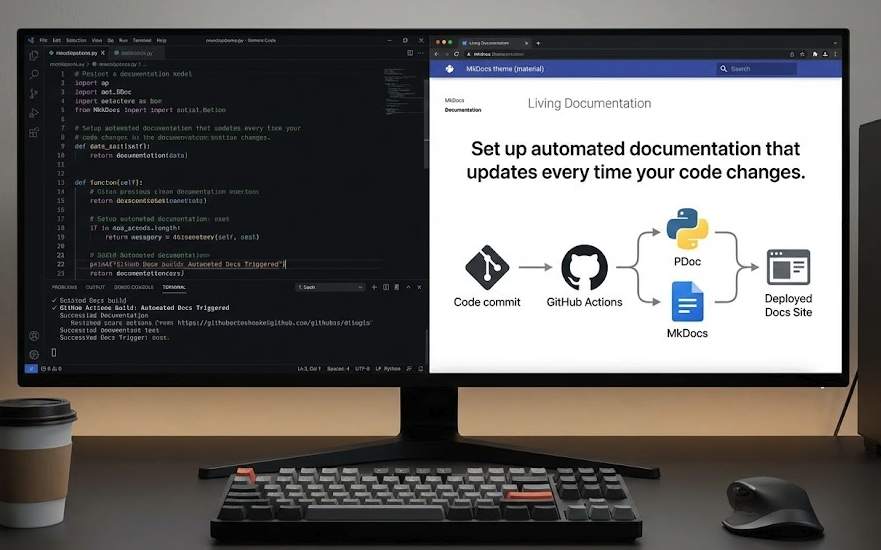
Living documentation connects directly to your codebase and build pipeline. Instead of existing as a separate artifact that people remember to update (or don’t), it’s generated from the same source as your software.

When your code changes, your documentation updates automatically. API references reflect current endpoints. Configuration guides match actual settings. Dependency information stays accurate.

This approach typically combines three elements:

Code-driven docs generate technical documentation straight from code comments. Tools like PDoc (Python), TypeDoc (TypeScript), and JSDoc (JavaScript) parse your docstrings and produce formatted reference material automatically.

Static site generators transform Markdown files and auto-generated content into searchable, navigable documentation websites. Frameworks like MkDocs and Docusaurus handle the presentation layer.

CI/CD integration ties documentation builds to your deployment pipeline. Every merge to main triggers a documentation rebuild and deploy. No manual steps required.

The result is documentation that can’t fall behind, because it’s part of your development workflow rather than a separate responsibility.

Setting Up Automated Documentation: A Practical Walkthrough

Let’s build a working example using MkDocs, PDoc, and GitHub Actions. This setup transforms code comments and Markdown files into an automatically updating documentation site.

Step 1: Write Meaningful Code Comments

Automated documentation is only as good as the comments it pulls from. The goal isn’t just listing parameters. It’s capturing intent, context, and expected behavior.

Write structured docstrings for functions and API endpoints that explain what the code does and why it matters.

Example (Python):

python

# services/reporting.py

def generate_monthly_summary(customer_id, start_date, end_date):
    """
    Generate and email a monthly financial summary.

    Parameters:
        customer_id (UUID): Identifier for the customer account.
        start_date (Date): Beginning of reporting period.
        end_date (Date): End of reporting period.

    Returns:
        ReportMetadata: Object containing report status, location, and timestamp.

    Raises:
        ReportException: If generation or delivery fails.
    """
    ...

Good docstrings describe what success looks like, what can go wrong, and any non-obvious behavior. They’re useful for humans reading the code directly and become even more valuable when transformed into searchable documentation.

Step 2: Create the Documentation Generation Script

A short automation script ties everything together. This converts structured code comments into HTML or Markdown pages and adds contextual metadata like branch information and build timestamps.

Example (generate_docs.py):

python

# generate_docs.py

import pdoc
import os

# Generate API documentation directly from code
pdoc.pdoc(
    "services",                      # root package
    output_directory="docs/api"      # where to write docs
)

# Optional: auto-create project metadata
with open("docs/environment.md", "w") as f:
    f.write("# Environment Overview\n\n")
    f.write(f"- Deployed branch: {os.getenv('BRANCH', 'main')}\n")
    f.write(f"- Last build: {os.getenv('BUILD_TIME', 'unknown')}\n")

This script generates API documentation from your code comments and creates an environment overview page with deployment context. Customize it based on what information your team needs.

Step 3: Configure MkDocs

MkDocs turns your Markdown files and generated content into a polished documentation site. The configuration file defines your site structure and appearance.

Example (mkdocs.yml):

yaml

# mkdocs.yml

site_name: Enterprise Reporting Platform Docs
nav:
  - Overview: index.md
  - Environment: environment.md
  - API Reference:
    - Reporting Service: api/services/reporting.md
theme:
  name: material

The Material theme provides a clean, searchable interface out of the box. Your navigation structure can be as simple or detailed as your project requires.

Running python generate_docs.py followed by mkdocs serve builds a live documentation site reflecting your current codebase. You can preview changes locally before deploying.

Step 4: Integrate with CI/CD

The final step connects documentation generation to your deployment pipeline. Every push to main automatically rebuilds and deploys your documentation site.

Example (GitHub Actions workflow):

yaml

# .github/workflows/docs.yml

name: Build and Deploy Documentation
on:
  push:
    branches: [ main ]

jobs:
  docs:
    runs-on: ubuntu-latest
    steps:
      - uses: actions/checkout@v4
      - uses: actions/setup-python@v5
        with:
          python-version: '3.x'
      - run: pip install mkdocs mkdocs-material pdoc
      - run: python generate_docs.py
      - run: mkdocs gh-deploy --force

This workflow installs dependencies, generates documentation from your current code, and deploys to GitHub Pages. Similar configurations work with Azure DevOps, GitLab CI, or any other CI/CD platform.

Once this is in place, documentation updates happen automatically. No reminders, no manual steps, no drift between code and docs.

Why This Matters for Development Teams

For developers, automated documentation means less manual work. Your comments, commit messages, and configuration files become inputs to the documentation pipeline. When you change code, documentation reflects those changes without extra effort.

More importantly, teams can trust that documentation is accurate because it’s built from the same source of truth as the code itself. No more wondering if the docs reflect reality or some historical version that nobody updated.

For engineering managers and technical leaders, automated documentation delivers measurable operational value:

  • Faster onboarding. New engineers learn from current, searchable documentation instead of outdated wikis or constant questions to senior team members.
  • Consistent standards. Every project follows the same documentation pipeline, creating predictable structure across your codebase.
  • Knowledge retention. Information doesn’t disappear when people change teams or leave the company. It’s captured in the system.
  • Audit capability. Documentation becomes versioned and reviewable like any other part of your codebase. You can see what changed and when.

Documentation transforms from a liability that requires constant maintenance into an asset that compounds in value as your codebase grows.

Other Tools Worth Considering

MkDocs with PDoc works well for Python projects, but the same principles apply across different technology stacks.

Docusaurus is ideal for React-based projects or product documentation. It integrates tightly with Markdown, supports versioning out of the box, and handles both technical and user-facing documentation well.

Sphinx excels for large Python projects, especially those requiring sophisticated cross-referencing or API documentation generated directly from code. It’s more complex to configure but offers extensive customization.

DocFX fits .NET projects with deep code-to-documentation integration. If your stack is primarily Microsoft technologies, it’s worth evaluating.

TypeDoc and JSDoc serve JavaScript and TypeScript projects the same way PDoc serves Python, generating API documentation from code comments.

The specific tools matter less than the principle: connect your documentation to your code and automate the publishing pipeline. Whatever stack you’re using, there’s probably a toolchain that supports this approach.

Making Documentation Sustainable

The goal isn’t perfect documentation. It’s sustainable documentation.

Manual processes fail because they require ongoing effort that competes with other priorities. When deadlines pressure, documentation loses. Every time.

Automated documentation succeeds because it removes that competition. The effort happens once, when you set up the pipeline. After that, keeping docs current requires no additional work. It just happens as part of your normal development workflow.

This shift matters more than the specific tools you choose. Whether you use MkDocs or Docusaurus, GitHub Actions or GitLab CI, the important thing is building a system where documentation maintains itself.

When knowledge lives inside your CI pipeline, it can’t get lost. When documentation generates from code, it can’t go stale. When publishing happens automatically, it can’t be forgotten.

The best documentation isn’t written once and maintained forever. It’s rebuilt automatically, every day, from the source of truth that matters most: your actual code.


Need Help Setting This Up?

Implementing automated documentation requires some initial configuration, but the long-term payoff is significant. If you’d like guidance on building a documentation pipeline for your development team, we can help you design a sustainable system that fits your technology stack and workflow.

A 3-Second Query, 20 Open Connections, and the Design Pattern That Fixed It

A simple database query that normally runs in under 0.1 seconds was suddenly taking 3 seconds. No schema changes. No new joins. No suspicious filters. Just a plain, boring query that had decided to become slow.

So we started digging.

Finding the Real Problem

One of the first things we checked was the number of active connections to the database. That’s when we saw it. One of our applications had more than 20 active connections open at the same time. Just for that single app.

Out of curiosity, we terminated the application and reran the exact same query. It completed in less than a tenth of a second.

The query was never slow. The Oracle database was under unnecessary pressure because of how our application was managing its connections. Or rather, mismanaging them.

The Culprit: One Connection Per Object

Looking into the code, we found the issue. Every time a certain part of the application needed to talk to the database, it created its own connection object.

Different parts of the code were doing:

  • new Database() here
  • new Database() there
  • Then holding on to those connections longer than necessary

None of this looked horrible at a glance. But in practice, the database was juggling dozens of concurrent connections from a single application that didn’t need them.

The Fix: A Simple Singleton

The solution was textbook. We changed the database access logic so the application used a singleton object for its connection.

That meant:

  • The application maintained only one active connection
  • All code that needed the database shared the same instance
  • We stopped flooding Oracle with unnecessary connections

After that change, query times went back to normal and stayed there.

What the Code Looked Like

Before: Creating New Connections Everywhere

Every time the constructor runs, a new Oracle connection opens:

java

public class BadOracleDatabase {
    private Connection connection;

    public BadOracleDatabase() throws SQLException {
        // New connection every time this is called
        this.connection = DriverManager.getConnection(
            "jdbc:oracle:thin:@//db.mycompany.com:1521/ORCLEDB",
            "<app_user>",
            "<secret>"
        );
    }

    public Connection getConnection() {
        return connection;
    }
}

When different classes keep calling new BadOracleDatabase(), you end up with dozens of open connections. That’s when the database starts choking.

After: One Shared Instance

The Singleton version ensures the application shares a single connection:

java

public class OracleDatabase {
    private static OracleDatabase instance;
    private Connection connection;

    private OracleDatabase() throws SQLException {
        this.connection = DriverManager.getConnection(
            "jdbc:oracle:thin:@//db.mycompany.com:1521/ORCLEDB",
            "<app_user>",
            "<secret>"
        );
    }

    public static synchronized OracleDatabase getInstance() throws SQLException {
        if (instance == null || instance.getConnection() == null || 
            instance.getConnection().isClosed()) {
            instance = new OracleDatabase();
        }
        return instance;
    }

    public Connection getConnection() {
        return connection;
    }
}

Now all database-using code goes through OracleDatabase.getInstance() instead of creating new objects. One shared instance. One active connection. Problem solved.

Why This Matters Beyond the Code

This wasn’t a fancy microservice refactor or a massive infrastructure overhaul. It was a basic design pattern that most developers learn early and then forget to apply.

But that small change:

  • Improved query performance by orders of magnitude
  • Reduced database load significantly
  • Made the system more predictable under normal operations
  • Saved hours of debugging and tuning
  • Avoided unnecessary scaling costs

The broader lesson is simple. You don’t always need something exotic to solve real problems. Sometimes, recognizing that something should be a shared object instead of N separate ones is enough.

Design patterns aren’t academic exercises. They’re practical tools that save time, money, and headaches. This one certainly did for us.