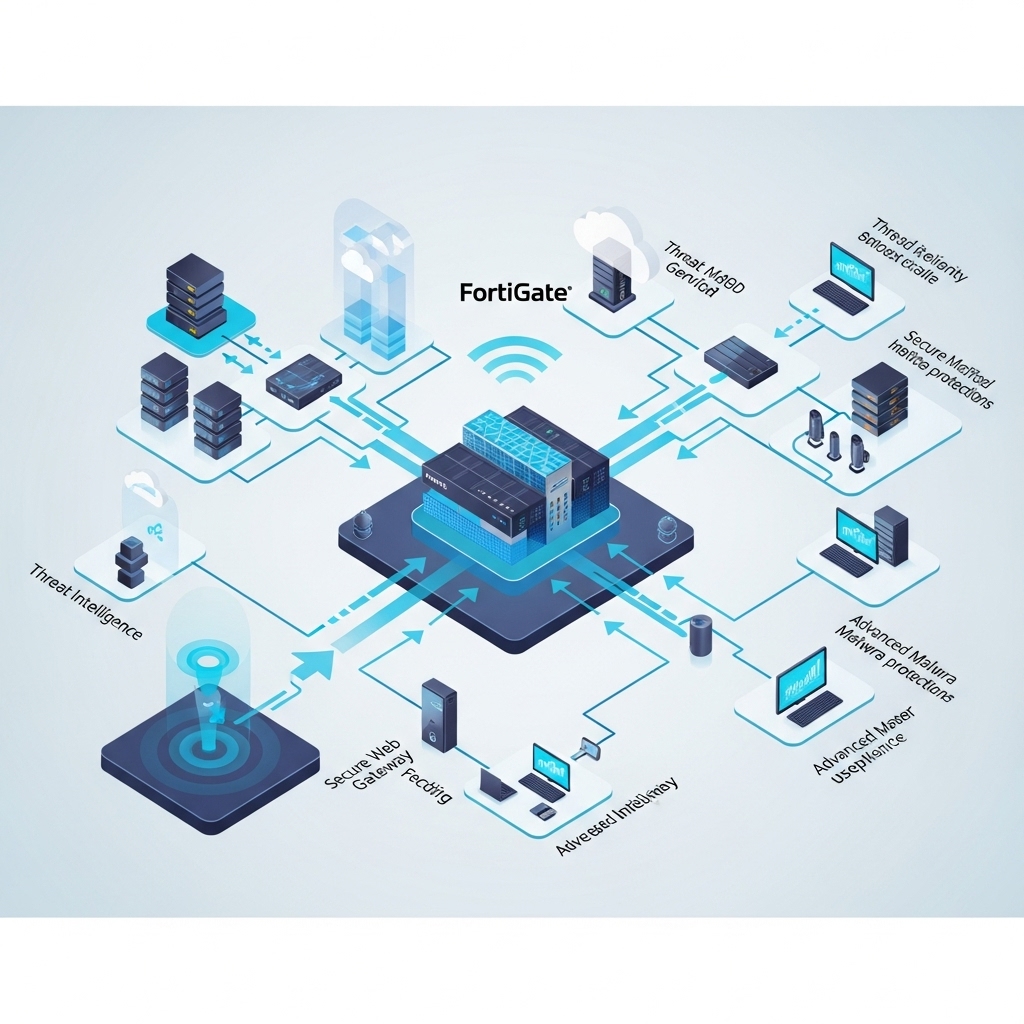
Every single action on your network leaves a digital footprint. From a user logging in, to data moving between servers, to an attempted cyberattack your FortiGate firewall captures an immense amount of this information. Without understanding these logs, businesses are essentially “flying blind” regarding their network’s health and security posture. This is precisely where FortiGate Security Logging becomes critical. It’s the raw evidence that tells the story of what’s happening in your digital environment.
What Your FortiGate is Recording: Types of Logs
Your FortiGate is constantly working, generating different types of logs, each providing unique insights for effective FortiGate reporting:
Traffic Logs: These are like the flight manifest for your network. They tell you who is communicating with whom, what applications are being used, which ports and protocols are involved, and how much data is being transferred.
UTM (Unified Threat Management) Logs: These logs detail the actions of your FortiGate’s security features. They record when viruses are blocked, intrusions are detected, websites are filtered, or specific applications are controlled.
Event Logs: Think of these as your FortiGate’s diary. They capture system-level activities, such as configuration changes, administrative logins, device reboots, and overall hardware health.
VPN Logs: If you use VPNs for remote access or site-to-site connections, these logs provide crucial information on connection attempts, user authentications, and tunnel status.
These diverse logs are the raw data that, when properly understood, form the basis of powerful FortiGate reporting.
From Raw Data to Actionable Insights: Interpreting FortiGate Logs
So, you have all this data. How do you make sense of it? Interpreting FortiGate logs means looking for patterns and anomalies. Key fields to pay attention to include:
Source IP / Destination IP: Where is the traffic coming from and where is it going?
Action: Was the traffic allowed, denied, or blocked?
Service / Application: What kind of communication is it (e.g., web browsing, email, a specific business application)?
Policy ID: Which firewall rule was applied to this traffic?
Threat Name: If a threat was detected, what was it?
For example, seeing many failed login attempts from an unusual country in your VPN logs could indicate a brute-force attack. Or, a sudden spike in outbound traffic to an unknown destination in your traffic logs might signal data exfiltration. Manually sifting through millions of lines of logs, however, is a huge challenge.
Elevating Your Analysis: The Role of FortiAnalyzer in FortiGate Reporting
To truly unlock the power of your FortiGate Security Logging, a dedicated platform like FortiAnalyzer is invaluable. FortiAnalyzer centralizes and enhances your log analysis:
Centralized Collection: Gathers logs from all your FortiGate devices (and other Fortinet products) into one place, giving you a holistic view.
Correlation: It doesn’t just show you individual events; it automatically links related events across different devices and timeframes to identify complex attack chains that might otherwise go unnoticed.
Advanced Reporting: Generates customizable reports for various needs from executive summaries of your security posture to detailed compliance reports for regulations like PCI DSS or HIPAA.
Interactive Dashboards: Provides visual overviews of network activity, threat trends, and device health, making complex data easy to understand at a glance.
Threat Hunting: Enables your security team to proactively search through historical data for subtle indicators of compromise, moving beyond just reacting to alerts.
While FortiManager helps with centralized policy management, FortiAnalyzer is the powerhouse for deep analysis of your FortiGate security logging.
Why Comprehensive FortiGate Logging & Reporting is Crucial
Leveraging your FortiGate’s data effectively provides immense benefits:
Network Health Monitoring: Understand what “normal” looks like on your network, making it easier to spot when something is off.
Faster Troubleshooting: Quickly pinpoint the root cause of network or security issues.
Proactive Threat Detection & Response: Identify active threats sooner and respond effectively, minimizing potential damage.
Compliance & Auditing: Generate the necessary records and reports to meet regulatory requirements and pass audits with confidence.
Continuous Security Improvement: Use insights from past events to refine your security policies and strengthen your overall defenses.
Don’t Let Your Data Go Unseen.
The true power of your FortiGate lies not only in its ability to protect your network but also in the rich intelligence it gathers. Effective FortiGate Security Logging and reporting transforms raw data into actionable insights, empowering you to make informed decisions and build a more resilient defense.
Partner with BALANCED+ for Expert FortiGate Logging & Reporting.
Are you truly leveraging the intelligence your FortiGate generates? Unlock deeper insights into your network’s security and performance. BALANCED+ specializes in optimizing FortiGate security logging and reporting, from FortiAnalyzer deployment to custom dashboards and expert analysis. Schedule a consultation with our experts to transform your data into a powerful defense.
Offering Wi-Fi to your customers or visitors is a great way to be welcoming and provide good service. From cafes and retail shops to offices and clinics, everyone expects easy internet access. But here’s the hidden risk: if your guest Wi-Fi isn’t set up correctly, it could put your entire business at risk.
Imagine your important business files, customer information, or even your company’s bank details, all visible to someone casually Browse the internet on your guest network. A poorly configured guest Wi-Fi could be an open door for viruses, hackers, or data theft, potentially disrupting your operations and damaging your reputation.
Why You Need Separate, Secure Guest Wi-Fi
The key to safe guest Wi-Fi is separation. You want to let guests connect to the internet without ever being able to “see” or interact with your business’s computers, servers, or other devices. Think of it like having a guest house on your property: your visitors have a comfortable place to stay, but they don’t have access to your main home or its contents.
This is where your FortiGate firewall comes in. Your FortiGate is a powerful tool designed to protect your network. It can easily create this vital separation, giving your guests internet access while keeping your core business network safe and sound. This is the foundation of effective FortiGate Guest Wi-Fi Security.
Your FortiGate: The Key to Secure Guest Wi-Fi
Your FortiGate firewall isn’t just for protecting your main business network. It’s also perfectly capable of handling a secure guest Wi-Fi network. By setting it up correctly, you can provide convenience without sacrificing security.
Heres a practical guide to setting up secure FortiGate Guest Wi-Fi Security for your business:
Step-by-Step Guide: Setting Up Secure FortiGate Guest Wi-Fi
Remember, while this explains the “what” and “why,” the actual steps in your FortiGate might look slightly different based on your specific model and setup.
Step 1: Network Segmentation (VLANs)
What it is: This creates a completely separate “lane” for your guest network traffic. It’s like building a new, isolated road for guests so they can’t stray onto your private business roads.
Why it’s important: Guest devices can’t see or communicate with your internal company devices. This prevents potential threats from guests affecting your business.
Step 2: Dedicated DHCP Server
What it is: Your FortiGate will hand out unique network addresses (like a phone number) specifically for guest devices.
Why it’s important: This keeps guest network addresses separate from your main business network addresses, ensuring no overlap or confusion that could lead to unauthorized access.
Step 3: Captive Portal (The Login Page)
What it is: This is the “welcome screen” that guests see when they first try to connect to your Wi-Fi, before they can access the internet.
Why it’s important:
Accept Terms: Guests can click to agree to your terms of service.
Password: You can require a simple password that you change daily or weekly, giving staff control over who connects.
Branding: You can customize this page with your company logo and messages, making it professional.
Step 4: Bandwidth Control
What it is: You can set limits on how fast guests can browse the internet.
Why it’s important: This ensures that guests downloading large files or streaming videos don’t slow down your important business operations, like processing payments or video calls.
Step 5: Firewall Policies
What it is: These are the strict rules on your FortiGate that control exactly what traffic can go where.
Why it’s important: You’ll create rules that specifically allow guest devices to access the internet, but strictly block them from reaching any of your internal business systems. This is the core of your FortiGate Guest Wi-Fi Security.
Step 6: Monitoring
What it is: Regularly checking your FortiGate’s logs and reports.
Why it’s important: This allows you to see how your guest Wi-Fi is being used and helps you spot anything unusual, ensuring continued security.
Benefits of a Properly Configured FortiGate Guest Wi-Fi
Setting up your guest Wi-Fi correctly with FortiGate offers big advantages:
Enhanced Security: Your sensitive business data and systems are protected from outside access.
Improved Performance: Guest traffic stays separate, so it won’t slow down your main network operations.
Professional Image: Providing secure and reliable guest internet shows you care about your visitors’ online safety and your business’s professionalism.
Reduced Liability: Proper setup helps protect your business from potential issues caused by guest misuse.
Need a Hand? BALANCED+ is Here to Help
While this guide breaks down the steps, setting up and managing network security can still be tricky. Ensuring every setting is just right for maximum FortiGate Guest Wi-Fi Security takes expertise.
At BALANCED+, we’re experts in FortiGate and cybersecurity management. We can help you design, configure, and maintain a guest Wi-Fi network that’s both convenient for your visitors and ironclad for your business.
Don’t risk your business’s security with an unmanaged guest network. Our experts can ensure your FortiGate Guest Wi-Fi is set up perfectly, securely, and conveniently. Schedule a free consultation with BALANCED+ today to get started!
The Growth Paradox: Scaling Your Business Can Strain Your Security
The excitement of business growth is undeniable. More customers, more employees, more data, more locations it all points to success. Yet, this very growth often presents a hidden challenge for your IT infrastructure, particularly your network security. What happens when your security solution, once perfectly adequate, can no longer keep pace?
An improperly designed or unscalable FortiGate architecture can quickly transform from a powerful protector into a critical bottleneck. This can lead to frustrating performance degradation, increased management complexity, and, most dangerously, new security vulnerabilities that expose your expanding operations to unnecessary risk. Don’t let your security become the barrier to your next big leap.
Recognizing FortiGate Scalability Issues in Your Network
How can you tell if your current FortiGate deployment is struggling to keep up with your business growth? Look for these common symptoms of FortiGate scalability issues:
Network Slowdowns and Latency: Users complain about sluggish application performance, slow internet access, or delays in accessing internal resources, especially during peak hours.
Frequent CPU/Memory Spikes: Your FortiGate devices consistently show high CPU or memory utilization, even during what should be normal operational periods, indicating they are being overworked.
Management Complexity Overload: It becomes increasingly difficult to manage a growing number of security policies, VPN tunnels, or user access rules, leading to errors and inefficiencies.
Challenges with New Integrations: Integrating new cloud services, opening new branch offices, or onboarding a large number of remote users becomes a painful, performance-impacting process.
Increased Operational Costs: You might be overspending on bandwidth or other resources to compensate for an underperforming security appliance, or constantly troubleshooting issues that stem from architectural limitations.
If any of these sound familiar, it’s a strong indicator that your FortiGate architecture needs a strategic review.
Common FortiGate Scalability Pitfalls to Avoid
Many businesses inadvertently create FortiGate scalability issues by overlooking key planning considerations:
Under-Sizing from the Start: Choosing a FortiGate model based only on current needs, without forecasting future growth in user count, traffic volume, or the adoption of new bandwidth-intensive applications.
Monolithic Design: Relying on a single FortiGate device to handle all security functions for an entire, rapidly expanding organization. This creates a single point of failure and can easily overwhelm the device’s capacity.
Lack of Network Segmentation: As your network grows, failing to properly segment it into smaller, isolated zones. This increases the “blast radius” of a potential breach and makes policy management unwieldy.
Inefficient Policy Management: Allowing your security policy database to become a sprawling, unoptimized mess. Too many redundant or overly broad rules can significantly impact FortiGate performance.
Ignoring Cloud Integration: Neglecting to plan for secure, scalable integration with public or private cloud resources and SaaS applications as your business increasingly adopts them.
Designing for Growth: Key Principles for FortiGate Scalability
Addressing FortiGate scalability issues requires a proactive and strategic approach. Here are the core principles for designing a FortiGate deployment that truly grows with your business:
Strategic Sizing & Forecasting: Always select FortiGate models with ample headroom. Work with experts to forecast your expected growth (e.g., 3-5 years out) in users, devices, traffic, and security feature usage to ensure your chosen appliances can handle future demands.
High Availability (HA) & Redundancy: Implement FortiGate devices in High Availability (HA) clusters (active-passive or active-active). This not only ensures business continuity in case of a device failure but also allows for better load distribution and seamless upgrades.
Network Segmentation & Micro-segmentation: Break down your network into smaller, isolated zones using FortiGate’s Virtual Domains (VDOMs) or internal segmentation firewall capabilities. This limits the lateral movement of threats and simplifies policy management for specific user groups or applications.
Leveraging FortiManager & FortiAnalyzer: For growing and complex deployments, these centralized management and analytics platforms are non-negotiable.
FortiManager provides unified policy orchestration across multiple FortiGates, simplifying configuration and ensuring consistency.
FortiAnalyzer offers scalable logging, advanced analytics, and threat intelligence, crucial for monitoring performance and identifying emerging threats across your expanded network.
Secure SD-WAN for Distributed Environments: If your business has multiple branch offices or a significant remote workforce, FortiGate’s integrated Secure SD-WAN capabilities are vital. They efficiently and securely connect distributed environments, optimizing application performance across diverse connections and reducing reliance on expensive MPLS lines.
Cloud-Native Integration (FortiGate-VM): For businesses embracing cloud infrastructure, deploy FortiGate-VM (Virtual Machines). This extends consistent FortiGate security policies and centralized management into public and private cloud environments, ensuring seamless scalability and protection for your cloud workloads.
Don’t Let Your Security Become a Barrier to Growth.
The journey of business expansion is exciting, but it shouldn’t be hampered by an outdated or unscalable security infrastructure. Proactive planning for FortiGate scalability issues is an investment in your future success, ensuring that your network security evolves in lockstep with your business ambitions.
Partner with BALANCED+ for Future-Proof FortiGate Architecture.
At BALANCED+, we understand the unique challenges growing businesses face. Our experts specialize in designing, implementing, and optimizing FortiGate solutions that are built for tomorrow’s demands, not just today’s.
Is your FortiGate ready for your business’s next growth phase? Ensure your security scales with your success. BALANCED+ specializes in FortiGate architecture review and scalability planning. Schedule a consultation with our experts to future-proof your network security.
Your Cloud Infrastructure Demands More Than Just Basic Security.
As businesses increasingly migrate to cloud environments, the traditional security perimeter dissolves, creating new challenges and opportunities for protection. Simply lifting and shifting on-premises security solutions won’t suffice. To ensure robust defense and efficient operations in public or private clouds, a purpose-built virtual firewall like FortiGate-VM is not just an option, but an essential component for consistent security across hybrid and multi-cloud architectures.
Why FortiGate-VM for Cloud Security?
Extending your security posture into the cloud requires a solution that’s as agile and scalable as the cloud itself. FortiGate-VM brings the full power of FortiGate’s advanced security features directly into your cloud infrastructure:
Comprehensive Security: Leverage Next-Generation Firewall (NGFW) capabilities, Unified Threat Management (UTM) services (like IPS, antivirus, web filtering, application control), and integrated Secure SD-WAN directly within your cloud deployments.
Consistency and Centralization: Maintain consistent security policies and management across your on-premises FortiGate devices and your cloud-based FortiGate-VM instances, often managed from a single pane of glass (e.g., FortiManager).
Scalability and Flexibility: Easily scale your security resources up or down to match cloud workload demands, paying only for what you use, a core principle of effective FortiGate Cloud Optimization.
Critical Considerations for FortiGate-VM Deployment
Effective FortiGate Cloud Optimization begins with thoughtful deployment planning.
Right-Sizing Your FortiGate-VM
Choosing the correct virtual machine instance type and resource allocation (vCPUs, RAM) is paramount. It’s not a one-size-fits-all. Consider:
Expected Traffic Volume: How much data will flow through the FortiGate-VM?
Security Profiles Enabled: Will you be using deep packet inspection (SSL/TLS inspection), IPS, or other resource-intensive features?
Throughput Requirements: Match the chosen FortiGate-VM model (e.g., FortiGate-VM01, VM02, VM04) to your desired throughput, ensuring it aligns with your cloud provider’s instance capabilities. Over-provisioning wastes resources, under-provisioning creates bottlenecks.
Network Architecture Design
Integrating FortiGate-VM seamlessly into your cloud network requires careful design:
Virtual Private Clouds (VPCs) / Virtual Networks: Position FortiGate-VM strategically within your cloud VPCs to act as a security gateway for traffic entering and leaving your protected subnets.
Subnets and Routing: Configure subnets and routing tables to direct relevant traffic through the FortiGate-VM for inspection and policy enforcement. This is crucial for ensuring all desired traffic is secured.
Licensing Models
Understand the licensing options for FortiGate-VM in the cloud:
Bring Your Own License (BYOL): If you have existing FortiGate licenses, you might be able to use them in the cloud.
Pay-as-you-go (On-Demand): Cloud marketplaces often offer FortiGate-VM as a service, billed hourly or monthly, which can be ideal for flexible scaling and cost management. Choosing the right model is key for FortiGate Cloud Optimization from a financial perspective.
Best Practices for FortiGate-VM Configuration & Performance
Once deployed, optimizing your FortiGate-VM‘s configuration is vital for peak performance and security.
Resource Allocation & Performance Features
Cloud-Native Network Features: Leverage cloud provider-specific network enhancements (e.g., SR-IOV in Azure, Enhanced Networking in AWS, or equivalent features) to boost throughput and reduce latency for your virtual network interfaces.
Virtual Network Interface Sizing: Ensure your virtual network interfaces are appropriately sized and configured to handle expected traffic loads.
Policy Optimization
Granular Security Policies: Create specific, granular security policies that define exactly what traffic is allowed or denied. Avoid broad “any/any” rules, which can increase processing overhead and security risks.
Policy Ordering: Place the most frequently hit or most specific policies at the top of your rule base for faster processing.
Security Profile Tuning
Balance Efficacy and Performance: While enabling all security profiles offers maximum protection, it also consumes more resources. Tune IPS, Antivirus, Web Filtering, and Application Control profiles to balance security efficacy with performance impact, focusing on the most critical threats for your environment.
Exclusions: Implement judicious exclusions for trusted traffic or applications that don’t require deep inspection, but do so cautiously.
Logging & Monitoring
Robust Logging: Configure your FortiGate-VM to send comprehensive logs to a centralized FortiAnalyzer instance (whether in the cloud or on-premises). This is critical for security analytics, troubleshooting, and FortiGate Threat Hunting.
Continuous Monitoring: Regularly monitor your FortiGate-VM’s performance metrics (CPU utilization, memory usage, session count, throughput) using cloud provider monitoring tools and FortiGate dashboards to identify and address bottlenecks proactively.
High Availability (HA) in the Cloud
For business continuity and resilience, deploy FortiGate-VM in High Availability (HA) configurations. Cloud providers offer mechanisms to support active-passive or active-active HA setups, ensuring your security gateway remains operational even if an instance fails.
SD-WAN for Cloud Connectivity
Leverage FortiGate-VM‘s integrated Secure SD-WAN capabilities to optimize connectivity to SaaS applications, other cloud resources, and distributed branches. This improves user experience, reduces latency, and provides intelligent path selection for critical business traffic.
Cloud-Specific Security Integrations
Cloud-Native Security Services: Integrate FortiGate-VM with cloud-native security services like security groups, network access control lists (NACLs), and Identity and Access Management (IAM) roles to create a layered, defense-in-depth strategy.
Auto-Scaling: Explore options for auto-scaling FortiGate-VM instances based on demand, ensuring performance scales dynamically with your cloud workloads.
The BALANCED+ Advantage in FortiGate Cloud Optimization
Optimizing FortiGate-VM in complex cloud environments requires specialized expertise. BALANCED+ is your trusted partner in maximizing your FortiGate investment and ensuring robust cloud security. We can assist your business with:
Strategic Planning and Design: Expertly architecting your FortiGate-VM deployments for optimal security and performance.
Expert Configuration and Performance Tuning: Fine-tuning your FortiGate-VM instances for peak efficiency and security efficacy.
Ongoing Managed Services: Providing continuous monitoring, maintenance, and threat intelligence for your cloud security infrastructure.
Guidance on Cloud Security Best Practices: Ensuring your cloud environment adheres to the highest security standards and compliance requirements.
Don’t let the complexities of cloud security compromise your business. With proper FortiGate Cloud Optimization, you can achieve powerful, scalable, and efficient protection for your cloud-based assets.
Ready to boost your FortiGate-VM performance in the cloud?
Contact BALANCED+ today for a consultation and discover how we can help you achieve seamless FortiGate Cloud Optimization and robust security.
The Silence from Your Security Tools Can Be the Loudest Warning.
Relying solely on automated alerts and waiting for a breach to trigger a response is a dangerous gamble. In an era of increasingly sophisticated cyber threats, a reactive security posture leaves your organization vulnerable to advanced persistent threats (APTs) and stealthy attacks that bypass traditional defenses. To truly protect your digital assets, businesses must shift from simply reacting to actively seeking out hidden dangers. This is where FortiGate Threat Hunting becomes indispensable, transforming your security logs from mere records into a powerful weapon.
FortiGate: Your Foundation for Rich Security Data
Your FortiGate devices are more than just firewalls; they are powerful data collection engines. Every packet, every connection, every security event generates valuable logs that paint a detailed picture of your network’s activity. This vast amount of dataencompassing traffic flows, security events, user behavior, and application usageforms the essential foundation for effective FortiGate Threat Hunting. It’s the raw material from which insights are forged, allowing you to uncover anomalies and suspicious patterns that automated systems might miss.
What Exactly is Threat Hunting?
Threat hunting is the proactive, iterative search through network data to detect and isolate advanced threats that have evaded existing security solutions. Unlike traditional security, which waits for an alert, threat hunting assumes a breach has occurred or is in progress. It involves security analysts actively looking for subtle indicators of compromise (IOCs) or unusual behaviors that suggest malicious activity. It’s about asking “what if?” and systematically investigating those hypotheses using the rich data at your fingertips.
The Indispensable Role of FortiGate Logs in Threat Hunting
FortiGate devices generate a wealth of log data, each type offering unique insights for FortiGate Threat Hunting:
Traffic Logs: Detail every connection, including source/destination IP, ports, protocols, and bandwidth. Crucial for identifying unusual communication patterns or data exfiltration.
UTM Logs: Record events from unified threat management features like IPS, antivirus, web filtering, and application control. Helps pinpoint blocked threats and policy violations.
Event Logs: Capture system-level events, configuration changes, and administrative activities, essential for detecting unauthorized access or tampering.
VPN Logs: Provide visibility into remote access and site-to-site VPN connections, vital for monitoring secure access and identifying suspicious login attempts.
By analyzing these diverse log types, security teams gain comprehensive visibility into network behavior, allowing them to spot potential anomalies and subtle indicators that a threat might be present.
Leveraging FortiAnalyzer and FortiManager for Advanced FortiGate Threat Hunting
While FortiGate devices generate the data, tools like FortiAnalyzer and FortiManager elevate your FortiGate Threat Hunting capabilities to the next level.
FortiAnalyzer: This centralized logging, analysis, and reporting platform is critical for aggregating and correlating log data from multiple FortiGate devices. It provides:
Centralized Visibility: A single pane of glass for all your FortiGate logs.
Custom Reports & Dashboards: Allows security teams to create tailored views of their data, highlighting specific metrics or potential threats.
Automated Playbooks: Can be configured to automate responses to detected anomalies, speeding up incident response.
FortiManager: While primarily for centralized management and orchestration of FortiGate devices, FortiManager also aids threat hunting by ensuring consistent security policies and simplifying the deployment of new rules based on threat intelligence gathered during hunting exercises.
Together, these platforms empower security analysts to move beyond basic log review, enabling sophisticated data analysis and pattern recognition crucial for effective FortiGate Threat Hunting.
Practical Steps for FortiGate Threat Hunting
So, how do you put FortiGate Threat Hunting into practice? Here are some actionable scenarios:
Investigating Unusual Outbound Traffic: Look for large data transfers to unknown external IPs, especially during off-hours. This could indicate data exfiltration.
Analyzing Failed Login Attempts: Identify a high volume of failed login attempts from unusual geographic locations or against specific user accounts, potentially signaling a brute-force attack.
Detecting Unauthorized Application Usage: Use application control logs to find employees using unsanctioned applications that might pose a security risk or violate company policy.
Correlating Disparate Alerts: Combine seemingly minor alerts (e.g., a single malware detection, followed by unusual network activity from the same host) to uncover a larger, more coordinated attack.
Searching for Known Indicators of Compromise (IOCs): Proactively search your logs for known malicious IP addresses, domains, or file hashes provided by threat intelligence feeds.
The Undeniable Benefits of Proactive FortiGate Threat Hunting
Embracing FortiGate Threat Hunting offers significant advantages for your business:
Early Detection of Advanced Threats: Uncover sophisticated attacks like APTs that are designed to bypass traditional perimeter defenses.
Reduced Dwell Time: Minimize the time attackers spend undetected within your network, significantly reducing potential damage.
Minimized Breach Impact: By identifying threats early, you can contain them before they escalate into major security incidents.
Improved Overall Security Posture: Continuously refine your defenses by understanding how attackers are attempting to breach your systems.
Deeper Network Understanding: Gain unparalleled visibility into your network’s normal behavior, making anomalies easier to spot.
Partnering with BALANCED+ for Expert FortiGate Threat Hunting
While the power of FortiGate analytics is immense, effectively leveraging it for proactive threat hunting requires expertise and dedicated resources. BALANCED+ is your trusted partner in maximizing your FortiGate investment. We can help your business:
Optimize FortiGate Logging and Reporting: Ensure your devices are configured to capture the most relevant data.
Implement and Configure FortiAnalyzer/FortiManager: Set up these critical platforms for centralized visibility and analysis.
Provide Managed Threat Hunting Services: Our security experts can conduct proactive threat hunts on your behalf, identifying and neutralizing threats before they cause harm.
Offer Training and Expertise: Empower your internal team with the knowledge to perform effective FortiGate Threat Hunting.
Don’t let hidden threats compromise your business. Move beyond reactive security and embrace the proactive power of FortiGate Threat Hunting.
Ready to transform your security logs into actionable intelligence?
Contact BALANCED+ today for a consultation and discover how we can help you fortify your defenses with advanced FortiGate Threat Hunting capabilities.
When a FortiGate enters conserve mode, it is protecting itself: memory usage has crossed a preset threshold, so FortiOS starts changing how it handles new traffic to avoid a crash. It is a symptom of memory pressure, not a hardware fault. To fix it you need to confirm memory is the real bottleneck, find what is consuming it, and either tune the load or move to a firewall sized for your traffic. This guide walks through diagnosing and clearing conserve mode on FortiOS 7.4 and 7.6 using the CLI.
Conserve mode
Conserve mode is a self-protection state in FortiOS. When memory usage crosses the “red” threshold (88% of RAM by default), the FortiGate stops accepting new sessions into proxy-based inspection and takes other steps to relieve memory pressure. If usage keeps climbing to the “extreme” threshold (95% by default), it starts dropping new sessions outright. The firewall exits conserve mode automatically once memory falls back below the “green” threshold (82% by default).
Conserve mode is FortiOS telling you it is out of memory headroom. Diagnose it with get system performance status and diagnose hardware sysinfo conserve memory, relieve the pressure by trimming memory-heavy features, and if the box hits conserve mode under normal load it is undersized for your traffic.
What is FortiGate conserve mode and why does it matter?
Conserve mode is a built-in safety net, not a failure. Think of your FortiGate as a security guard that keeps working even when overloaded: when memory runs low, FortiOS deliberately sheds work to stay stable rather than crashing. The trade-off is that some new traffic is no longer inspected or admitted the way it normally would be, so users can feel it as slow or refused connections.
It matters because conserve mode sits directly in the path of your security posture. While the firewall is conserving memory, it may bypass or block the very inspection you deployed it for. Left unaddressed, a FortiGate that dips into conserve mode during busy periods is a warning that your inspection load has outgrown the hardware.
What triggers conserve mode on a FortiGate?
Conserve mode is triggered by memory usage crossing defined thresholds, measured as a percentage of total RAM. FortiOS 7.4 and 7.6 ship with three defaults that you can tune:
Red threshold (88%): the firewall enters conserve mode and stops sending new sessions to proxy-based inspection.
Extreme threshold (95%): the panic line. The FortiGate drops new sessions outright, regardless of inspection. This is where users will definitely notice.
Green threshold (82%): the recovery point. Memory must fall below this before the firewall exits conserve mode and returns to normal.
You can adjust these thresholds to suit your environment under config system global:
config system global
    set memory-use-threshold-extreme 95
    set memory-use-threshold-red 88
    set memory-use-threshold-green 82
end
Warning:
Raising the thresholds does not add memory, it just delays the alarm. If your FortiGate reaches 88% memory under normal daily load, widening the thresholds hides the symptom while the box runs closer to the edge. Treat threshold tuning as a temporary measure, not a fix, and investigate the underlying memory consumption.
What happens to my traffic during conserve mode?
In conserve mode, new sessions that require memory-heavy inspection are affected first, and at the extreme threshold new sessions are dropped entirely. There is also a quieter mechanism that acts even before conserve mode: memory tension drops. If FortiOS needs memory it cannot allocate, it silently drops the oldest sessions to free resources, with no “conserve mode” banner to warn you.
To check whether tension drops are happening, look at the session statistics:
BALANCED+ (global) # diagnose sys session stat
misc info:  session_count=75 setup_rate=3 exp_count=0 clash=0
     memory_tension_drop=0 ephemeral=0/126976 removeable=0 extreme_low_mem=0
     npu_session_count=21
     nturbo_session_count=21
delete=10, flush=13, dev_down=274/41 ses_walkers=0
TCP sessions:
     26 in ESTABLISHED state
     1 in TIME_WAIT state
The memory_tension_drop counter is the one to watch. A non-zero value means sessions have already been dropped under memory pressure, often the earliest hard evidence that the firewall is running short on RAM.
How do I diagnose a FortiGate memory or performance problem?
Diagnose conserve mode from the CLI in a fixed order: confirm memory is the bottleneck, then drill into what is consuming it. These commands are read-only and safe to run on a production FortiGate.
Step 1 – Get a system snapshot: run get system performance status to see CPU per core, memory used and freeable, session counts, and network load in one view.
Step 2 – Confirm conserve state and thresholds: run diagnose hardware sysinfo conserve memory to see current memory use against the red, extreme, and green thresholds and whether conserve mode is active.
Step 3 – Watch processes in real time: run diagnose sys top to find which processes are burning CPU or memory (press m to sort by memory, q to quit).
Step 4 – Break down memory by type: run diagnose hardware sysinfo memory for a detailed breakdown, and diagnose hardware sysinfo slab for slab (session and NAT) allocation.
A typical get system performance status snapshot looks like this:
BALANCED+ (global) # get system performance status
CPU0 states: 20% user 1% system 0% nice 79% idle 0% iowait 0% irq 0% softirq
CPU1 states: 8% user 2% system 0% nice 90% idle 0% iowait 0% irq 0% softirq
CPU6 states: 67% user 1% system 0% nice 32% idle 0% iowait 0% irq 0% softirq
Memory: 1964036k total, 1346896k used (68.6%), 369604k free (18.8%), 247536k freeable (12.6%)
Average sessions: 45 sessions in 1 minute, 45 sessions in 10 minutes, 44 sessions in 30 minutes
Uptime: 41 days, 5 hours, 18 minutes
Read it top to bottom. High “user” or “system” percentages with low “idle” point to CPU load; a high memory “used” percentage with little “freeable” points to memory pressure and possible conserve mode. FortiGate memory falls into distinct categories, and knowing which is growing tells you where to look:
Kernel memory: used by the operating system and drivers.
Shared memory: shared across processes, often for databases like IPS.
User space: memory consumed by individual processes (for example, httpsd).
Cached memory: disk caching to speed up operations.
Slab memory: pre-allocated for structures like sessions and NAT entries.
To inspect shared memory specifically, use diagnose hardware sysinfo shm:
Conserve mode is always a memory problem, but a slow FortiGate is not always in conserve mode, so separate the two before you act. Use get system performance status: if memory “used” is high and climbing toward the red threshold, treat it as a memory issue and follow the conserve-mode path. If memory is comfortable but one or more CPU cores sit near 0% idle, the bottleneck is CPU, usually a single core pinned by proxy inspection or a busy process you can spot in diagnose sys top.
On multi-core FortiGates, look at each core individually, not the average. Proxy-based inspection and some daemons are single-threaded, so one core can be pinned at 100% while the average still looks healthy. A single saturated core is a common cause of “the firewall feels slow” reports that a whole-box average would hide.
How do I fix and prevent conserve mode?
To clear conserve mode you need to reduce memory usage below the green threshold, then keep it there. Work from the least disruptive change to the most:
Step 1 – Identify the consumer: use diagnose sys top and the memory breakdown commands to pin down which process or feature is driving usage before changing anything.
Step 2 – Trim memory-heavy features: review the biggest offenders, WAN optimization, proxy-based inspection, verbose logging and report generation, and threat feed updates. Switch policies to flow-based inspection where proxy features are not required.
Step 3 – Add resources where you can: on FortiGate VMs, allocate more RAM. On physical appliances, confirm hardware acceleration (NP and CP offload) is enabled so inspection is offloaded from the CPU.
Step 4 – Engage Fortinet TAC for tuning: worker process counts and per-daemon tuning should be adjusted with TAC guidance, not guessed at. If conserve mode recurs after tuning, it is a sizing problem, not a configuration one.
You may read advice to kill a runaway process (diagnose sys process pidof <name> then diagnose sys kill <signal> <PID>, using signal 15 for a graceful stop). Reserve this for controlled test environments or explicit Fortinet TAC direction. Killing a process on a production firewall can drop services and rarely addresses the root cause.
When does conserve mode mean my FortiGate is undersized?
If your FortiGate hits conserve mode during normal business hours, with features configured sensibly, the hardware is undersized for your inspection load. Enabling full SSL inspection, IPS, and application control multiplies memory and CPU demand, and the throughput on a spec sheet assumes lighter processing than a fully inspecting mid-market network runs. Tuning buys headroom; it does not add capacity.
For SMB and mid-market deployments, the current generation is the FortiGate G-series (30G, 50G, 70G, 90G) built on the FortiSP5 security processor, succeeding the F-series (40F, 60F, 80F). The F-series is still sold and supported with no end-of-life announced, but any new multi-year purchase should be priced on the G-series, which delivers meaningfully higher threat-protection throughput for the inspection features that push a FortiGate into conserve mode in the first place.
2-3x
Higher threat-protection throughput on the FortiSP5-based G-series versus the F-series it replaces (Fortinet)
F-series (previous)
G-series successor
Security processor
FortiGate 40F
30G / 50G
FortiSP5
FortiGate 60F
70G
FortiSP5
FortiGate 80F
90G
FortiSP5
If you are refreshing FortiGate hardware, size the replacement on your real inspection throughput (SSL inspection plus IPS enabled), not on firewall throughput alone. Our managed firewall services cover FortiGate sizing, deployment, and ongoing performance tuning so the box you buy carries your traffic with headroom to spare.
Get expert help with FortiGate performance
BALANCED+ is a Fortinet Advanced Partner with deep experience tuning and right-sizing FortiGate firewalls for mid-market networks across Toronto and the GTA. If your firewall keeps dipping into conserve mode, or you want a sizing check before your next hardware refresh, we can analyze your environment and give you a clear answer. Reach out to discuss keeping your FortiGate fast, inspecting, and stable.
Hi! I'm the BALANCED+ assistant. Ask me anything about our managed IT or cybersecurity services — or I can help you figure out if we're the right fit for your business.
Submit a Support Ticket
What happens after you submit
We receive your ticket instantly
Your request hits our queue the moment you submit — no delays, no middlemen.
A technician reviews your issue
Our help desk team assesses priority and assigns the right technician for your issue type.
15-minute response on critical issues
You'll hear from us fast. Critical issues are responded to within 15 minutes — guaranteed by SLA.
Remote or on-site resolution
We resolve most issues remotely. If we need to come to you, we'll schedule a visit same day.