Skip to content

What Clients Never See: The Structure Behind a Healthy MSP Relationship

A few months ago, in a monthly review meeting, a client executive stopped me at an item on our risk list. It was a storage volume trending toward capacity, flagged and scheduled for remediation. He read it, looked up, and asked: “So what would have happened if you had not caught this?”

The honest answer was uncomfortable. You would have found out in about three weeks, probably during your busiest production window, and this would have been a very different meeting.

That question has stayed with me, because it gets at something most businesses quietly worry about but rarely say out loud: is my IT provider actually watching, or do they only show up when something breaks?

I work at a managed service provider. I spend most of my week embedded at client sites, and I have sat on both sides of that worry. So I want to open the hood and show what a healthy MSP relationship actually looks like from the inside. Not the version on the website. The version that happens at 7:30 in the morning when nobody is watching.

The morning nobody sees

Every working day starts the same way for me: a health check that runs before the client’s day does. Servers. Databases. Backup jobs from the night before. Network hardware. The phone system. Monitoring alerts that fired overnight.

It takes maybe forty minutes. Most days, nothing is wrong. And that is exactly the point.

Here is what years of doing this have taught me: serious problems almost never arrive out of nowhere. They announce themselves quietly, days in advance, in ways that are easy to miss if nobody is listening. A backup job that took twice as long as usual. A disk creeping toward full. A server that rebooted itself at 2 AM and came back fine, this time.

That storage volume from the opening? It was caught on a Tuesday morning during a routine check, when it was still just a line item on a spreadsheet. The alternative version of that story is a production floor standing still while everyone scrambles to figure out why orders stopped flowing. Same root cause. Completely different day.

The daily check is boring. I will not pretend otherwise. But boring, done every single day, is what prevention actually looks like. There is no dramatic version of catching a problem early. That is the whole idea.

A monthly meeting with no surprises

Once a month, I sit down with the client’s leadership for what we call a Service Delivery Review. On paper it is a status meeting: what happened, what is at risk, what is coming next. In practice it is something closer to a trust exercise.

Because here is the thing about these meetings. They are only comfortable if you have nothing to hide. Ticket volumes go on the table. Recurring issues go on the table. Things we got wrong go on the table too. If we misjudged a maintenance window or a fix took longer than it should have, the client hears it from me, in that room, with context.

I have come to believe the review is not really for the MSP at all. It is the client’s meeting. And there is one rule I hold myself to: if the client is hearing bad news for the first time in a monthly review, we already failed a step earlier. Bad news should travel fast, the same day it happens. The monthly meeting is where we look at patterns, make decisions, and plan ahead.

Good to know:

There is a quieter benefit to the cadence itself. A client who hears from their provider every month, in a structured way, never has to sit and wonder whether anyone is paying attention. That wondering is corrosive. It is where distrust starts, long before anything actually breaks.

Nothing changes without you knowing

One of the most valuable documents in any client relationship is also one of the least glamorous: a written change management process, approved by the client, that governs how anything in their environment gets modified.

Change management process

A change management process is an agreed set of rules for how any update, patch, or configuration change gets made in your IT environment. No change happens without the client knowing in advance, and every change has a scheduled window, a documented reason, and a rollback plan in case it goes sideways.

I will be honest about how this feels day to day. Process feels slow, right up until the first time it saves you. Then it feels like the only sane way to work.

But the real value is not technical. It is emotional. Without a change process, every hiccup turns into “IT did something and now this is broken,” which is a terrible sentence for everyone involved. With one, the conversation becomes “we agreed on this window, here is what we planned, here is what we are doing about it.” Same event. Entirely different relationship.

When things break anyway

I want to be straight about something, because this is where a lot of MSP writing gets dishonest. Structure does not prevent every incident. Hardware fails. Software has bugs. I have been on-site at 7:40 in the morning doing a cold restart of a server after a night nobody enjoyed. Anyone in this industry who tells you outages are a thing of the past is selling something.

What structure changes is everything that happens next.

From the client’s chair, a well-handled incident has a recognizable shape. Someone acknowledges the problem fast. Updates keep coming while things are still broken, even when the update is “we are still working on it, here is what we know so far.” And afterward, there is a written explanation of the root cause in plain English. Not jargon. Not a wall of log excerpts. A version the business owner can read and actually understand, because it happened to their business and they deserve to know why.

I have written those explanations after long nights, and I can tell you the temptation to hide behind technical language is real. Resist it. In my experience, clients do not lose trust because something broke. They lose trust when nobody can explain why, or when the same thing breaks twice and nobody connected the dots.

Being heard is a process, not a personality

Every MSP says some version of “we listen to our clients” or “we are proactive, not reactive.” I have said those words myself. But at some point I realized that being heard is not a soft skill. It is an output. It is what falls out of the structure when the structure is real.

Think about what the pieces add up to. The daily check means someone is watching your environment before you wake up. The monthly review means you are never in the dark about your own systems. The change process means nothing happens behind your back. The plain-English incident writeup means even the worst days end with understanding instead of confusion.

None of those pieces, individually, is impressive. Together, they are the answer to the fear I opened with. A charming account manager with no system behind them will eventually miss something that matters. A solid system makes even an ordinary Tuesday feel like someone has your back. Ideally you get both. But if I had to choose, I would take the system every time, because the system does not have bad weeks.

The question worth asking

If you work with an IT provider today, or you are evaluating one, here is a simple test. Do not ask about their tools or their certifications. Ask this instead: “Walk me through what you did for us last Tuesday.” Not last quarter. Last Tuesday.

A provider with real structure can answer in detail: the morning checks that ran, the alerts reviewed, the changes scheduled, the tickets closed. A reactive provider will talk about their general approach, because on any given Tuesday where nothing broke, they were not thinking about you at all.

And that brings me back to that question from the review meeting. “What would have happened if you had not caught this?” It is a fair question, and I never mind answering it. But the best measure of a healthy MSP relationship is that with the right structure in place, it is a question you rarely have to ask.

This is what our managed IT services are built around: daily monitoring, monthly service reviews, and a change process that keeps you in the loop. If you are wondering whether your current provider is watching or just waiting for the phone to ring, that is a conversation worth having. Get in touch and we will walk you through what our week looks like.

How Much Does a Penetration Test Cost in Canada?

You have decided your business needs a penetration test. Maybe a SOC 2 auditor asked for one, maybe a client’s security questionnaire demands it, or maybe you simply want to know whether your defences hold up. Then you request three quotes and they come back at $3,000, $14,000, and $55,000 for what looks like the same thing. The spread is not a mistake, and understanding it is the difference between buying real security assurance and buying a scan with a nice logo on the cover.

This guide breaks down what a penetration test actually costs in Canada, what drives the price up or down, and how to budget without overpaying or, worse, underpaying for a test that misses the flaws an attacker would find.

Most penetration tests for mid-market Canadian businesses land between $5,000 and $30,000 CAD, with the majority of scoped engagements we see for GTA companies falling in the $8,000 to $20,000 range. Price is driven mainly by scope (how many IP addresses, applications, and environments are in play) and methodology (how much of the work is manual expert testing versus an automated scan). A single external network test starts around $5,000; a full objective-based red team engagement can exceed $50,000.

Penetration testing is priced by scope and depth, not by a flat rate. Budget $8,000 to $20,000 CAD for a typical mid-market test covering your external network and key web applications. If a quote comes in dramatically lower, confirm you are buying a manual test and not an automated vulnerability scan relabelled as a pen test.

Penetration Test

A penetration test is a controlled, authorized simulation of a real cyberattack in which security professionals attempt to exploit vulnerabilities in your systems, networks, or applications the same way a malicious hacker would. Unlike an automated scan, which only flags known weaknesses, a penetration test confirms which flaws are genuinely exploitable and what an attacker could reach through them.

How much does a penetration test cost in Canada?

In Canada, penetration tests typically cost between $5,000 and $30,000 CAD, with most mid-market engagements falling in the $8,000 to $20,000 range. The exact figure depends on what you are testing and how deeply. A narrow external network test sits at the low end, while a broad web application test or a multi-environment engagement climbs toward the top. The table below reflects the typical ranges we scope for mid-market clients across Toronto and the GTA.

Test typeTypical CAD rangeTimeline
External network penetration test$5,000 to $12,0001 to 2 weeks
Internal network penetration test$6,000 to $15,0001 to 2 weeks
Web application penetration test$7,000 to $20,000+1 to 3 weeks
Cloud (Azure, M365, AWS) review and test$8,000 to $18,0001 to 2 weeks
Social engineering / phishing simulation$3,000 to $8,0001 to 2 weeks
Full red team engagement$25,000 to $60,000+4 to 8 weeks

These ranges assume manual testing by certified professionals, not an automated scan. A one-off scan of a small environment can be had for under $2,000, but it is a different product. For a fuller breakdown of the test types themselves, see our guide on what penetration testing is and the types available.

What affects the price of a penetration test?

The single biggest cost driver is scope: the number of live IP addresses, applications, user roles, and environments in play. When we scope a test for a GTA client, the quote moves on the count of targets far more than on the vendor’s day rate. A 5-page brochure site and a 40-screen customer portal with three user tiers are both “a web app,” but the second takes five times the effort to test properly.

Beyond raw scope, these factors push the number up or down:

  • Methodology and manual depth. Automated scanning is cheap. Skilled humans chaining vulnerabilities together, the way a real attacker does, is where the cost and the value sit.
  • Tester seniority and certifications. OSCP, GPEN, and CREST-certified testers command higher rates because they find what junior testers and tools miss.
  • Retesting. A reputable firm retests after you fix findings to confirm the holes are closed. Some vendors bundle one retest; others charge extra.
  • Reporting depth. A prioritized report with business context and remediation guidance costs more to produce than a raw tool export, and it is worth it when you have to hand it to an auditor or a board.
  • Compliance requirements. Tests scoped to satisfy SOC 2, PCI DSS, or PIPEDA expectations follow stricter methodologies and documentation standards.
Warning:

We regularly see mid-market firms buy a $2,000 “penetration test” that turns out to be an automated vulnerability scan with a consultancy logo on the PDF. The tell is the timeline: a genuine manual test of a real environment does not finish in 48 hours. If the engagement has no scoping call, no named tester, and no retest, you are buying a scan, not a test.

What do you actually get at each price tier?

Price tier maps directly to how much human expertise is involved and how usable the output is. A budget engagement is largely tool-driven and rarely satisfies an auditor. A mid-market engagement blends manual testing with automation and produces a report you can act on and defend. A premium engagement simulates a determined adversary against specific objectives. The table shows what separates them.

What you getBudget ($2K to $5K)Mid-market ($8K to $20K)Premium ($25K+)
MethodologyMostly automated scanManual + automated (OWASP, PTES)Objective-based red team
Named certified testerRarelyYesYes, senior team
Retest after fixesRarelyUsually one includedYes
Report qualityRaw tool outputPrioritized, business contextExecutive + technical + attack narrative
Compliance-readyNoSOC 2, PIPEDA, PCIYes, advanced

Ask every vendor a single question before comparing prices: “How many hours of manual testing are in this quote, and who is doing them?” A firm quoting real expert hours will answer directly. A firm selling a scan will get vague. That one question tells you more than the dollar figure.

Penetration test vs vulnerability scan: why the price gap?

A vulnerability scan and a penetration test are different products at different prices because they answer different questions. A scan is an automated tool that lists known weaknesses, often hundreds of them, with no confirmation of which are actually exploitable. It costs a few hundred dollars and takes hours. A penetration test uses those findings as a starting point and has a human confirm what an attacker could truly reach, chaining flaws together to reach real business impact. That expert time is why a test costs 10 to 40 times more than a scan.

Both have a place. Run vulnerability scans continuously to catch new issues cheaply, and commission a penetration test periodically to validate your actual exposure. The mistake is paying scan prices and expecting test-grade assurance, or paying test prices for what turns out to be a scan.

Do you need a penetration test for SOC 2 or PIPEDA compliance?

For most Canadian mid-market businesses, yes, at least in practice. PCI DSS explicitly requires annual penetration testing for organizations that handle cardholder data. SOC 2 does not name penetration testing in the criteria, but auditors routinely expect one as evidence that you actively test your controls, and a missing test is a common finding. Under PIPEDA and Quebec’s Law 25, businesses must protect personal information with safeguards appropriate to its sensitivity, and regular testing is how you demonstrate that duty of care.

Here is the practical part that saves money: nine times out of ten, the SOC 2 auditor wants an external network test plus a web application test, not the full red team engagement a vendor may try to upsell. Scoping the test to the compliance requirement, rather than to the biggest possible engagement, is one of the easiest ways to control cost without failing the audit. If compliance is your driver, our compliance readiness team scopes the test to exactly what your framework requires.

$6.32M CAD

Average total cost of a data breach in Canada in 2024, according to IBM’s Cost of a Data Breach Report. A single mid-market penetration test costs a fraction of one percent of that.

How should you budget for penetration testing?

Budget from your risk and your obligations, not from a competitor’s invoice. Start by defining what a breach of each system would actually cost you, then scope the test to protect what matters most. Use this framework to arrive at a defensible number.

Define the driver: Compliance requirement, client demand, or genuine risk reduction. This sets the minimum viable scope.

Inventory your attack surface: Count external IPs, public web apps, and cloud tenants. This is the number that moves the quote.

Prioritize crown jewels: Test the systems holding customer data or running revenue first. You do not have to test everything in year one.

Confirm manual hours and retest: Insist the quote states manual testing hours and includes at least one retest after remediation.

Plan for annual cadence: Budget for a test at least once a year and after any major change, such as a new application launch or a cloud migration.

For most GTA mid-market companies, a realistic first-year budget of $10,000 to $18,000 CAD covers a properly scoped external and web application test with remediation retesting. Choosing the right partner matters as much as the budget, and our guide on how to choose a penetration testing company in Toronto walks through what to vet.

A penetration test is not a commodity, and the cheapest quote is usually the most expensive mistake. Budget $8,000 to $20,000 CAD for a proper mid-market test, scope it to your real risk and compliance needs, and confirm you are paying for expert manual testing with a retest, not an automated scan in disguise.

At BALANCED+, we have scoped and delivered penetration tests for mid-market businesses across Toronto and the GTA since building our security practice, and we price every engagement to the client’s actual attack surface and compliance requirements, not a one-size template. As a SOC 2 and ISO 27001 certified MSSP with a 24/7 security operations centre, we scope the test you need and help you fix what it finds. Explore our penetration testing services or get a scoped quote for your environment.

Sources

How ERP Became the Digital Backbone of Fenestration Manufacturing

The fenestration industry has moved well beyond cutting glass and bolting together frames. A single commercial project can involve thousands of custom units, each with its own dimensions, coatings, hardware, and glazing spec, and every one of them has to be manufactured, tracked, shipped, and installed without a single mix-up. Precision at that scale is not something you manage with spreadsheets and a wall of filing cabinets.

That is where Enterprise Resource Planning has quietly become essential. ERP is no longer just another piece of software sitting next to the production line. For a growing number of manufacturers it has become the digital backbone that ties the whole operation together, from the first purchase order to the moment a window is installed on the twentieth floor.

ERP (Enterprise Resource Planning)

A single system that connects a company’s core processes, purchasing, inventory, production, quality, shipping, and finance, so information flows between departments instead of getting re-keyed, printed, or lost along the way.

At BALANCED+ we build and integrate these systems for manufacturers, so most of what follows comes from watching what actually changes on the shop floor once the data starts flowing. If you want the bigger picture on how we approach it, our business systems and software work is a good place to start.

Every Window Has a Story

Picture a finished high-rise. Thousands of windows, all fabricated, glazed, and installed. Six months later the phone rings: “Window A-24 on Level 18 has an issue. Can you tell us exactly when it was made, which glass batch it used, and who signed off on it?”

Not long ago, answering that meant digging through job folders for hours, sometimes days. With an integrated ERP, it takes seconds. Every window carries a complete digital history, and you can pull it up on demand.

Seconds, not days

How long it takes to trace a single window back through its full production history once the data lives in one connected system, instead of scattered across paperwork.

How Does ERP Trace a Window From Raw Material to Installation?

Modern ERP systems give every finished product an end-to-end digital identity. Instead of tracking batches by hand, a manufacturer can pull up exactly what went into any unit, and when:

  • Material supplier information (glass batch numbers and profile codes)
  • Coating specification (Duranar, Duranar XL, Acrynar, Duracron, or powder coat)
  • Aluminum extrusion, with real-time inventory and allocation
  • Hardware components and production dates
  • The CNC machine and the operator behind each fabrication step
  • Quality inspection records and QA/QC checklists
  • Packaging, bill of lading, and installation status
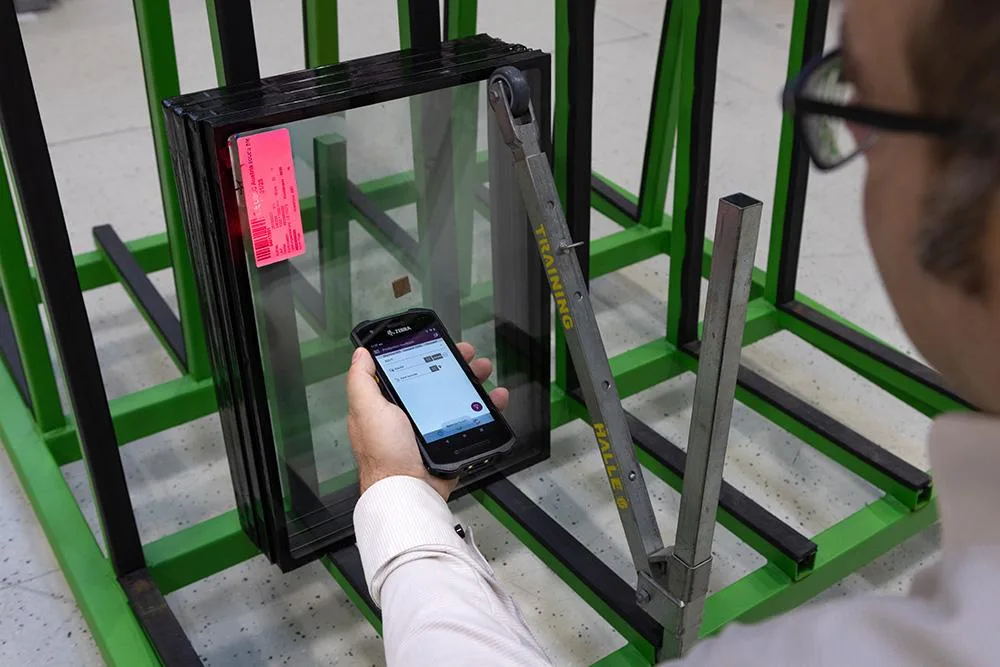
Worker scanning a barcode label on an insulating glass unit for end-to-end traceability

When a defect does surface, that digital identity changes everything. Instead of quarantining a whole day’s output, teams can isolate the exact batch, machine, or shift involved and act with confidence. We saw this firsthand when we rebuilt the production database for a commercial window manufacturer, where tracing a unit back to its source was the difference between a quick correction and an expensive guessing game.

Important:

Traceability has stopped being a nice-to-have. In a market where a single field failure can put an entire contract at risk, being able to answer “what happened, and where else could it happen?” in minutes is a real competitive advantage.

How Does ERP Connect CNC Fabrication to the Plant?

Today’s CNC equipment generates a constant stream of production data: cut times, material consumption, machine status, cutting accuracy. Without ERP, most of that stays trapped inside individual machines. Connect the two, and the shop floor starts talking back in real time.

Optimized jobs are released straight to the machines, utilization and accuracy are tracked automatically, and the ERP compares estimated output against what actually happened. Instead of chasing operators for manual updates, planners work from live numbers, and estimating gets sharper with every job.

Automation Replaces the Paper Trail

For years, manufacturing ran on paper: printed travelers, handwritten inspection sheets, manual shipping documents, and filing cabinets full of job records. Every one of those documents was another chance for something to get lost, delayed, or copied down wrong.

The paper wayThe ERP-connected way
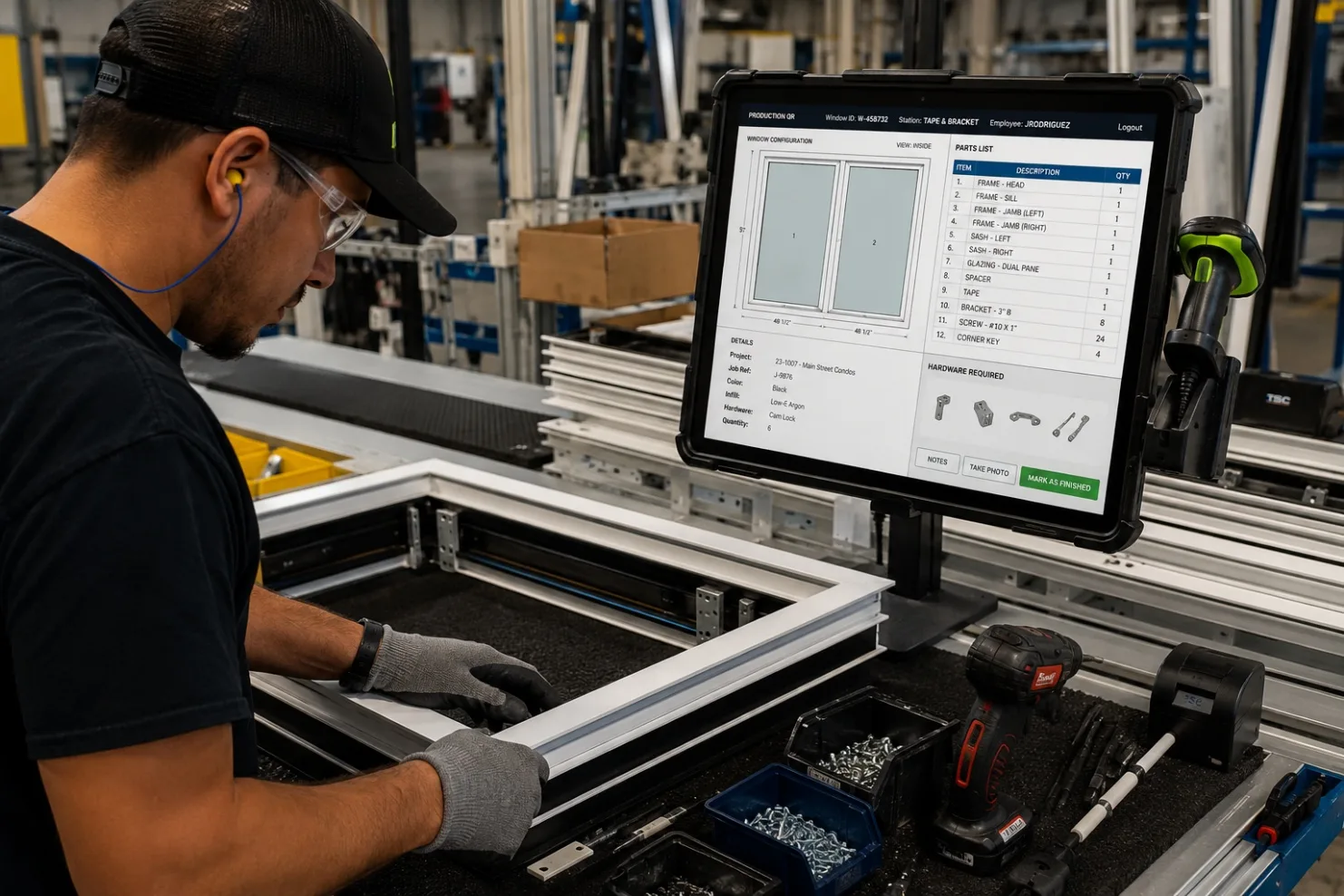
Printed production travelers on the floorLive job data on a shop-floor terminal
Handwritten inspection sheets, filed and forgottenDigital QA/QC records tied to each unit
Manual shipping paperworkAutomated bills of lading and packing slips
Filing cabinets you hope no one needsFull history searchable in seconds
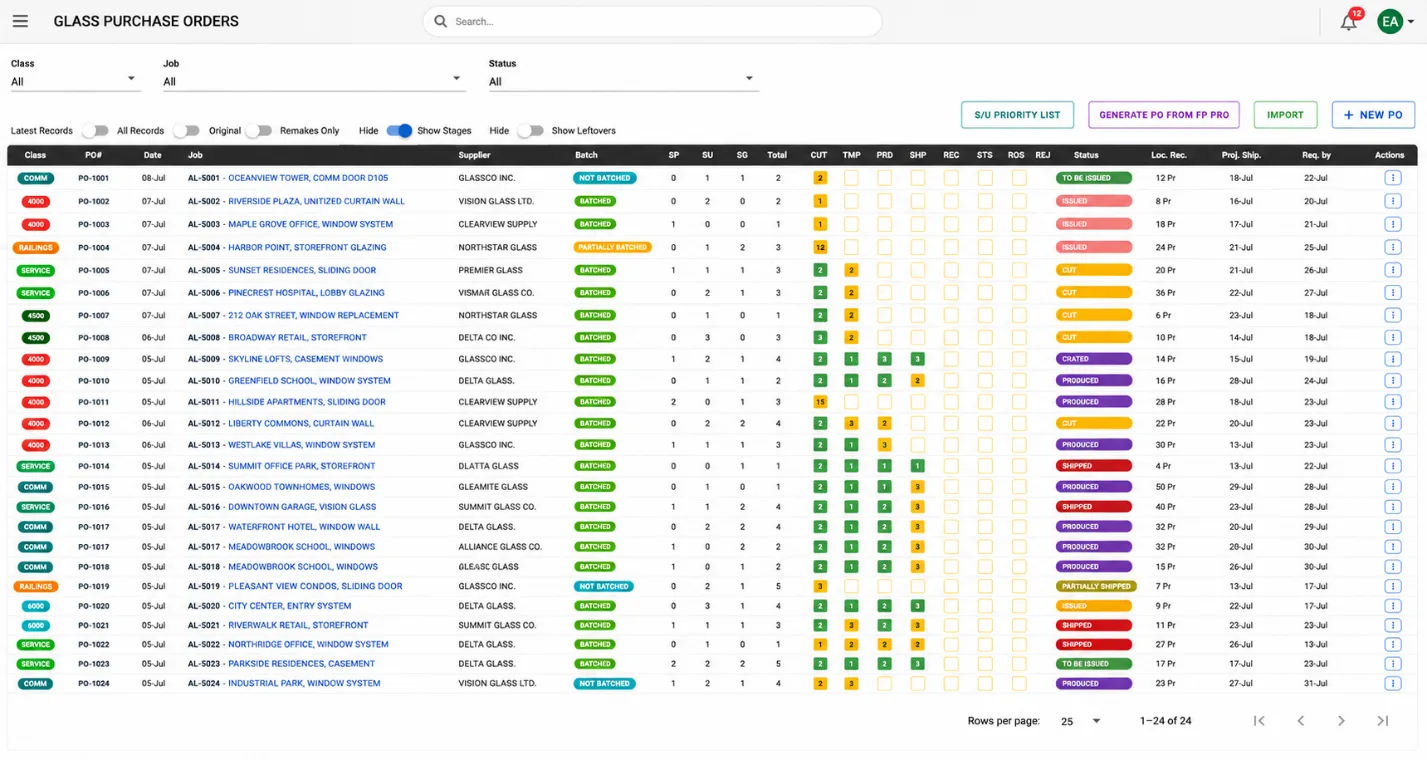
ERP glass purchase orders dashboard tracking batches, suppliers and production status

Digitizing those workflows does more than tidy up the front office. It removes the small daily errors, a transposed dimension here, a missed revision there, that quietly eat into margins and show up as rework weeks later.

How Does ERP Handle RFIs and Change Requests?

RFI (Request for Information)

A formal question raised during a project, usually by a contractor, to clarify a drawing, spec, or site condition before work continues. On a live job, RFIs pile up fast, and each one can change what the shop is supposed to build.

No construction project stays exactly as drawn. Architects revise, consultants issue clarifications, owners request modifications, and contractors submit RFIs faster than anyone would like. Without a central system, those updates scatter across emails, phone calls, spreadsheets, and marked-up PDFs, and the shop floor ends up building from yesterday’s information. The consequences are predictable and expensive: incorrect fabrication, rework, wasted material, missed deadlines, and the occasional warranty claim.

ERP pulls every revision into one controlled workflow. RFIs are logged, drawings are version-controlled, and approved changes flow straight to production. The team always manufactures from the latest sign-off, which quietly eliminates one of the most common and costly sources of error in the business.

Incident Reporting Creates Continuous Improvement

No operation is perfect. Machines fail, quality slips, glass gets damaged in transit, and safety incidents have to be documented properly. Historically, that meant a paper form that got filed away and rarely looked at again.

Modern incident modules let a team log an issue the moment it happens, attach photos, tie it to the affected batch, assign a corrective action, and track it through to resolution. Do that consistently and the patterns start to surface. Over time, the problems you used to react to become problems you design out, and every incident turns into a small improvement rather than a repeat.

Data-Driven Decisions Replace Guesswork

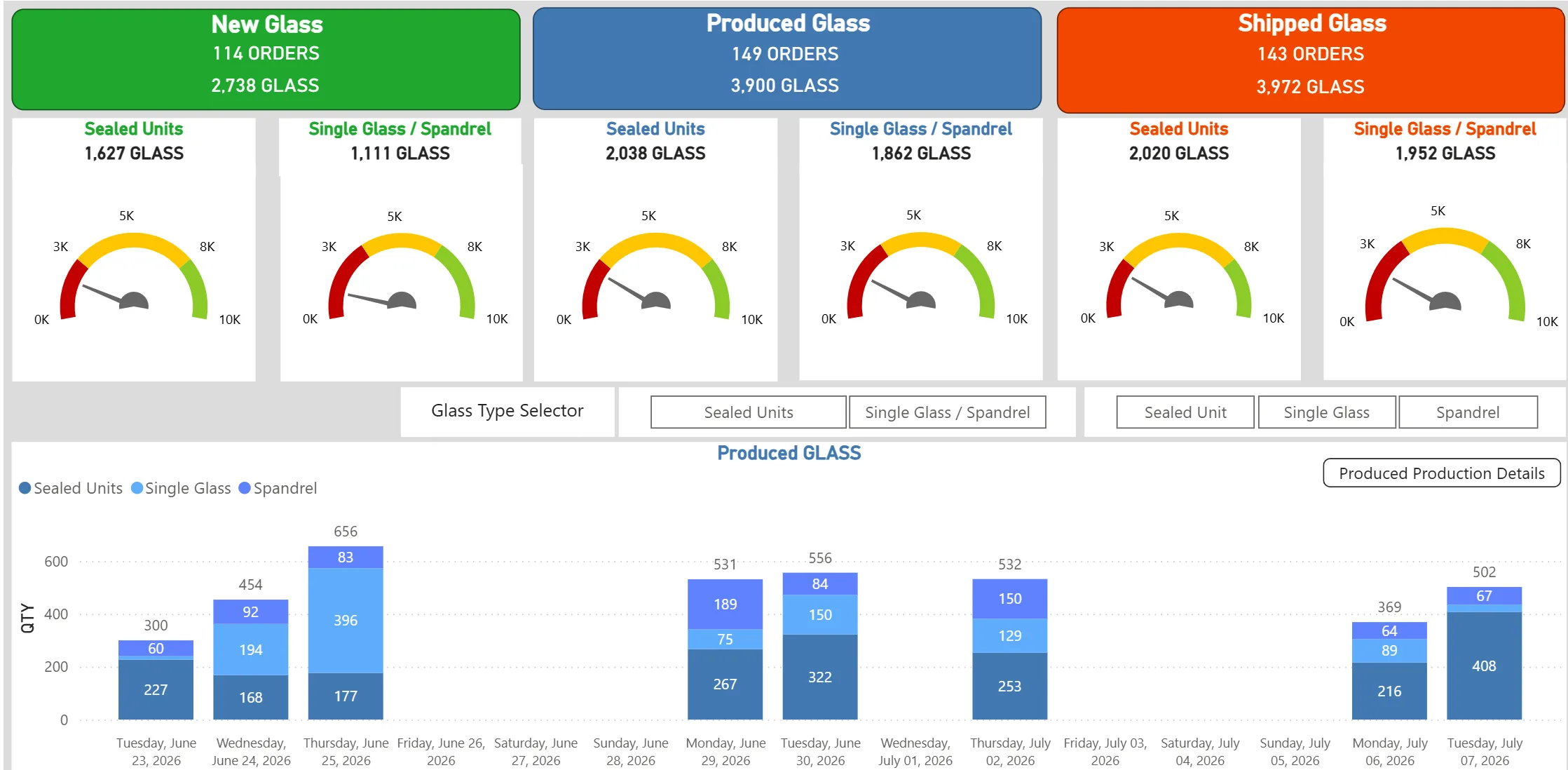
ERP glass production analytics dashboard with daily output charts and performance gauges

One of ERP’s quieter strengths is turning day-to-day operations into something you can actually steer. Production efficiency, machine downtime, labour productivity, on-time delivery, quality trends, inventory turnover: it all becomes visible on live dashboards instead of landing in a report two weeks after it mattered. Executives stop waiting for month-end and start making calls based on what the factory is doing right now.

Start with the two or three numbers that actually drive your business, on-time delivery and glass breakage are common ones, and build the dashboards around those before trying to measure everything. A focused business intelligence dashboard that people check daily beats a sprawling one nobody opens.

Building Customer Confidence Through Transparency

Customers today expect more than a quality product. They expect visibility. When a client asks where their order stands, “let me look into it and get back to you” is a weak answer. ERP lets you give them real-time project status, shipment tracking, and documentation on the spot. That kind of transparency builds trust, strengthens the relationship, and, in a crowded market, quietly wins the next contract.

How Does ERP Integrate With Glass Lines Like Bottero and Forel?

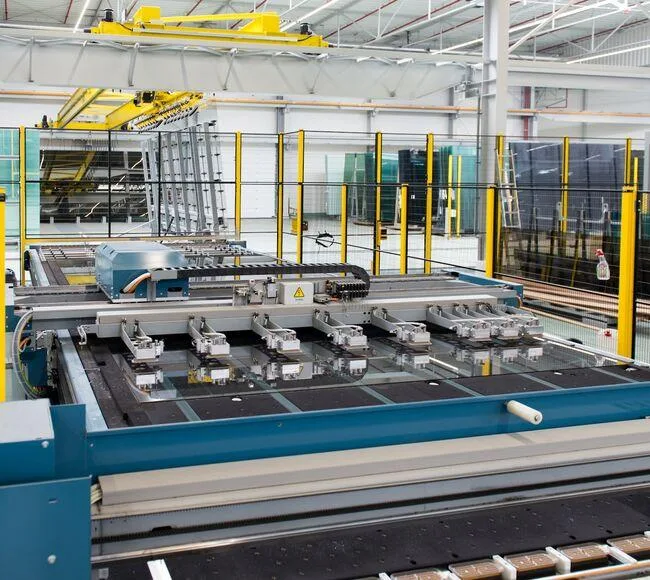
Automated insulating glass processing line in a fenestration manufacturing plant

ERP used to stop at inventory, scheduling, and order management. That boundary is disappearing fast. Insulating glass units move through cutting, edge processing, tempering, and assembly, and each stage generates data worth capturing. By integrating ERP directly with industry equipment such as Bottero cutting tables and Forel glass lines, manufacturers finally close the loop between the office and the floor.

When an order is released, the ERP generates the cutting jobs and optimization data automatically. As each lite moves down the line, the machines report back in real time:

  • Glass cutting completion, throughput, and material yield
  • Scrap and breakage reporting
  • Production timestamps and quality inspection results
  • Insulating glass assembly status and finished inventory
  • Shipment readiness

That two-way link turns ERP from a planning tool into a real-time manufacturing execution platform, and it sharpens traceability even further, since every finished unit ties back to its source glass, machine, and operator. Pulling this off usually takes some custom software and integration work to get the machines and the ERP speaking the same language, but for teams chasing Industry 4.0, this is where it stops being a slogan and starts being measurable.

The Future of Fenestration Is Fully Connected

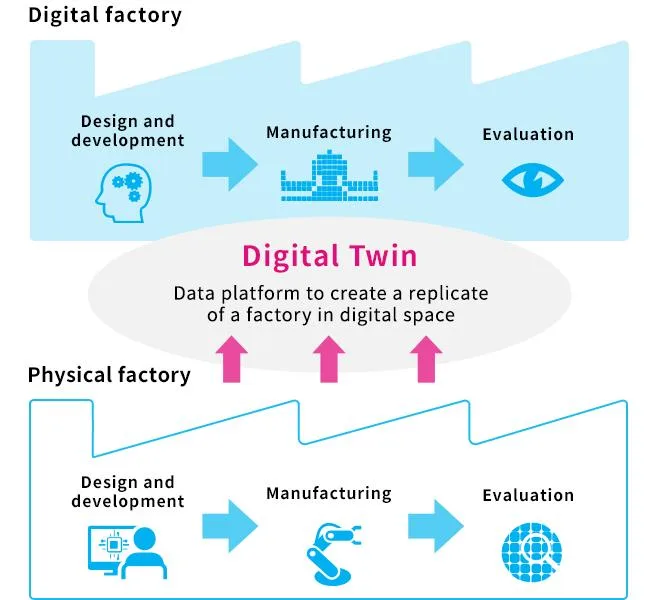
Digital twin concept linking a physical factory to its digital replica across design, manufacturing and evaluation

Automation, robotics, IoT, and AI will keep reshaping the factory floor. Through all of it, ERP is the platform that holds the pieces together, linking sales to engineering, engineering to production, production to quality, quality to logistics, and logistics to installation. In the end, it connects the manufacturer to the customer.

The goal was never just better windows. It is smarter windows, with full traceability, integrated fabrication, and complete visibility from raw material to installed product. For the modern fenestration business, ERP has stopped being back-office software and become the foundation for delivering quality and accountability, one window at a time.

  • ERP gives every window a complete digital history, so traceability goes from a days-long hunt to a few seconds.
  • Connecting CNC equipment and glass lines like Bottero and Forel turns ERP into a real-time execution platform, not just a planner.
  • Digitized RFIs, change control, and incident reporting remove the most common and costly sources of rework.
  • Live dashboards replace month-end guesswork, and real-time visibility becomes something customers can feel.

If you are weighing what a connected system could do for your plant, our team can help you map it out. Take a look at the BALANCED+ ERP platform, or talk to us about your business systems and where the biggest wins are hiding.

Human Error Remains the Biggest Cybersecurity Risk

You can spend six figures on firewalls, endpoint protection, and round-the-clock monitoring and still get breached because one employee granted access to someone they believed was IT support. That is not a hypothetical. It is the most common way Canadian mid-market businesses get compromised, and in most cases the security tools were working exactly as designed when it happened.

This post covers why human error is still the leading cause of cyber incidents, the social engineering threats your organization faces today, and the practical steps that actually lower the risk.

Human error remains the biggest cybersecurity risk because attackers have shifted their focus from breaking technology to manipulating people, and people are far easier to fool than modern security tools are to defeat. Social engineering, from phishing emails to fake IT-support requests for remote access, along with weak or reused passwords, bypasses technical controls by targeting the person holding the keys. The organizations that stay secure treat their staff as part of the defence, pairing layered technology with continuous training so a single mistake does not turn into a breach.

Human Error (in Cybersecurity)

In cybersecurity, human error is any unintentional action, or failure to act, by a user that gives an attacker an opening: granting remote access to an impostor, clicking a malicious link, reusing a password, or sending sensitive data to the wrong recipient. It is distinct from malicious insider activity because there is no intent to cause harm, which is exactly why it is so hard to defend against with technology alone.

Why do attackers target people instead of systems?

Because it works, and it is cheaper. A modern security platform that is patched and configured correctly is genuinely hard to break. A distracted employee at 4:45 on a Friday is not. Rather than spend weeks hunting for a software vulnerability, attackers reach people directly by email, phone, chat, or a remote-support tool, ask them to approve a request or grant access, and let normal human behaviour do the rest.

68%

of data breaches involved a human element such as error, misuse, or social engineering (Verizon 2024 Data Breach Investigations Report)

We see this pattern directly. When we run a baseline social engineering test for a new GTA client before any training, the number of staff who engage with a convincing request commonly lands between 20 and 30 percent. These are not careless people. They are busy staff who have never been shown what a modern attack actually looks like, and that gap is what attackers monetize. According to the Verizon 2024 Data Breach Investigations Report, the human element is a factor in roughly two-thirds of all breaches, a figure that has barely moved despite years of improving security technology.

What are the most common social engineering threats?

Social engineering is the common thread behind most human-driven incidents, whether it arrives as a phishing email, a fake IT-support request, or a phone call. It works by getting a legitimate user to act on the attacker’s behalf, which is why it slips past tools built to stop malicious code. Weak passwords then compound the problem by turning one successful trick into access across multiple systems.

Social Engineering

Social engineering is any attack that manipulates a person into granting access, revealing information, or taking an action that helps the attacker, rather than exploiting a technical flaw. It spans phishing emails, fraudulent phone calls, text messages, and impersonation over chat or remote-support tools. Because it targets human trust instead of software, it routinely bypasses technical defences.

ThreatHow it exploits peopleFirst line of defence
PhishingFake emails, websites, and messages that impersonate trusted brands or colleagues to steal credentials or deliver malwareUser training plus email filtering and MFA
IT-support impersonationAttackers pose as internal IT or a trusted vendor over chat or remote-support tools and request access to a workstationVerify every unexpected access request through a known channel
Weak passwordsReused, predictable, or shared passwords let one leaked credential unlock multiple accountsA password manager, enforced complexity, and MFA

A single successful trick often becomes the foothold for a wider campaign, which is why we treat social engineering defence as the foundation rather than one item on a checklist.

Warning:

Attackers increasingly use AI to write flawless, personalized messages, so the old advice to “watch for spelling mistakes” no longer holds. A message can be grammatically perfect, reference a real project, and still be fraudulent. Verification habits matter more than spotting typos.

How do attackers impersonate IT support?

A fast-growing social engineering tactic skips email entirely: the attacker contacts a user directly through a chat or remote-support tool, claims to be from IT or a trusted vendor, and asks for remote access to fix an urgent problem. The channel is what makes it effective. A message in Microsoft Teams or a session request through a tool like ScreenConnect feels far more legitimate than a cold email, so the usual phishing instincts never fire.

Once a user grants access, the attack moves fast. An impostor with a live remote session can install malware, copy sensitive data, and disconnect within minutes, often before anyone realizes the “support technician” was never from IT. Because none of this touches the email gateway, email-based phishing training does nothing to stop it. This is exactly why awareness has to extend beyond the inbox to every channel a user can be reached on.

Warning:

Treat any unexpected request for remote access as hostile until proven otherwise, whether it arrives by email, phone, Microsoft Teams, or a remote-support tool such as ScreenConnect. Verify it through a known IT contact or your ticketing system before granting access. A real technician will never object to being verified.

Why isn’t security technology enough on its own?

Because every technical control still has a human in the loop, and that person can be persuaded to open the door. Firewalls, endpoint detection, and multi-factor authentication all raise the cost of an attack, but a user who approves a fraudulent MFA prompt or hands remote control to a fake technician has just walked the attacker past those defences. Technology narrows the attack surface; it does not remove the person standing in the middle of it.

99.9%

of automated account-compromise attacks are blocked by enabling multi-factor authentication (Microsoft)

That does not make the technology optional. Multi-factor authentication alone blocks the overwhelming majority of automated account attacks, according to Microsoft. The point is that controls and people reinforce each other. Layered technology catches the mistakes training misses, and trained users catch the attacks that slip past the tools.

Move your organization to phishing-resistant MFA (hardware keys or passkeys) for administrators and finance staff first. These accounts are the highest-value targets, and app-based push approvals can still be defeated by MFA fatigue attacks where a user taps “approve” just to stop the notifications.

How do you build a security-aware culture?

You build a security-aware culture by making safe behaviour routine and easy, not by running a once-a-year training video and hoping it sticks. The goal is an organization where staff recognize common attacks across every channel, follow simple verification habits, and feel safe reporting a mistake immediately. The following steps are the ones we put in place for clients, in order of impact.

Train regularly, in short sessions: Replace the annual marathon with brief, frequent refreshers covering email, phone, and chat-based attacks. People retain more from ten focused minutes each month than from a single long session they forget by lunch.

Verify every remote-access request: Teach staff that no one approves remote control of their workstation from an unexpected message or call, no matter how urgent it sounds. Confirm through a known IT contact or a ticket first, regardless of the channel it came through.

Run social engineering simulations: Send realistic phishing tests and, where possible, simulate impersonation attempts, then measure engagement and report rates. Simulations turn an abstract risk into a concrete, improvable number and show staff what a real attack feels like in a safe setting.

Enforce strong passwords and MFA: Require a password manager, block reused and breached passwords, and turn on multi-factor authentication everywhere it is available, starting with email and privileged accounts.

Make reporting easy and blameless: Give staff a one-click way to report a suspicious message or call, and thank them when they do, even for false alarms. The faster a real attack is reported, the smaller the damage.

This works. Across the clients where we run continuous simulations and short monthly training, we typically see engagement with test attacks fall from that 20 to 30 percent baseline into the single digits within a few cycles, and report rates climb at the same time. The cost of that program is trivial next to the alternative. IBM puts the global average cost of a data breach at US$4.88 million in 2024.

US$4.88M

average total cost of a data breach in 2024, the highest on record (IBM Cost of a Data Breach Report 2024)

The bottom line

The strongest cybersecurity strategy combines advanced security technology with continuous employee education. Technology alone cannot stop social engineering that convinces a person to open the door, whether by email, phone, or a remote-support tool, and awareness alone cannot catch what slips through. Reducing human error is the highest-leverage move most organizations can make to lower the risk of a successful attack and strengthen their overall security posture.

BALANCED+ is a Fortinet Authorized Partner, and our security engineers hold Fortinet NSE certifications, but we tell every client the same thing: the technology is only half the job. Our managed cybersecurity team runs social engineering testing and awareness training alongside the firewalls, monitoring, and MFA, so your people become a layer of defence rather than the weakest link. If you want to see where your staff stand today, a baseline social engineering assessment is a low-effort place to start.

Sources