Skip to content

How BALANCED+ Helped Nuform Building Technologies Automate Their Production Scheduling Process

These days, IT-based automation has become a staple in businesses that are looking to move forward and grow.

In one of our previous posts, we discussed how BALANCED+ helped Nuform Building Technologies Inc., a leader in wall forming systems, digitalize data collection for a particular production process. Our work with Nuform did not stop there impressed with the result, Nuform decided to explore other opportunities of making IT-based improvements to business processes.

The Need: Keeping a Tight Schedule

The use of any resource in a production process must be managed. As production specialists know, that applies first and foremost to the bottleneck  the weakest link in a production system, which requires the longest time in operations of the supply chain.

The Nuform production process starts with extrusion of PVC panels through devices called extrusion lines. Each extrusion line requires significant time for power-up, shutdown, and setup operations between different types of extrusion jobs. Each extrusion job requires significant time (~24 hours) to produce and is scheduled for production up to 3 weeks or more in the future.

The old process of scheduling jobs on extrusion lines was:

  • entirely manual entered by hand in a spreadsheet;
  • not easily accessible the spreadsheet was stored in a remote file share;
  • required complex knowledge of over 100 (!) different extrusion dies that are used for production to calculate production time;
  • took the time of a single full time employee to enter, update and manage the schedule.

Nuform identified the following business need for improving the scheduling process:

  • Automation: the new scheduling system should automate data entry as much as possible by integrating with existing databases and simplifying the entry and calculation process.
  • Transparency: the system should provide cross-platform visibility of extrusion operations and schedule with minimal lag.
  • Flexibility: the system should allow to easily manage situations where changes in the schedule are required to satisfy customer need.

BALANCED+ delivered a solution through the following steps:

  1. A Commit100 IT business analyst spent time learning the current scheduling process, from A to Z, including shadow sessions with the Nuform associates who are involved in the process. This allowed to get a clear picture of what happens in the field a clear understanding of the actual, existing business process.
  2. Based on analysis, BALANCED+ defined an optimised business process and approved it with Nuform production managers.
  3. The new business process was used by BALANCED+to design the user interface and prepare specifications of the new application.
  4. The application was developed by a software development team managed by BALANCED+
  5. After rigorous user acceptance testing, BALANCED+ integrated the scheduling application into the existing IT infrastructure and business processes at Nuform.

THE RESULT

The result was a web-based application called Extrusion Production Scheduling. The customer needed app accessibility from a wide range of platforms and locations, so a web-based solution was the clear choice. The application was deployed on a Windows server and integrated with the existing database.

User login screen for the Scheduling app:
The Scheduler Dashboard  the main interface used by the operator to monitor the current status of the schedule. Current Schedule and main menu.

The app is integrated with the Nuform ERP system. Every time a job is released for production, the scheduling operator receives an alert with buttons to quickly schedule the job or dismiss the alert.


When the operator goes to create a new job, they would see the Job Queue, which lists all jobs that have been released for production.

The app significantly simplified the data entry process and automated time and production buffer calculation, which the operator had to manually do before. The application formalised several different order types to quickly schedule orders based on priority.

The system allows to keep notes for every job:
Profile and admin consoles for application maintenance and adjusting view settings.

The web-based solution allows Nuform production staff to quickly and easily access the Scheduling system and monitor current events from any device and any location that has an internet connection.

To Conclude

By automating their production scheduling process, Nuform Building Technologies Inc. has been able to improve their operations and keep their business moving forward. With the help of BALANCED+’s IT consulting services, they were able to find an optimal solution that met their specific needs. If you’re looking to improve your business processes and streamline operations, consider reaching out to BALANCED+ for IT consulting services.

Are you managing on the Tip of the Iceberg?

While keeping track of sales and production numbers and completing financial statements is necessary, it only scratches the surface of valuable information that can help improve performance, reduce costs, and optimize throughput in plastics manufacturing. Hidden measurements of production, material usage, and hours offer insights beneath the surface that can help you achieve a more efficient operation. Ignoring this data poses a risk to the health of your business.

Overall management of production and inventory is really the sum of the management of individual resources within the business individual machines, people, materials, and goods. And just as the chain is only as strong as its weakest link, challenged or underperforming resources can negatively affect the performance of the entire organization.

It is important, therefore, to measure and manage each resource as closely as possible in order to detect any variance from expectations and be able to take corrective action before productivity and throughput are affected. In todays digital factory, it is easier than ever to achieve that goal. The best modern ERP/MES systems are built to continuously monitor key measures of machine rate, output, efficiency, quality (reject rates), utilization and other factors and alert operators and managers when conditions or accomplishments vary from expectations.

Arguably the most important internal measurement to watch is Machine Efficiency: tracking of cycle time the interval between successive pieces produced or similarly the amount produced per hour in either units or pounds. Since actual production time is a major factor in product cost, a variance from the assumed or optimum run rate can make a big difference in cost-of-goods and profit.

But running faster than normal may not always be good if the result is lower yield or a higher scrap rate. So tracking rejects is also very important. And reject tracking should be as real-time as possible. The sooner a quality problem is detected, the sooner corrections can be made and fewer bad parts will be made.

Even though raw material cost is typically a relatively small component of cost-of-goods, availability is critical running out of material before the required quantity is produced can be disastrous. Acquisition and maintenance of raw material are tied to forecast or backlog, and usage rate. If the usage rate is incorrect, there is risk of material shortage. In addition, an inaccurate usage assumption in the recipe or bill-of-material can lead to incorrect pricing and misleading margin assumptions.

ProdProfit

Monitoring actual material usage validates bill-of-material assumptions and provides insight into actual usage including start-up losses and normal scrap all information that can be used to refine costing and material management. Monitoring of usage in real-time may also provide early warning of process problems that can lead to rejects or operational problems.

It may sound complicated to continually watch multiple factors at multiple resources, but in fact, continuous measurement and reporting are much simpler it sounds. Technology gathers the detailed information and does the initial assessment by matching actual measurements against expectations and past experience. Only deviations or unexpected results are immediately communicated to responsible individuals for follow-up or further investigation. Accumulated information is always available, of course, for study and performance improvement efforts. Contrast that with the need to respond to a quality problem, production delay or cost overrun after the fact without any hint as to the source and location of the problem.

The Titanic had its unfortunate encounter with the hidden underside of the iceberg at a time when radar, sonar and modern navigation and communications did not yet exist. A sinking caused by an iceberg encounter is unimaginable today simply due to the technology available and in use in all ocean-going vessels. Plastics manufacturers have access to the equivalent of sonar and radar for monitoring activities and resources in the plant that can reveal the existence and even the emerging possibility of hidden perils like an unexpected variance in run rate, change in scrap or yield, or unusual material usage. Smart management will use these signals to proactively fine tune performance to reduce scrap, lower costs, improve on-time completion, and preserve margin.

Source: Cyframe.com

Our Comment:

BALANCED+ has extensive expertise in developing software to collect information on physical quantities and monitor production in plastics manufacturing. You can learn more about by reading our case study on Nuform which you can click here to read

Four Reasons Why IT Documentation is Important

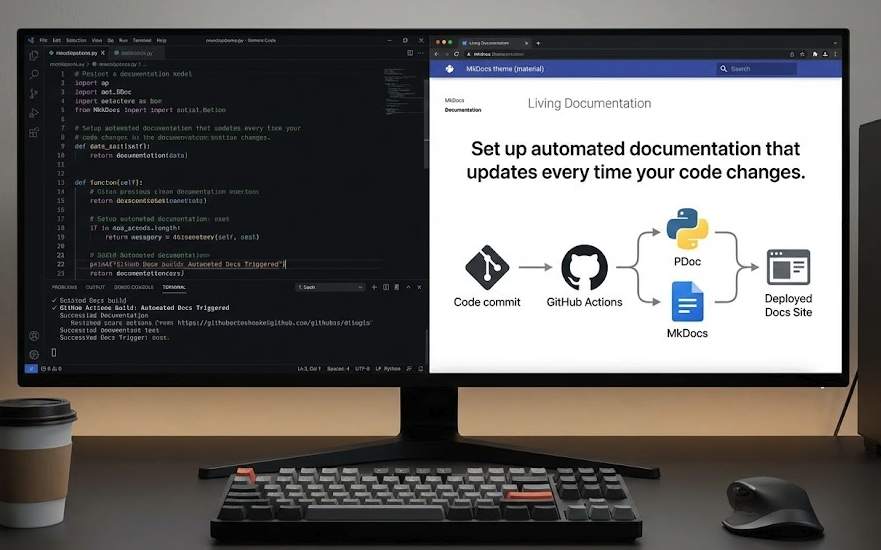
As businesses continue to rely more heavily on technology to operate, it becomes increasingly important to manage IT systems and infrastructure effectively. One way to ensure that IT resources are used efficiently and effectively is through proper IT documentation. IT documentation is essentially a record of an organization’s IT infrastructure, systems, and procedures. It includes everything from network diagrams and IP address distribution tables to active directory user audit spreadsheets and firewall access control lists. Here are four reasons why IT documentation is essential:

1.Knowledge Transfer

One of the most important benefits of IT documentation is knowledge transfer. When key IT staff leave an organization, they take with them a wealth of knowledge about the organization’s IT systems and infrastructure. If this knowledge isn’t properly documented, it can be lost forever. However, when IT systems and procedures are properly documented, this knowledge can be transferred to new staff members, reducing the impact of staff turnover.

2.Standardization and Coordination

IT documentation helps to standardize and coordinate IT systems and infrastructure across an organization. By providing a clear and concise record of IT systems, it becomes easier to identify areas where standardization can be achieved. This reduces the complexity of IT systems, making them easier to manage and more efficient.

3.Time Efficiency

Time Efficiency By providing quick access to IT documentation, staff can be more productive, spending less time searching for information and more time focused on their core responsibilities. This can be particularly valuable during high-pressure situations such as outages or emergencies, where quick access to accurate information can be the difference between quickly resolving an issue or prolonged downtime.

4.Improved Transparency & Communication

Finally, IT documentation provides a clear picture of what is going on within an organization’s IT systems and infrastructure. This makes it easier to identify potential issues before they become major problems, and to respond quickly when issues arise. Additionally, IT documentation can be used to identify trends and patterns in IT systems and infrastructure, helping organizations make better-informed decisions about future IT investments.

Office-network-diagram-template

What should be documented?

Some important things you should document, and the list is by no means exhaustive:

  • Network and system overview. This gives any IT-savvy individual a general overview of your IT infrastructure. This may be one or more documents, depending on the size and complexity of your infrastructure.
  • Administrative credentials and passwords. Needless to say, they should be stored in a secure, preferably encrypted, location, but accessible in case of an emergency and by other IT staff.
  • IT policies, reflecting the IT approach to various aspects of managing the infrastructure. This includes
    • Network and Security Policy (what networks and systems exist, for what purpose, who has access, etc),
    • Information policy (privacy, appropriate email use),
    • Internet policy (access to third-party resources like cloud platforms, what content is accessible, what content is blocked),
    • Hardware management policy (how often hardware is replaced, how old hardware is used, etc),
    • Backup and Recovery (when and how recovery is done),
    • and many more.   
  • Information system. All the software that supports business processes and how it interacts between each other.
  • Hardware inventory. What hardware you have, where it is, who uses it, and if any spare devices are available if needed.
  • Software and license inventory. What software you have, who uses it, and if any spare licenses are available if needed. This will prove invaluable in the case of a licensing audit.
  • Project-related documentation. This is especially critical for knowledge transfer if multiple individuals successively work on the same project.

How to keep documentation updated

First and foremost, work with your IT department or IT consultant to work out an approach to documentation. Make your position in this matter clear, and work out a policy to make sure important documentation exists and is updated, while avoiding excessive time spent on documentation.

It is best to update documentation real-time, as policies and environment change, but that is not always possible. Some documentation should in fact be updated immediately after changes are implemented, like administrative passwords. BALANCED+ recommends that IT policies and procedures should be revised and updated on a quarterly or semi-annual basis. This will also ensure that outdated and inaccurate documentation does not clutter up document library.

Conclusion

In conclusion, IT documentation is a critical component of effective IT management and support. By providing knowledge transfer, standardization and coordination, time efficiency, and a clear picture of what is going on, IT documentation can help organizations reduce the complexity of their IT systems, improve efficiency, and achieve better business outcomes.

As an IT consulting company, BALANCED+ can help your organization develop and implement effective IT documentation practices. Contact us today to learn more about our IT consulting services and how we can help your organization achieve its goals through effective IT management.

Customer Retention Strategies: How to Keep Customers Coming Back for More

In today’s competitive business landscape, customer retention is more critical than ever. Retaining existing customers is a cost-effective way to grow your business and create long-term success.

With the average cost of new customer acquisition on the rise, it’s crucial to focus on keeping your existing customers happy and loyal. But how can you ensure that your customers keep coming back for more?

In this blog, we will explore five practical steps to boost customer retention and generate opportunities for growth within your business. By implementing these strategies, you can create a positive customer experience, enhance loyalty, and drive long-term business success.

1. Create a Customer Success Team

Keeping your customers happy is so fundamental that it will undoubtedly pay to have
a dedicated team who leads the way in ensuring that Customer Experience lies at the
heart of your operations.


It also sends out a clear message that you are proactive in caring about your
customers, making sure that their expectations are met and that they get the best
results from your products or services. To put it another way customers want to feel
loved! When asked for the reasons they feel a strong emotional connection to a
particular brand, 65% of US consumers recently said it is because they feel as if the
company cares about people like them.

2. Maximize Opportunities For Feedback

The adage about not relying on assumptions applies to customer retention as much
as acquisition. Dont be fooled into thinking you know what it is your customer expects
or needs in their ongoing relationship with you. Aim to give them regular opportunities
to feed back on all aspects of your delivery, from onboarding to the product itself to
overall satisfaction and experience.


Customer satisfaction surveys certainly retain a role in retention marketing, but this
doesnt have to be restricted to a formal (possibly annual) mass send-out. You can
ask customers to complete ad-hoc surveys after any engagement exercise, such as a
webinar. Immediate, activity-specific feedback like this can be immensely useful to
help you tweak your approach mid-campaign. Consider getting loyal customers
involved in focus groups and dont underestimate the value of timely and concise
email updates, blogs like this one! and engaging with customers on social media.

In essence, aim to keep the dialogue going at all points in the customer journey so
that you are equipped with the insight you need to make informed decisions about
future retention activity and make your customers feel valued at the same time.

3. Value Reviews For Deeper Understanding

As you will read in our Customer Success blog I referred to above, Value Reviews
form a key element of best practice retention strategy, not only to gauge satisfaction
levels but to check that your customers are reaping maximum benefit from your
services and to support them in doing so. This really helps build trust and loyalty
from a relationship perspective, not to mention the practical matter of embedding your
services deeper within their company.


Weve found that these in-depth reviews which can be undertaken by phone or face
to face tend to surface new areas for growth and development for both our business
and our customers.

4. Educate And Advise

Todays consumers are masters in self-education. Between 60% and 90% of the
buyers journey is now self-guided, and both Forrester and Gartner have predicted that
80% of the buying process will take place without any direct human-to-human
interaction by 2020. You can try to exploit this trend by ensuring there are plenty of
opportunities for customer-based learning on all your communication channels. For
example, providing webinars, videos, online user guides and even case studies can
further customers understanding of how your services can be adopted and extended,
helping you to create more valuable and stronger relationships.

5. Create A Customer-Centric Culture

This last step essentially joins all the others together to establish a coherent path to
customer satisfaction and loyalty across your whole organization. Everyone within
your business (not just those in customer-facing roles) needs to understand their
contribution and impact on your customers experience. Fostering a positive, forward looking, customer-centric culture may require training to secure buy-in from all teams.

To End it Off

Customer retention is crucial for the growth and success of your business. By implementing a dedicated customer success team, maximizing opportunities for feedback, valuing reviews for deeper understanding, educating and advising your customers, and creating a customer-centric culture, you can improve the overall customer experience, enhance loyalty, and generate opportunities for growth.

It is essential to keep the dialogue going, listen to your customers, and implement changes based on their feedback. By prioritizing customer retention, you can reduce costs associated with customer acquisition and drive long-term business success.

How to Boost Manufacturing Sales with a CRM

Finding buyers for manufactured product is essential. Making on its own will not drive economic growth it will only come when those goods are sold. Customer Relationship Management for manufacturing (CRM) could be the difference between success and failure, but manufacturing companies are very different to other industries. What works in the financial services sector doesnt always work for the engineers, fabricators and component suppliers that drive manufacturing.

Growing Manufacturing Sales

Following the pandemic, confidence is returning to certain sectors. Consumers are once again hitting the high street and low interest rates are encouraging some growth in capital projects. After some lean months, demand in the economy is building.

Unfortunately, others are looking at the same customers you are. They will do everything in their power to take your business and to take your customers.

Fighting back is not just about the cost of goods. A race to the bottom will not drive growth. Before dropping your prices to compete, look at the other weapons in your arsenal. Low cost foreign imports rarely come with the customer service that a local provider can give. Often they are ill equipped to provide Just In Time (JIT) delivery services. Essentially, they rarely have the local feet on the street. Customer

relationships are a key determinant of why the customer buys and Maximizer CRM can give you an advantage.

Manufacturing Customer Relationships

Think of the process flows and production modelling techniques you use to drive your manufacturing processes. When was that amount of time, effort and brainpower applied to your sales processes? For most manufacturers, the answer is never. Sales are the forgotten department. Despite occasional complaints about the cost of the sales team, they dont get the forensic attention that they need.

KAIZAN and Lean manufacturing have revolutionized production, but sales are often doing the same things they did in the bad old days of manufacturing. Implementing a CRM system would mean exposing them to that same level of scrutiny.

Start with the basics

Who is the customer?

Not just the list of companies you sell to, but who in those companies actually makes the purchasing decisions?

What do they buy?

Beyond specifications, what motivates them to buy? Why would they buy one product over another?

How do they buy?

What are the procurement processes? Can you help them with their procurement?

How do they find out about new products?

How do they go from Never a Customer to Always a Customer?

Just understanding these, and other key questions, will help you identify your customer and the relationships they need to have with their suppliers. CRM software then provides the tools to help you manage the relationship in ways that work for you and your customers.

Armed with this understanding you are in a better position to refine your processes for competitive advantage. With improved understanding, you can improve production

forecasting. This potentially reduces your inventory costs and transport costs. It can improve cash flow and provide a timely warning of possible spikes in demand. CRM has been shown to improve profitability and reduce customer churn. Put like that whats not to like?

Taking the first step

Often, manufacturing companies will look to the provider of their ERP systems to provide a CRM solution. In some cases this makes good sense; however, in many cases it fails. The problem with ERP companies that implement CRM functionality is that they just dont understand how salespeople work. They attempt to apply analytic disciplines to processes that are intuitive, not structured.

Independent CRM vendors create products that meet these needs. Instead of bending your sales and marketing processes to fit with a model developed by an ERP vendor, they provide customizable off the shelf Manufacturing CRMs that builds a system that works for you and the customer. They have the experience to help you understand sales processes. Often they provide experience gained in delivering successful CRM projects for other manufacturers.

CRM Software is a hyper-competitive market. Just as you have to earn your orders, look for a CRM provider that work to earn your business, and wi;ll be there for you post-sale. Do they have other customers in your sector? Are they of a size that means you will be able to manage them, or will they attempt to manage you? Selecting the right CRM partner is an important step to claiming your place on the March of the makers.

If you would like to explore how Maximizer can accelerate your business growth and increase your revenues, sign up for a 30-day free trial or get in touch with one of our CRM experts today!

8 Proven CRM Adoption Strategies for Achieving ROI

A CRM implementation isnt coin-operated

Achieving a successful CRM ROI instead takes focus. Its about planning, getting your technology and people working together. And there are many moving parts that can impact your total cost.

Indeed, businesses spend anywhere between $5,000 to $80,000+ getting a new CRM system up and running.

Those costs include expenses like software subscriptions advertised on your vendors pricing page and expenses your vendor will be less keen to share, such as the cost of extra user training, technical support and software customization. With an industry-leading solution, yourhidden costscan rack up significantly.

You want a solid return on your investment. And you know no matter how well your CRM strategy aligns with your business objectives and no matter how good the technology you will struggle to achieve your ROI if your team does not engage.

What follows are the top CRM adoption obstacles and 8 proven CRM adoption strategies.

The top CRM adoption obstacles

Youll ultimately confront several people-related issues during your implementation, as highlighted by repeated Forrester surveys.

These cited human pitfalls have included the following:

  • 15% aligning their organization with new ways of working
  • 35% inadequate change management and training
  • 49% slow user adoption

According to CRM analysts, here are the most common user adoption roadblocks:

  • Poor adoption strategy
  • Lack of support from senior leadership
  • Poor coordination with your intended end-users
  • Few consequences for not using your CRM
  • Software badly mismatched to your teams existing workflow
  • Software poorly integrated with your other systems
  • Lack of relevant training
  • Lack of training support across your solutions lifetime

Thankfully, there are some relatively simple strategies that significantly boost your chances without adding significantly to your final tally.

Well address each factor impacting your adoption fortunes.

  • Building a robust adoption outreach strategy
  • Choosing the right CRM system to spur, not frustrate, adoption

Building a robust CRM adoption strategy

People dont like change and may resist it. Its a common instinct, especially when change isnt clearly articulated and entails potential liabilities. Here are some ways to communicate effectively with your team.

1. Create an inclusive vision:

Its almost cliche to say this, but getting people on board early is essential to nipping status quo bias in the bud. Host luncheons and meetings where you can visually demo your new software. Then once youve got their attention, consider asking the following: How are they interacting with existing apps that they rely on every day?

  • Do they find them easy to use? Where do they get stuck?
  • Do they ever waste time waiting for systems to respond?
  • How can you leverage the new system to eliminate interruptions that distract them from selling, solving problems and delighting customers

A clear implementation game plan and clear messaging are equally crucial. Plan out your messaging to be as clear and consistent as possible, and be sure to cover all the bases, including

2. Layout a clear game plan:

  • Why the new software is necessary
  • Why staying the same is impossible
  • What is about to happen
  • Where your project is at on an ongoing basis
  • A realistic completion date
  • How your project’s success will be measured

3. Sell your CRM using a CRM Champion

You will also need ways to sell your solution to your team. Like anyone, theyll want to know what is in it for them. If CRM becomes a synonym for extra IT admin work, distracting from calling prospects then no matter how hard you push, your team still wont want to use it. Appointing a dedicated CRM Champion can help you bridge the divide. Ideally, your CRM Champion is a team leader who understands how your solution will help your team become more productive without doing more work and can communicate the benefits of your new system in terms they will appreciate.

4. Make CRM-use mandatory

Finally, youll need to get rid of the old ways of working as soon as your CRM is up and running. Consider doing the following:

  • Restrict access to duplicate data sources and system
  • Require sales reps to enter key prospect information into their CRM during their first sales call
  • Mandate sales reps close their opportunities inside their CRM

Getting the right CRM software

Next, lets talk about software. Ideally, you want a solution that helps learners adjust quickly and collaborate painlessly and with minimal delay!

Therefore:

5. Embrace debate

When you engage users they might request costly or impractical capabilities. Dont be afraid to push back. Your aim is to strike a balance between high levels of customization and automation, and reasonable scope of work. Fine-tune your software within practical limits to help end-users achieve their aspirations

6. Consider getting every department hooked up:

Your sales team will want to see their prospects, opportunities, contacts and accounts all in one place. Consider getting sales, marketing and customer service on the same page so they can collaborate on a shared 360-degree view of your customer. A mid-tier

vendor who offers an all-in-one subscription at a reasonable price can help you add new user subscriptions at a reasonable price.

7. Get the right integrations:

Additionally or alternatively, consider a CRM that connects easily with your other business-critical apps. That way, if your marketing team wants to keep working in familiar marketing apps, like Marketo or Hubspot they can continue doing so! Meanwhile, you can automatically flow lead information to your sales team working in your CRM so they can take effective action further down the buyer journey. A solution that comes with an app directory stocked with the right (free!) pre-built integrations can be of huge benefit here.

8. Personalize your UX:

Clunky, slow or cluttered interfaces will only make matters worse. So will CRM solutions that shoehorn you into their workflow, forcing you to contemplate more coercive, time consuming or expensive measures to guarantee adoption, including extra training services or software customization involving pricey third-party consultants. Instead, consider smoothing your transition and keeping costs down with a more flexible solution. One that doesnt take a one-size-fits-all approach and expects you to fit into its workflow, but rather, one that can be adapted to how you do things. At Maximizer, for example, we consult with customers thoroughly to build a CRM that matches their workflow as closely as possible. We then empower them to personalize their UX even further by leveraging our CRMs built-in configuration features. Youll find some CRMs like Maximizer come with heightened personalization, allowing you to self-tailor your process stages and data capture fields as much as you want to work just as you need them to

Bottom Line

A CRM implementation can feel intimidating. And its true, without the proper approach, you may incur needless expenses that can rack up quite quickly. In a worst- case scenario unlikely but possible your implementation may fail, leaving you to start again from scratch. Assuming theres a second chance.

Thankfully, the strategies for ensuring user CRM adoption and locking down your CRM ROI are well understood. A good vendor can also help hand hold you all the way to a successful completion

7 Reasons Business Intelligence Is Vital To Business Success

Todays customer-centric, digital-first world, many business owners and managers are bombarded with information overload and are urgently seeking ways to derive greater control, understanding, and intelligence from their organizations data.

One of the best solutions to this growing problem is to adopt a Business Intelligence (BI) strategy, but in reality many companies have been slow to do so due to a lack of knowledge of exactly what it involves, where to start, and how long it will take to see any benefit. The truth is: Business Intelligence should be an integral part of your operation.

Technology analyst Gartner describes Business Intelligence as including the applications, infrastructure and tools, and best practices that enable access to and analysis of information to improve and optimize decisions and performance.

So in practical terms, how would Business Intelligence deliver benefits to your company? 

This article outlines seven ways in which BI can deliver benefits, including smart decision-making, smashing sales and marketing goals, deepening customer knowledge, delivering an outstanding customer experience, powering up productivity, tightening up data accuracy and compliance, and accelerating return-on-investment.

1. Smart Decision Making

As a business manager or owner, its vital to have a firm grip on what your organizations data is telling you. As we all know, information does not necessarily equal intelligence! This is especially the case if that information is siloed in disparate parts of your business. The overriding goal of a BI initiative is to convert your companys information into structured, analyzable insight in other words, real business intelligence that can inform strategic decision-making across the company. Based on our customers own experiences, its clear that having up-to-date, data-driven intelligence at your fingertips not only leads to better business decisions but will ultimately contribute to superior financial performance. 

The technical backbone to intelligent decision-making is a single, centralized repository that draws together data on all of your business activities and customer interactions. Customer Relationship Management (CRM) solutions typically play an invaluable role here. A well-implemented CRM acts as the bridge between teams and will enable you to run reports that deliver a range of key business metrics on productivity, staff performance, product preferences, sales cycles, customer behavior, core customers, revenues and market trends all ready for analysis by the management team. Its then possible to quickly pinpoint performance hotspots and to flag up where processes could be emulated in other parts of the business, or where adjustments need to be made. Any resulting decisions will be based on hard facts rather than guesswork or assumptions. 

2. Smash Sales and Marketing Goals

Your Business Intelligence program will deliver in-depth analysis to kickstart sales, boost the performance of your marketing function, and crucially shake up the way that both teams work together. 

Lets take sales first. Providing your salespeople with tools that can measure their activity and identify trends in customer behavior is fundamental if they are to time their approaches more strategically and exploit all up-selling or cross-selling opportunities. 

This is exactly what one of our customers in the financial services sector, EMCORE, has achieved since implementing Maximizers CRM solution. The company has created dashboards of bespoke indicators including sales leads by stage, to give a visual representation of their cold, warm and hot prospects. One of their Relationship Managers, Carolina Newton, provides a powerful testimonial to the way that this gave an immediate shot in the arm to sales: Its a tremendous tool that has brought insight to the whole process. The biggest difference is the detailed insight into our sales pipeline which has improved forecasting, work scheduling and process analysis. 

In her blog post, Carolina explains how theyve reaped the benefits of business intelligence to spot trends and react quicker to potential sales opportunities. 

When it comes to marketing, your team will benefit greatly from BI through improved visibility of sales information, which can be used to finely tune and target their marketing campaigns. They can use technical features to track and measure every campaign and use information garnered to ensure future marketing initiatives are as profitable and effective as possible. 

Interestingly, our customer EMCORE mentioned specifically that they have achieved significant collaborative gains by linking up sales and marketing with the same intelligent platform a very topical issue given the fast-evolving dynamic between the two functions. 

3. Deepen Your Customer Knowledge

One of the main reasons behind the rising demand for tools that deliver Business Intelligence is that its never been more important to understand how your customers are interacting with you and how best to reach them or, more accurately, to encourage them to reach you. Without this knowledge, you are likely to find yourself falling behind your competitors. 

The reality facing business owners today is that people are less and less receptive to being sold to. The typical journey from initial interest to point of purchase has changed radically over the last five years. The emphasis nowadays is on engagement rather than promotion; drawing prospective customers to you rather than relying on outdated, outbound techniques based on the hard sell. 

Solutions such as CRM are a critical tool to provide the intelligence necessary to adapt your business to the New Customer Journey. Weve talked about drawing together data from various departments; but its important to stress the importance of deploying your chosen platform as widely as possible across sales, marketing, customer service, operations, product development and finance. This is the springboard to creating the single version of the truth holistic customer profiles based on their every interaction with you along their journey, regardless of the communication channel. This is true commercial intelligence, delivering detailed insight on buyer behavior and trends and allowing you to hone your sales, marketing and business growth strategies accordingly. 

4. Deliver an Outstanding Customer Experience

According to Gartner, Customer Experience (CX) has become the new marketing battlefront with more than two thirds of marketers stating that their companies compete mostly on the basis of CX. 

It is therefore imperative that your efforts to improve customer knowledge bear fruit in terms of driving up CX, overall customer satisfaction and retention. Linking to our last point, having immediate access to the single customer view is the enabler here. It is perfectly achievable for everyone who needs it to have an up-to-date, at-a-glance view of each customer that takes in all real-time information, including ongoing service cases, previous purchases and where they are in the sales cycle. This provides the basis for enhanced customer service response, as well as allowing your business to spot when a prospect or customer might be in buying mode, and to manage any danger points where a customer service failure risks undermining CX. 

Another of our customers, Laura Mould, Managing Director at SSG Recruitment Ltd. puts it like this: Having access to all our information in one place, anywhere anytime has helped improve data accuracy and management. Up-to-date interaction tracking allows the business to substantially improve our customer engagement, support and experience.

With your newfound customer insight in place, you can also conduct segmentation work to identify the typical profile of your most profitable customers, helping you to check that resources are being applied appropriately and that you are attracting the right type of prospects to meet your business growth targets. 

5. Power Up Productivity

Business Intelligence has the potential to release inefficiency bottlenecks, refine existing business processes, automate routine tasks and bring new levels of organization and prioritization to everybodys work. The efficiency and productivity gains can be considerable, including more responsive customer service, better use of salespeoples time, and closer measurement of product development cycles and marketing campaigns. The efficiency element is also evident at a more senior level thanks to automated reporting and dashboards. 

Centralization of data, in itself, and making that data accessible on any device through the Cloud, cuts everybodys administration time. One of our customers whose employees often work remotely told us that their Cloud CRM solution has halved the number of calls back to the office significantly boosting productivity, not to mention data integrity. 

6. Tighten Up Data Accuracy and Compliance

A recent article on Forbes.com identified some of the most complex elements of implementing Business Intelligence as discovering precisely where your data resides, deciding what is important, and who should have access to it. The article states: Without addressing those issues, the business is at risk through poor decision making based on inaccurate data and from increasingly strong data compliance regulations. 

So not only does holding data in separate siloes make it almost impossible to achieve the 360-degree view of your customers, it jeopardizes the very practical matter of data accuracy and consistency, which will have a negative impact on all areas of your business. It is indeed vital to address the underlying integrity of your data in any BI project but we also see improved data governance as a strong motivating factor behind such investments. 

For instance, centralizing data helps to improve transparency and expose inaccuracies and gaps that will lead to wasted marketing spend, not to mention potential brand damage caused by sending insensitive or poorly targeted communications. 

Whats more, data protection regulations around the globe are gradually tightening the rules around the capture, storage and usage of personal data. The new laws include requirements to keep data accurate and up-to-date, to demonstrate grounds for processing data and formulate a clear privacy policy for improved transparency. If your company has poorly managed records, you are highly unlikely to be in a position to meet these requirements and risk falling foul of the regulator as well as your customers. 

7. Accelerate Return-on-Investment

The culmination of achieving all of the points above should be a vast improvement in your return-on-investment across the company from managing day-to-day efficiency, sales deal conversion metrics and Customer Experience, right through to analyzing, modelling and crafting future growth strategies. Without the right insight and disciplines, its easy to fall back on old ways of doing things, on hypotheses and preconceptions especially about customer behavior and preferences and that could set your company on entirely the wrong course. 

In particular, smart technologies are being embraced to track, inform, guide, manage and measure Customer Experience embedding the notion firmly into the company culture that every team and every individual bears responsibility for putting the customer at the heart of the business. 

As we have implied already, the focus is turning away from department-specific solutions and towards enterprise-wide deployments that help companies keep all tactical and strategic business activity tightly aligned with current objectives. This is why BI can be succinctly described as providing managers with a clearer idea of how well their companies are running, and if they are meeting goals. 

To Finish it Off

Adopting a Business Intelligence strategy can bring a wide range of benefits to businesses of all sizes. By centralizing and analyzing data, businesses can make more informed decisions, improve sales and marketing efforts, deepen their understanding of customers, provide outstanding customer experiences, increase productivity, ensure data accuracy and compliance, and ultimately achieve a better return-on-investment.

With the growing importance of data and the increasing availability of BI tools, now is the time for businesses to prioritize a BI strategy and stay competitive in today’s fast-paced digital landscape.

Converting Prospects into Loyal Customers: Strategies for Success

In today’s digital age, sales professionals and business owners must adapt to modern prospects’ preferences and behaviours to expand their customer base. Instead of relying on traditional outbound sales techniques and hard selling, companies need to focus on engaging prospects and creating personalized, emotional connections with their brands.

This article provides tips and strategies to help businesses convert prospects into loyal customers, from using customer data to deliver personalized engagement to offering webinars and useful content.

Focus on Engagement, Rather Than Promotion

As sales professionals and business owners, its crucial that we acknowledge our modern prospects desire to interact with us on their terms, how and when they choose. There has been a fundamental shift away from outbound sales techniques and the hard sell cold calling, for instance. In fact I would say that the challenge for businesses like ours today is to sell without selling; modern consumers are simply turned off by what are perceived as old-fashioned methods, preferring to deal with suppliers who let them control the pace and direction of their buying journey.

Todays smartphone society increasingly rely on social media, blogs, peer reviews and comparison sites to self-educate on products or services they are interested in. This is a trend which is accelerating fast, and is part of the growing appetite for engagement rather than overt promotion. People are seeking more authentic, personalised and emotional connections with their chosen brands, which of course is partially driven by the immediacy of the online world. A Forbes article recently stated that over 60% of Millennials are more likely to become brand loyal if a company engages with them, sincerely, on social media. This is likely to hold far greater sway these days than anything sent to them directly by a traditional sales rep.

As such, when prospects do reach out and make contact, they are further along in their decision-making process with some commentators estimating that 75% of the buying journey is already complete.

From Hot Prospect To Customer

So with this in mind, how can you seal the deal and convert prospects interest into sales and revenue? Actually, the fact that prospects are further along their buying journey than ever before should make closing the deal easier. Here are some key points to bear in mind to avoid potential customers slipping through your fingers.

1. Personalization

Use the wealth of customer data already at your fingertips through business tools such as CRM to identify new prospects and to deliver the truly personalized level of engagement expected today. This involves profiling customer segments to paint a figurative picture of your likely prospects. But its important to go beyond this and drill down deeper into your companys data to individual customer level, analyzing key information such as purchase, billing and service history alongside communication preferences such as which online or offline channel they use and at which time of day. It is this degree of insight which allows you to personalize the all-important final steps in their journey to purchase

2. Commitment

When building any relationship its always a helpful strategy to stage commitment by breaking it down into manageable steps that feel less intimidating. Start by asking prospects to make small pledges of loyalty to you, such as booking meetings, engaging with you about an email you sent them or completing an online survey. These all help to pave the way for future, larger commitments, as well as giving you actionable business intelligence on their preferences that will influence the nature of future interactions.

3. Visibility

As we mentioned earlier, todays consumer is likely to verify your claims through a range of online means, from peer reviews and press articles to demo videos and blogs. Improving your visibility and customer reviews on the right channels will help you to progress prospects to the next stage. Remember, over 80% of consumers seek peer referrals before making a purchase.

4. Reciprocity

Giving tends to inspire a reciprocal gesture, so bear this in mind in your interactions with prospective customers. You could offer consultancy sessions, webinars or useful content such as eBooks all of which satisfy the prospects preference to self-educate but at the same time make them feel valued and help to create stronger, more enduring relationships.

5. Effective Sales Process

Research shows that the difference between a sales team that executes and one that struggles to hit targets is process, so the importance of a trackable and repeatable sales process cant be emphasised enough. Teams who work in a consistent way are more likely to move deals through the pipeline and close them. Developing a Sales Playbook

will help define your process and provides a transparent, detailed, honed roadmap for you team to implement, evolve and adjust to your new customer journey and buying behaviours.

To Conclude

To succeed in today’s competitive business landscape, companies need to understand and cater to modern prospects’ preferences and behaviors. By focusing on engagement and personalization instead of promotion and hard selling, businesses can create authentic and emotional connections with their customers, resulting in brand loyalty and increased revenue. By following the strategies outlined in this article, sales professionals and business owners can effectively convert prospects into loyal customers, making the most out of their customer base and ultimately growing their business.

Total Cost of Ownership: Cloud vs On-premise CRM Solutions Compared

The debate over the Total Cost of Ownership (TCO) of cloud vs. on premise software choices is still a much-debated topic. Complicated questions like quantifying the long-term costs of IT management, plus the intangibles (uncertainties like downtime) can make comparing the two a bit like apples to oranges.

In 2019, according to a recent ZDnet Cloud Computing article, cloud services are accelerating, and faster than ever. We increasingly rely on cloud services in both our professional and personal lives, like NetFlix, GMail, Amazon, and many others.

We wanted to confirm for ourselves what the advantages of a Cloud CRM vs. an On-premises installation and heres what the experts had to say.

Cloud CRM has the edge in terms of stability, ease-of-use and scalability – and comes at a predictable price most SMB’s can easily absorb

However, there’s no straight answer on which costs less – cloud or on-prem?

According to VP and Corporate Counsel at Pemeco, Jonathan Gross, the answer depends on the app under consideration and the factors at play in your business, incluing timeline, staffing and related opportunity costs.

On-premises vs. Cloud: What is the difference?

With the liberal use of “cloud” as a marketing slogan, it can sometimes be easy to confuse definitions. Which is why it’s critical to first understand the difference.

On-premises CRM Solution

An on-premises CRM solution is hosted on your own server or data centre. People used to get on-premises software from a CD or a flash stick. Today, it’s usually accessed through an emailed download link

Analysts agree: On premise will cost you less up front. You pay a one-time license fee, along with a maintenance subscription covering things like vendor support. These are far cheaper than the cost of your cloud subscription over time.

However, Gross wrote the biggest error when evaluating on-premises’s total cost of ownership is to forget to factor in ongoing costs.

According to Gartner, the annual cost to own and manage software app can be up ot four times the cost of the initial purchase.

Think of it this way: on-prem software is effectively a capital investment. You can buy it and you’re responsible for it. You need to make sure it’s set up properly – or call in costly, time-consuming third party consultants – which can significantly prolong your implementation. There’s also the cost of maintaining supporting infrastructure: hardware and database software needs to be maintaned and periodically refreshed (usually every 5 years) to ensure it’s free of database corruption and latency issues.

And then there are the regular software updates, patches and fixes; making sure your software and network is secure; setting up your network connection so your CRM can be accessed remotely. All of that consumes many hours of your time.

Plus, customizations done on on-premises tend to get less vendor support; if an integration breaks because of a software update, you’ll likely have to pay to have it re-written while you temporarily lose access to that functionality.

Cloud CRM Solution

A Cloud CRM Solution, in contrast, is accessed through the internet. Your data is hosted on your provider’s data centre. They take care of IT management: that includes maintenance, updates, patches and fixes, network access, backups, server redundancy, security and more.

Unlike its on-prem counterpart, cloud CRM functions more like an operating expense. After your initial setup (where you may pay extra for services like data migration, customization and training) you pay a predictable subscription rate. You’re essentially “renting” the software and its supporting infrastructure as a service; hence the correct term: Software-as-a-Service(SaaS)

ZDnet Columnist and Founder of tech research firm Vital Analysis, Brian Sommer, indicated one potential “massive” SaaS benefit: upgrades and patches come as part of your subscription. Meaning, you don’t have to buy a new solution every few years to retains access to the leading edge; instead, updates are installed automatically on your vendor’s data centre without you doing any work.

Brian Sommer added that there are additional savings when it comes to expansion: companies can leverage SaaS to establish “new offices anywhere in the world with no lost time, no hardware purchases and no extra anything. All these firms needed is n internet connection and a computing device to have a new instance”

In short, SaaS CRM offers companies stable, convenient and scalable access to leading edge software.

Nevertheless, SaaS isn’t perfect -there are risks. For example, you might end up paying more for SaaS compared to on-premises over the full lifecycle of the solution (which can be up to a decade or more in the case of a CRM)

Four things to keep in mind when comparing TCO

Ultimately, you’ll want to carefully evaluate your choice. There are a few critical decision factors, according to Gross.

  1. Time horizon – what is expected lifecycle of your software? For a humongous Enterprise Resource Planning system with hundreds if not thousands of users, that timeline may span decades, making it worth doing in-house. Some office tools, however, may be only in use for a couple of years by a single team.
  2. Available IT resources – Sure, if you’re a tech titan, the sky’s the limit: you can build your dream infrastructure in-house and reap huge benefits. But for many SMBs, working on a shoestring budget, you need to consider your limitations.
  3. Opportunity costs – For examples ,how many people can you dedicate to maintaining your software – and what are the opportunity costs of having the preoccupied with IT management? You need to consider whether it’s worth it having your CGO, for example, pulling double duty maintaining your CRM and finances. By freeing up workers with cloud CRM, you can have them focus elsewhere.
  4. Uncertainty and risk – One final consideration is risks of downtime or security breaches. In smaller organizations, a single individual might be responsible for all IT-related responsibilities. But employees need to take vacations and sick days: what happens if your server goes down while your sole IT person is still in Barbados, their cell phone switched off while they’re sipping mojitos on the beach?

The advantage of cloud CRM for SMBs

Ultimately, cloud service offerings can have substantial advantages, and cloud adopters often experience at least a 40% reduction in their IT spend.

For those with limited capital expense budgets and difficulty predicting future usage and business needs, SaaS models can be liberating. It helps them to reduce operating expenses and offer services that compete with larger organizations – while freeing up staff to focus on revenue-generating activities.

Choosing a CRM Vendor The Journey Continues

In our previous article on Choosing a CRM for your business, we provided a list of questions to help you identify your specific business requirements and individual CRM needs.

It is now time to move on to identifying potential CRM vendors and solution providers that match with those needs youve identified.

The CRM software market has become very crowded, and that is especially true in the past 2-3 years as new CRM start-ups race to grab a piece of what has been estimated to be a $40 Billion industry in 2019, with expected growth to $80 Billion by 2025.

In the year 2018, the CRM market overtook database management systems to become the biggest software market globally. With such amazing growth prospects, the CRM industry is the fastest growing software market in the world, with no signs of slowing down.

Tech Perspective

Industry-specific vendors & partner networks

Some industries may have specific needs or requirements for peak efficiency, such as customized fields and workflows. If your business falls into one of these industries, you might want to look for a CRM vendor who has proven experience providing CRM solutions to companies similar to yours. 

Most CRM vendors showcase a selection of their customers on their website, so this is one way to get an idea of the industries and size of companies they work with. If you dont see any examples from your industry dont hesitate to ask the vendor if they have any examples of clients that are similar to your company. 

Review Sites & Partner Network

Another way to learn what types and sizes of companies use a particular CRM solution is to check the third-party review sites, such as Capterra, SoftwareAdvice, and G2, for customer testimonials, references, review scores, etc. 

Another factor to consider, particularly if you are looking for an on-premises solution, is if the vendor has an established network of local or regional partners to provide localized support, training, and implementation.

Many large vendors, like Maximizer, have an established Global Partner Network who not only provide CRM implementation and support, but many also offer general business consulting services. 

Available customization and training?

A CRM solution is only truly effective if its configured properly and your staff is trained 

to efficiently and correctly use all of the relevant features. 

When discussing price with each vendor, be sure to ask about the cost of properly configuring the software to adequately meet your initial needs, and if personalized training sessions are available in addition to online tutorials. 

A CRM system should complement your business and align with your sales process, marketing strategy, and your customer service activities. Its important that the solution you choose is flexible and can be easily customized to match your needs and existing processes. 

Adequate Training is typically the most important factor to ensure successful CRM adoption. It should be an on-going, user-specific hands-on experience, so that everyone knows how to use the software efficiently. 

Regardless of the delivery method, CRM training should not only demonstrate how the software works, but also how everything is connected, and how to get the most value and ROI from your CRM. 

CRM Free Trials and Personal Demos 

The bottom line is that the only true way to evaluate a CRM is to see and try it for yourself. When you purchased your last vehicle did you test-drive it first or buy it sight-unseen? In all likelihood you test drove it and compared it to other makes and models. 

The same approach is needed with a CRM given the amount and length of time it will likely be used, and its importance within your company. Most CRM vendors today offer a video overview, a personalized demo, an Unrestricted Free Trial, or like Maximizer, all of these options.

During a live demo session, an expert CRM Consultant walks you through the software and shows you how it works. They may be able to tailor their demo to your specific industry or application. 

Regardless of whether you request and experience a personalized demo, we recommend you always take advantage of a free trial version in order to get a good feel of how everything works on your own time, and to help you compare strengths and weaknesses of each product being considered. It allows you to properly evaluate factors like ease of use, key functionalities and the ability to expand and customize. 

Unless you are only needing a very basic CRM, we recommend discounting any vendor who does not allow you to test a full, working, unrestricted version of their software or platform before making a purchasing decision. 

The User Experience

One of the most important criteria for choosing a CRM solution is how you feel and your experience when using it. Does it help you? Is it intuitive? Or, do you get frustrated or find it slows you down? 

How many clicks does it take to carry out a common task? How effective and intuitive is the user interface? Is it easy to navigate? Are main functions clearly identified? Is the work- flow logical? 

All this constitutes what is called the user experience, or UX, and when it comes to a CRM system a positive UX is imperative because the success of the software rides on user adoption. In fact, about 65 percent of CRM implementations fail due to low user adoption. 

Some common CRM user experience complaints include: 

  • Slow loading time 
  • Inaccessibility of commonly used fields 
  • Not intuitively guiding users to the next intended action 

When choosing the right CRM for your company its important to ask everyone who will potentially use or benefit from the platform for their feedback. Talk to your sales team and customer service agents about how they input data, and how their current workflow can be improved with the right technology. 

As you are watching a live demo, or testing out a CRM Free Trial, ensure you are evaluating the systems user interface, your feelings while using it, and the overall ease of use. 

To Conclude

Hopefully you now have an understanding of why you need a CRM, how you will be using it, and who are the CRM vendors which offer a solution that fits your needs. 

While we hope Maximizer is one of the CRMs you are considering, we also understand that we are not a fit for every business. Regardless, we hope our two-part guide helps you in selecting the best CRM for your specific needs.