
Every development team says documentation matters. Few actually keep it current.
Somewhere between sprint planning and production releases, “update the docs” falls to the bottom of the priority list. Again. The result is predictable: tribal knowledge that lives in people’s heads, outdated instructions that mislead more than they help, and hours wasted rediscovering how things work.
The problem isn’t effort or intention. Developers want good documentation. Manual processes just can’t keep pace with modern development cycles.
The solution is treating documentation as an automated output of your engineering process, not a separate task that depends on someone remembering to do it.
The Real Cost of Stale Documentation
Outdated documentation isn’t just annoying. It’s expensive.
Teams lose time onboarding new engineers who follow instructions that no longer apply. Debugging sessions stretch longer because workflow documentation doesn’t match current reality. Architectural decisions get relitigated because nobody documented the reasoning behind them.
Over time, this creates knowledge debt. Institutional understanding that exists only in specific people’s heads. When those people leave, change teams, or go on vacation, the knowledge becomes inaccessible.
You’ve probably seen this pattern: a senior engineer gives notice, and suddenly everyone scrambles to capture what they know before they’re gone. Two weeks isn’t enough to transfer years of accumulated context. Critical information walks out the door.
Living documentation solves this by making documentation a natural byproduct of development, not an afterthought that requires separate effort.
What Living Documentation Actually Means
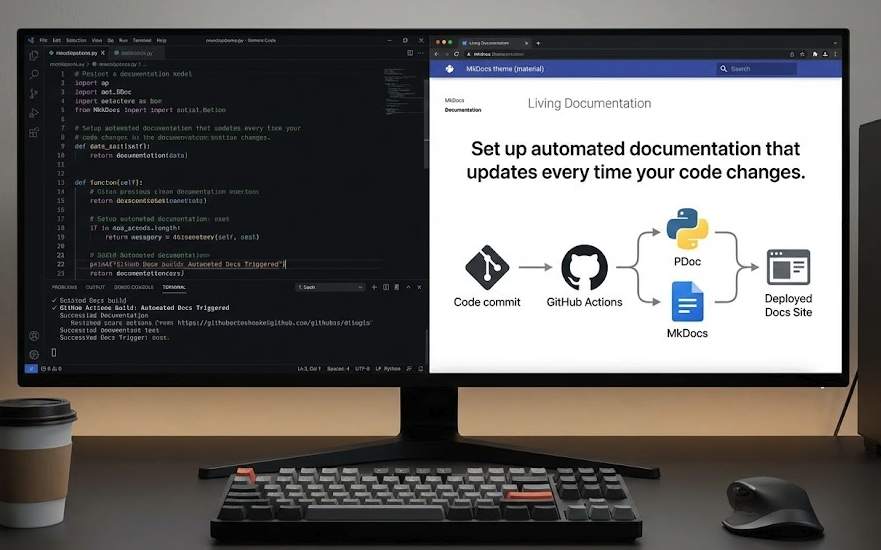
Living documentation connects directly to your codebase and build pipeline. Instead of existing as a separate artifact that people remember to update (or don’t), it’s generated from the same source as your software.
When your code changes, your documentation updates automatically. API references reflect current endpoints. Configuration guides match actual settings. Dependency information stays accurate.
This approach typically combines three elements:
Code-driven docs generate technical documentation straight from code comments. Tools like PDoc (Python), TypeDoc (TypeScript), and JSDoc (JavaScript) parse your docstrings and produce formatted reference material automatically.
Static site generators transform Markdown files and auto-generated content into searchable, navigable documentation websites. Frameworks like MkDocs and Docusaurus handle the presentation layer.
CI/CD integration ties documentation builds to your deployment pipeline. Every merge to main triggers a documentation rebuild and deploy. No manual steps required.
The result is documentation that can’t fall behind, because it’s part of your development workflow rather than a separate responsibility.
Setting Up Automated Documentation: A Practical Walkthrough
Let’s build a working example using MkDocs, PDoc, and GitHub Actions. This setup transforms code comments and Markdown files into an automatically updating documentation site.
Step 1: Write Meaningful Code Comments
Automated documentation is only as good as the comments it pulls from. The goal isn’t just listing parameters. It’s capturing intent, context, and expected behavior.
Write structured docstrings for functions and API endpoints that explain what the code does and why it matters.
Example (Python):
python
# services/reporting.py

def generate_monthly_summary(customer_id, start_date, end_date):
    """
    Generate and email a monthly financial summary.

    Parameters:
        customer_id (UUID): Identifier for the customer account.
        start_date (Date): Beginning of reporting period.
        end_date (Date): End of reporting period.

    Returns:
        ReportMetadata: Object containing report status, location, and timestamp.

    Raises:
        ReportException: If generation or delivery fails.
    """
    ...
Good docstrings describe what success looks like, what can go wrong, and any non-obvious behavior. They’re useful for humans reading the code directly and become even more valuable when transformed into searchable documentation.
Step 2: Create the Documentation Generation Script
A short automation script ties everything together. This converts structured code comments into HTML or Markdown pages and adds contextual metadata like branch information and build timestamps.
Example (generate_docs.py):
python
# generate_docs.py

import pdoc
import os

# Generate API documentation directly from code
pdoc.pdoc(
    "services",                      # root package
    output_directory="docs/api"      # where to write docs
)

# Optional: auto-create project metadata
with open("docs/environment.md", "w") as f:
    f.write("# Environment Overview\n\n")
    f.write(f"- Deployed branch: {os.getenv('BRANCH', 'main')}\n")
    f.write(f"- Last build: {os.getenv('BUILD_TIME', 'unknown')}\n")
This script generates API documentation from your code comments and creates an environment overview page with deployment context. Customize it based on what information your team needs.
Step 3: Configure MkDocs
MkDocs turns your Markdown files and generated content into a polished documentation site. The configuration file defines your site structure and appearance.
Example (mkdocs.yml):
yaml
# mkdocs.yml

site_name: Enterprise Reporting Platform Docs
nav:
  - Overview: index.md
  - Environment: environment.md
  - API Reference:
    - Reporting Service: api/services/reporting.md
theme:
  name: material
The Material theme provides a clean, searchable interface out of the box. Your navigation structure can be as simple or detailed as your project requires.
Running python generate_docs.py followed by mkdocs serve builds a live documentation site reflecting your current codebase. You can preview changes locally before deploying.
Step 4: Integrate with CI/CD
The final step connects documentation generation to your deployment pipeline. Every push to main automatically rebuilds and deploys your documentation site.
Example (GitHub Actions workflow):
yaml
# .github/workflows/docs.yml

name: Build and Deploy Documentation
on:
  push:
    branches: [ main ]

jobs:
  docs:
    runs-on: ubuntu-latest
    steps:
      - uses: actions/checkout@v4
      - uses: actions/setup-python@v5
        with:
          python-version: '3.x'
      - run: pip install mkdocs mkdocs-material pdoc
      - run: python generate_docs.py
      - run: mkdocs gh-deploy --force
This workflow installs dependencies, generates documentation from your current code, and deploys to GitHub Pages. Similar configurations work with Azure DevOps, GitLab CI, or any other CI/CD platform.
Once this is in place, documentation updates happen automatically. No reminders, no manual steps, no drift between code and docs.
Why This Matters for Development Teams
For developers, automated documentation means less manual work. Your comments, commit messages, and configuration files become inputs to the documentation pipeline. When you change code, documentation reflects those changes without extra effort.
More importantly, teams can trust that documentation is accurate because it’s built from the same source of truth as the code itself. No more wondering if the docs reflect reality or some historical version that nobody updated.
For engineering managers and technical leaders, automated documentation delivers measurable operational value:
- Faster onboarding. New engineers learn from current, searchable documentation instead of outdated wikis or constant questions to senior team members.
- Consistent standards. Every project follows the same documentation pipeline, creating predictable structure across your codebase.
- Knowledge retention. Information doesn’t disappear when people change teams or leave the company. It’s captured in the system.
- Audit capability. Documentation becomes versioned and reviewable like any other part of your codebase. You can see what changed and when.
Documentation transforms from a liability that requires constant maintenance into an asset that compounds in value as your codebase grows.
Other Tools Worth Considering
MkDocs with PDoc works well for Python projects, but the same principles apply across different technology stacks.
Docusaurus is ideal for React-based projects or product documentation. It integrates tightly with Markdown, supports versioning out of the box, and handles both technical and user-facing documentation well.
Sphinx excels for large Python projects, especially those requiring sophisticated cross-referencing or API documentation generated directly from code. It’s more complex to configure but offers extensive customization.
DocFX fits .NET projects with deep code-to-documentation integration. If your stack is primarily Microsoft technologies, it’s worth evaluating.
TypeDoc and JSDoc serve JavaScript and TypeScript projects the same way PDoc serves Python, generating API documentation from code comments.
The specific tools matter less than the principle: connect your documentation to your code and automate the publishing pipeline. Whatever stack you’re using, there’s probably a toolchain that supports this approach.
Making Documentation Sustainable
The goal isn’t perfect documentation. It’s sustainable documentation.
Manual processes fail because they require ongoing effort that competes with other priorities. When deadlines pressure, documentation loses. Every time.
Automated documentation succeeds because it removes that competition. The effort happens once, when you set up the pipeline. After that, keeping docs current requires no additional work. It just happens as part of your normal development workflow.
This shift matters more than the specific tools you choose. Whether you use MkDocs or Docusaurus, GitHub Actions or GitLab CI, the important thing is building a system where documentation maintains itself.
When knowledge lives inside your CI pipeline, it can’t get lost. When documentation generates from code, it can’t go stale. When publishing happens automatically, it can’t be forgotten.
The best documentation isn’t written once and maintained forever. It’s rebuilt automatically, every day, from the source of truth that matters most: your actual code.
Need Help Setting This Up?
Implementing automated documentation requires some initial configuration, but the long-term payoff is significant. If you’d like guidance on building a documentation pipeline for your development team, we can help you design a sustainable system that fits your technology stack and workflow.